
Your website is down. Customers cannot access your store, emails have stopped working, and your hosting dashboard isn’t giving you answers. What happens next?
This is when you discover whether your hosting provider offers genuine quality hosting support or simply sends automated replies.
A good web host customer support team does more than answer questions. It understands server environments, diagnoses technical issues, communicates clearly, and helps prevent recurring problems.
Whether you’re running a WordPress website, managing multiple client accounts, or deploying a production application, the right support team can make a significant difference.
If you’re looking for hosting that combines reliable infrastructure with technical assistance, register with TezHost and explore hosting solutions designed for different technical requirements.
But how do you identify a hosting provider that actually delivers? Here are seven important hosting support criteria to consider.
1. 24/7 Availability: Quality Hosting Support When You Need It
What makes 24/7 hosting support important?
Websites operate around the clock, and technical problems don’t follow business hours. A server issue at 2 AM can be just as damaging as one during the working day.
Quality hosting support should be accessible whenever customers need assistance, particularly when dealing with:
- Website downtime and server connectivity problems.
- DNS configuration and propagation issues.
- Email delivery failures.
- SSL certificate errors.
- Database connection problems.
- Security alerts and malware concerns.
Look for providers offering multiple communication channels, such as live chat, support tickets, email, and phone assistance.

TezHost provides 24/7 customer support through live chat, phone, email, and a ticket system, giving customers different ways to request assistance. Learn more about TezHost’s customer support and technical assistance.
Need help choosing a suitable hosting package? Talk to a TezHost sales agent.
2. Technical Expertise: Can Support Actually Solve Your Problem?
A quick response is useful, but a technically correct solution is what matters.
Quality hosting support requires more than basic customer service knowledge. Support engineers should understand the technologies running behind a website and be capable of investigating problems beyond the control panel.

For example, a website loading slowly could be experiencing:
- High CPU or RAM consumption.
- PHP execution bottlenecks.
- MySQL query inefficiencies.
- DNS resolution delays.
- Incorrect caching configurations.
- Disk I/O limitations.
- Network latency or packet loss.
A competent technical team should know how to investigate these possibilities rather than immediately recommending a plan upgrade.
For developers, this becomes even more important when working with application environments, databases, server configurations, and deployment workflows.
What to check: Ask whether the hosting provider has technical staff familiar with Linux, Windows, Apache, LiteSpeed, Nginx, PHP, MySQL, DNS, and common control panels.
The more complex your hosting environment, the more important technical expertise becomes.
3. Fast Response and Resolution: Speed Matters
Is a fast response the same as good technical support?
No. A fast acknowledgement does not necessarily mean your issue will be resolved quickly.
Quality hosting support should distinguish between response time and resolution time.
For example, receiving an automated ticket confirmation within seconds is not the same as having an engineer investigate a server error and provide a working solution.

A good support process should include:
- Acknowledging the issue.
- Assessing its severity and business impact.
- Investigating the underlying cause.
- Communicating progress and expected next steps.
- Confirming that the issue has been resolved.
Consider a website returning a 500 Internal Server Error. Simply telling the customer to clear their browser cache isn’t enough. The support team may need to inspect server logs, PHP errors, application configurations, or resource limits.
When evaluating hosting support criteria, look for a provider that focuses on meaningful resolution rather than simply closing tickets.
4. Proactive Monitoring and Problem Prevention
The best technical support doesn’t always wait for customers to report an issue.
Quality hosting support should work alongside monitoring and preventive maintenance to identify potential problems before they affect website visitors.

Useful monitoring practices include:
- Server resource monitoring for CPU, RAM, and disk usage.
- Uptime and availability checks.
- Network performance monitoring.
- Malware and security scanning.
- Backup monitoring and recovery checks.
- Monitoring unusual traffic and resource consumption.
For instance, if a website is consistently approaching its memory limit, identifying the trend early can help prevent service interruptions.
Similarly, monitoring disk usage can help avoid problems caused by a full filesystem, which may affect databases, email services, and application operations.
TezHost’s published support approach highlights continuous monitoring and proactive assistance as part of its customer support philosophy. Explore its technical assistance approach.
5. Clear Communication and Transparent Troubleshooting
Technical knowledge is important, but the ability to explain technical problems matters just as much.
Quality hosting support should make complicated issues understandable without overwhelming customers with unnecessary jargon.
Imagine receiving this response:
“Your website has an issue with PHP-FPM resource allocation.”
That’s not particularly helpful without an explanation.

A better response would explain that the PHP processes are reaching their configured limits, describe how this affects website requests, and recommend the appropriate corrective action.
Good communication should include:
- A clear explanation of the problem.
- The steps taken during troubleshooting.
- Any action required from the customer.
- Possible risks or limitations.
- Updates if the issue requires additional investigation.
This is especially important for agencies, resellers, and developers managing websites on behalf of clients.
A hosting provider should treat communication as part of technical support, not an optional extra.
6. Support for Different Hosting Technologies and Applications
Not every website runs on the same technology. A provider offering quality hosting support should understand the requirements of different hosting environments.
For example, a basic WordPress website and a real-time Node.js application have very different technical requirements.

Depending on your infrastructure, you may need assistance with:
| Hosting environment | Important support knowledge |
|---|---|
| DirectAdmin hosting | Account management, DNS, email, SSL, and resource configuration |
| cPanel hosting | PHP settings, databases, backups, and application management |
| Node.js hosting | Node.js versions, application deployment, dependencies, and process management |
| VPS hosting | Root access, Linux administration, firewall rules, and resource allocation |
| Domain services | DNS records, nameservers, domain transfers, and renewals |
TezHost offers DirectAdmin hosting for users who prefer DirectAdmin-based hosting management.
For developers deploying JavaScript applications, TezHost Node.js hosting includes native Node.js support, cPanel, NVMe storage, daily backups, free SSL, Imunify360 security, and technical support.
The Node.js hosting plans are designed for applications such as APIs, dashboards, automation tools, and SaaS platforms. This makes it important to have support that understands the application environment, not just the hosting account.
You can talk to a TezHost sales agent to discuss which hosting environment suits your application.
7. Security, Backups, and Recovery Assistance
A hosting provider’s responsibility doesn’t end with keeping a website accessible.
Quality hosting support should also help customers understand security issues, backup procedures, and recovery options.

Consider these essential areas:
- SSL/TLS: Assistance with certificate installation, renewal, and configuration.
- Malware protection: Help investigating suspicious files, malicious scripts, and security alerts.
- Access management: Guidance on secure passwords, account permissions, and authentication.
- Backups: Clear information about backup frequency, retention, and restoration procedures.
- Incident response: Assistance in identifying hosting-related security problems and recommended next steps.
A particularly important question is whether backups can actually be restored when needed. A backup that has never been tested may not provide the protection you expect.
If your business depends on its online presence, you should also protect your domain. Explore TezHost domain services and make sure your domain registration, DNS settings, and renewal details are properly managed.
How TezHost Is Improving the Hosting Support Experience
At TezHost, quality hosting support is about combining accessible assistance with the technical knowledge required to manage different hosting environments.
The goal is not simply to respond to a ticket. It is to help customers understand their hosting environment, troubleshoot problems, and make informed technical decisions.
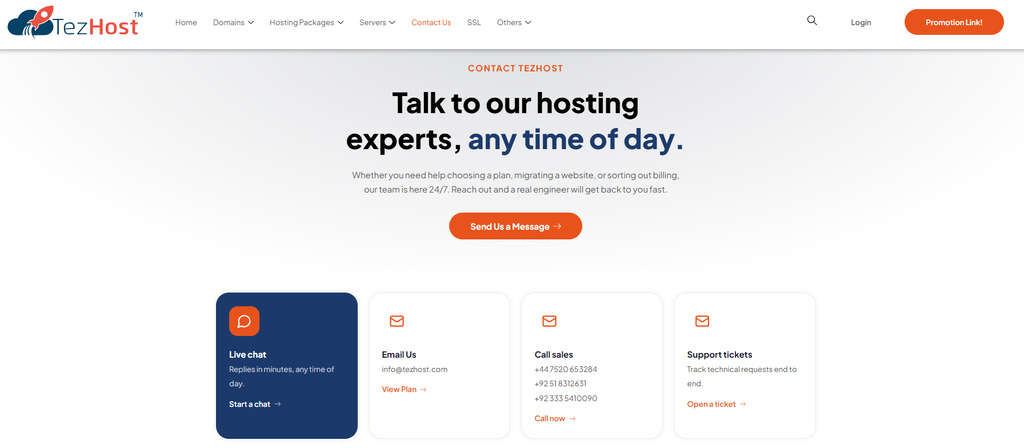
TezHost’s published support approach includes:
- 24/7 assistance: Customers can reach support through live chat, phone, email, and tickets.
- Technical guidance: Assistance with hosting-related issues, from server troubleshooting to email configuration.
- Problem resolution: Support for issues such as website outages, email delivery failures, and database connection errors.
- Personalized assistance: Guidance based on the customer’s hosting requirements.
- Proactive support: Monitoring and assistance aimed at identifying potential issues before they affect website performance.
These support channels are complemented by hosting solutions for different requirements, including DirectAdmin, Node.js, cPanel, VPS, and cloud hosting.
Whether you’re launching your first website or managing applications for multiple clients, choosing the right hosting environment and having access to knowledgeable assistance can make the process easier.
Ready to experience TezHost? Register here and explore the available hosting solutions.
Have questions before choosing a plan? Connect with a TezHost sales agent.
Conclusion: Don’t Choose a Web Host Based on Price Alone
A low-cost hosting plan may look attractive, but what happens when your website stops working or a critical application encounters an error?
That’s when quality hosting support proves its value.
Look beyond response times and promotional promises. Evaluate technical expertise, availability, troubleshooting processes, proactive monitoring, security assistance, and communication.
The best hosting provider is one that gives you more than server space. It gives you the technical assistance and infrastructure needed to keep your online operations running.
Before choosing your next hosting provider, ask one important question: When something goes wrong, will they actually help you fix it?
Explore TezHost and find a hosting solution backed by accessible technical assistance.