Imagine waking up one morning to discover that your business website is offline, your emails aren’t working, and someone else has control of your domain.
It’s not just a technical inconvenience. It could mean lost customers, disrupted business operations, damaged brand reputation, and expensive recovery efforts.
Your domain name is one of your most valuable digital assets. Yet many businesses register a domain and forget about it until something goes wrong.
That’s where secure domain management becomes essential.
Whether you’re managing one business website, multiple client domains, or an entire portfolio, protecting your domain requires more than choosing a strong password. You need to secure your registrar account, monitor DNS configurations, manage renewals, and control who can make changes.
If you’re planning to register a new domain, register with TezHost and explore domain registration and hosting options. You can also talk to a TezHost sales agent for guidance.
Here are seven practical ways to manage domain registration securely and protect your online identity.
1. Protect Your Domain Registrar Account with Strong Authentication
The first step in secure domain management is protecting the account where your domain is registered.
Think of your registrar account as the control center for your online identity. Anyone who gains unauthorized access may be able to modify DNS settings, change contact details, or initiate a domain transfer.
Start with these precautions:
- Use a strong, unique password for your registrar account.
- Enable multi-factor authentication (MFA) wherever available.
- Avoid sharing login credentials with employees or developers.
- Use a password manager to generate and store complex passwords.
- Review account login activity and security notifications.
- Secure the email address associated with your registrar account.
Why is MFA important for domain security?
MFA adds another verification step beyond your password. Even if someone obtains your login credentials, they may still be unable to access your account without the additional authentication factor.
For businesses managing multiple domains, assign individual user access where supported rather than sharing one administrator login.
2. Enable Domain Locking to Prevent Unauthorized Transfers
One of the most important hosting support criteria and domain security practices is understanding how domain locking works.
A domain transfer can allow another registrar to take over the management of your domain. If an unauthorized person initiates a transfer, your website and associated services could be at risk.
A registrar-level transfer lock helps prevent unauthorized transfer requests.
For most domains that support it, you should:
- Enable registrar lock or transfer lock.
- Keep the domain locked during normal operations.
- Unlock it only when you intentionally initiate a transfer.
- Verify transfer requests before approving them.
- Protect your domain authorization code (EPP/Auth code).
Some registries and domain extensions have different transfer policies, so check the rules applicable to your extension.
Remember: A transfer lock does not replace account security. Someone with sufficient account access may still be able to change settings or remove protections.
For additional guidance, explore domain registration services at TezHost.
3. Keep Domain Contact Information Accurate and Private
Your domain registration account contains important contact and ownership information.
If your email address is outdated or inaccessible, you may miss renewal reminders, verification messages, transfer notifications, and important security alerts.
Secure domain management requires keeping your registration details accurate and your contact channels protected.
Review the following information regularly:
- Registrant email address.
- Administrative contact details, where applicable.
- Account recovery email and phone number.
- Organization or business details.
- Domain ownership and registration records.
What Is WHOIS Privacy Protection?
WHOIS privacy protection helps limit the exposure of personal contact information in publicly accessible registration records, where supported by the domain extension and registrar.
Instead of displaying your personal contact details publicly, a privacy service may display alternative contact information.
This can help reduce unwanted spam, unsolicited contact, and exposure of personal information.
TezHost offers domain privacy protection as part of its domain management services, subject to applicable extension and service eligibility.
If you’re considering a new domain, explore TezHost domain registration or speak with a sales agent about available options.
4. Secure Your DNS Records and Monitor Changes
Your domain may be registered securely, but incorrect or unauthorized DNS changes can still redirect visitors, interrupt email delivery, or expose services.
DNS (Domain Name System) translates your domain name into the IP addresses and service destinations that computers use to connect.
This makes DNS security a critical part of secure domain management.
Understand the main DNS record types:
| DNS record | Purpose |
|---|---|
| A | Points a domain or hostname to an IPv4 address |
| AAAA | Points a hostname to an IPv6 address |
| CNAME | Creates an alias for another hostname |
| MX | Specifies email delivery servers |
| TXT | Stores verification and security-related text |
| NS | Identifies authoritative nameservers |
How Can You Protect DNS Configurations?
- Restrict access to DNS management accounts.
- Review DNS records before making changes.
- Remove outdated or unnecessary records.
- Monitor unexpected nameserver modifications.
- Use SPF, DKIM, and DMARC records to help protect email authentication.
- Consider DNSSEC where supported by your registrar, DNS provider, and domain extension.
DNSSEC helps protect DNS data integrity by allowing resolvers to verify digitally signed DNS information. It does not encrypt DNS traffic or replace other security controls.
If you use cPanel, TezHost’s cPanel DNS management guide explains how to access the Zone Editor and manage A, CNAME, MX, TXT, and other DNS records.
For example, changing an MX record incorrectly can interrupt business email delivery, while modifying an A record can send website traffic to the wrong server.
Always verify the intended destination before saving DNS changes.
5. Enable Automatic Renewals and Monitor Expiry Dates
A domain can be secure today and still become unavailable because its registration expires.
Forgetting to renew a domain can interrupt your website, business email, and other services connected to it. Depending on the extension and registry policies, an expired domain may eventually become available for someone else to register.
Secure domain management includes protecting your domain from accidental expiration.
Follow these practices:
- Enable automatic renewal if supported.
- Keep your payment method valid.
- Turn on renewal notifications.
- Monitor expiry dates through your registrar dashboard.
- Renew important domains well before their expiration.
- Keep a record of domain ownership and renewal details.
Is automatic renewal enough to protect your domain?
Not entirely. Payment failures, expired cards, incorrect billing details, or account issues can prevent renewal from completing.
Always check that the renewal was successfully processed.
If you’re registering multiple domains for your business, maintain a central renewal calendar so that no important domain is overlooked.
Looking for affordable domain and hosting options? Read our guide to cheap domain and hosting before choosing a package.
6. Use Secure Domain Management Practices When Choosing a Domain
Domain security starts before registration.
Choosing a domain that closely resembles another brand, contains confusing spelling, or is difficult to distinguish can create opportunities for phishing, impersonation, and customer confusion.
A good domain strategy should consider both branding and security.
Before registering a domain:
- Choose a recognizable and easy-to-spell name.
- Check for potential trademark conflicts.
- Avoid unnecessary hyphens and confusing character combinations.
- Consider registering important variations and common misspellings.
- Secure relevant extensions where commercially appropriate.
- Keep ownership and renewal information under your organization’s control.
Can a Creative Domain Name Improve Brand Protection?
A memorable domain can make it easier for customers to recognize your official website, but creativity alone doesn’t guarantee security or legal protection.
Check existing trademarks and similar business names before registration. Registering an available domain does not automatically grant trademark rights.
For inspiration, explore our guide on creative domain names.
TezHost offers 45+ domain extensions, giving businesses different options when establishing their online identity. Availability and pricing depend on the extension.
Search for your domain with TezHost and contact our sales team if you need help selecting an extension.
7. Limit Access and Maintain a Domain Security Audit Trail
If multiple employees, developers, agencies, or IT administrators manage your domain, access control becomes particularly important.
Giving everyone full registrar access increases the risk of accidental changes and unauthorized modifications.
A better approach is to follow the principle of least privilege: give each person only the access required to perform their responsibilities.
For effective secure domain management:
- Use individual accounts instead of shared credentials.
- Assign role-based permissions where available.
- Remove access when employees or contractors leave.
- Review authorized users periodically.
- Maintain records of important DNS and account changes.
- Document domain ownership and recovery procedures.
- Keep a backup of important DNS configurations.
For example, a developer may need permission to update DNS records but may not need access to billing, ownership, or domain transfer settings.
Keeping these responsibilities separate reduces unnecessary exposure.
For organizations managing multiple domains, a simple quarterly security review can help identify outdated users, forgotten domains, and incorrect configurations.
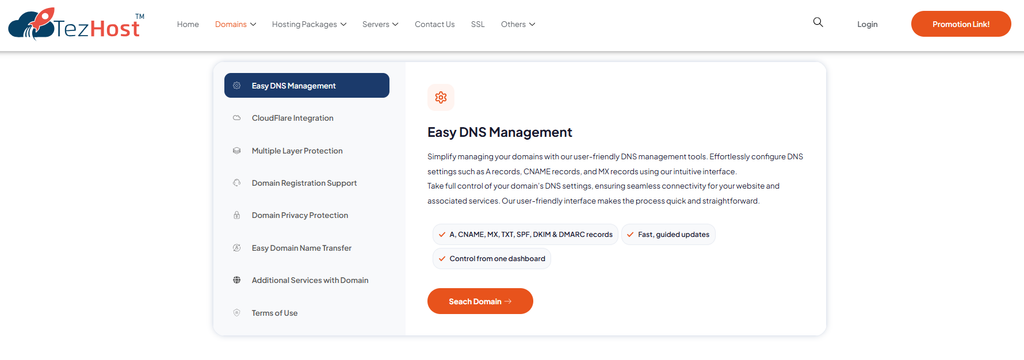
At TezHost, domain management is about more than registering a website address. Businesses need practical tools to manage their domains, configure DNS, protect their information, and maintain control over their online presence.
TezHost brings several domain management capabilities together:
How TezHost Is Improving the Domain Management Experience
- 45+ domain extensions: Options for businesses, organizations, online stores, and personal projects.
- DNS management: Manage A, CNAME, MX, TXT, SPF, DKIM, and DMARC records through a central interface.
- Cloudflare integration: Access features such as CDN caching, DDoS protection, and SSL/TLS encryption through supported integrations.
- Domain privacy protection: Help limit public exposure of personal registration information where supported.
- Domain transfer assistance: Support for customers moving their domains.
- Domain registration support: Assistance with availability checks, alternative names, and registration guidance.
TezHost also describes DNSSEC and multiple layers of DNS protection as part of its domain security approach. Actual protection depends on the relevant domain, DNS configuration, and supported services.
The goal is to make domain registration and management more accessible while giving website owners the tools to maintain better control over their digital assets.
Ready to secure your online identity?
Register your domain with TezHost, explore available domain extensions, or talk to a sales agent for assistance.
Conclusion: Your Domain Deserves More Than a Password
Your domain name is more than a website address. It connects your business to customers, supports your email communication, and represents your brand online.
That’s why secure domain management should be an ongoing process.
Protect your registrar account with MFA, enable transfer locks, keep contact information accurate, secure DNS records, monitor renewals, and regularly review account access.
Most importantly, don’t wait for a security incident to take domain protection seriously.
A few preventive steps today can help save your business from significant disruption tomorrow.
Looking for a reliable place to register and manage your domain?
Visit TezHost or register today. Need help choosing the right domain? Speak with our sales team.