A slow website can cost you visitors, enquiries, sales, and search visibility. But before blaming your WordPress theme, installing another caching plugin, or purchasing a more expensive hosting plan, ask one important question: Is your web host actually causing the problem?
Learning how to diagnose hosting performance issues helps you identify whether slow server response, limited resources, network latency, or application-level problems are affecting your website.
If you’re planning to launch a website or improve your existing hosting environment, you can register with TezHost and explore hosting options for different website requirements.
Not sure whether your current hosting plan is suitable? Talk to a TezHost sales agent to discuss your website’s resource requirements.
Let’s explore seven practical ways to investigate why is my site slow, identify whether your web host is causing a slow website, and find the right solution.
Why Is My Site Slow? Identify the Real Cause First
When investigating why is my site slow, remember that website performance depends on several connected components. These include server hardware, network connectivity, application code, databases, caching, and the visitor’s device.
A website may load slowly because its server takes too long to respond. However, oversized images, unoptimized JavaScript, inefficient database queries, and excessive plugins can create similar symptoms.
To properly diagnose hosting performance issues, separate the problem into three areas:
- Server-side performance: CPU, RAM, storage I/O, PHP execution, and database processing.
- Network performance: DNS resolution, connection latency, TLS negotiation, and packet loss.
- Website performance: Images, scripts, stylesheets, plugins, themes, and third-party integrations.
This distinction matters. If your server responds quickly but the page takes several seconds to display, the problem may be within the website rather than the hosting infrastructure.
1. Measure Server Response Time and TTFB
One of the first steps to diagnose hosting performance issues is measuring Time to First Byte (TTFB).
TTFB measures how long it takes for a browser to receive the first byte of a response after making a request. It includes several stages, such as redirects, DNS lookup, connection establishment, and server processing.

If TTFB is consistently high, your hosting environment or application backend may need investigation. This is one possible sign that your web host is causing a slow website.
Use tools such as:
- Google PageSpeed Insights.
- Google Lighthouse.
- WebPageTest.
- Chrome DevTools.
- Command-line tools such as
curl.
For example, this command helps inspect connection and response timings:
curl -o /dev/null -s -w \
"DNS: %{time_namelookup}s\nConnect: %{time_connect}s\nTLS: %{time_appconnect}s\nTTFB: %{time_starttransfer}s\nTotal: %{time_total}s\n" \
https://example.com/
Replace example.com with your website address.
A TTFB below 200 milliseconds can be a useful optimization target in suitable circumstances, but it is not a universal requirement. Visitor location, caching, network conditions, and application processing all influence the result.
For more practical improvements, read our guide on 5 ways to fix your website speed.
2. Check Whether Your Hosting Resources Are Being Exhausted
Another important way to diagnose hosting performance issues is to examine your hosting account’s resource usage.

Your website may be slow because its hosting plan does not have enough resources to handle its workload. This is particularly common with growing WordPress websites, online stores, membership platforms, and resource-intensive applications.
| Resource | What to investigate |
|---|---|
| CPU | High usage, processing limits, and throttling |
| RAM | Memory consumption and out-of-memory events |
| Storage | Disk space, I/O wait, and read/write performance |
| Bandwidth | Traffic limits and network throughput |
| PHP workers | Worker saturation and queued requests |
| Database | Slow queries and connection limits |
For example, if several visitors access your website simultaneously, your application may need more PHP workers or CPU capacity.
If CPU usage repeatedly reaches its limit or storage I/O becomes a bottleneck during busy periods, hosting limitations may explain why is my site slow.
Check your hosting control panel, resource usage reports, server monitoring tools, and error logs before upgrading.
If you need help identifying the right resources, talk to our sales team before purchasing a larger package.
3. Compare Website Performance at Different Times and Locations
Does your website load quickly in the morning but become slow during peak traffic hours?
This may indicate resource contention, insufficient capacity, application bottlenecks, or network-related problems.

To diagnose hosting performance issues accurately, avoid testing your website only once. Run performance checks:
- During quiet periods.
- During normal business hours.
- During peak traffic.
- From different geographic locations.
- On both mobile and desktop connections.
If TTFB increases significantly whenever traffic rises, the server may be struggling to process concurrent requests.
If local visitors experience good performance but international visitors encounter delays, geographic latency or network routing may be involved.
A Content Delivery Network (CDN) can help deliver static resources from locations closer to visitors. However, it will not automatically fix slow database queries or an overloaded origin server.
These comparisons help establish whether your web host is causing a slow website or whether the problem is related to network distance and content delivery.
4. Investigate Storage Performance and Database Delays
CPU and RAM are not the only factors affecting hosting performance. Storage and database operations can also influence how quickly a website responds.
For example, a WordPress website may appear slow because every page request triggers several database queries. An online store may experience delays when searching products, processing orders, or loading customer information.

When you diagnose hosting performance issues, investigate:
- Storage type and read/write performance.
- Disk I/O wait.
- Database response times.
- Slow SQL queries.
- Database connection limits.
- Unnecessary database records.
- Object and page caching.
NVMe SSD storage can provide higher throughput and lower latency than many traditional SATA SSD configurations. However, actual results depend on the workload and server configuration.
Database optimization is equally important. Identify slow queries, review database indexes, remove unnecessary overhead, and configure appropriate caching.
A faster storage device cannot compensate for poorly written application code or inefficient queries. If you’re wondering why is my site slow despite having a modern hosting package, database performance deserves attention.
5. Review Images, Plugins, and Website Scripts
Sometimes, the hosting provider is not the main reason your website is slow.
Large images, excessive plugins, unoptimized JavaScript, and third-party integrations can increase loading time even when the server performs well.
For example, a WordPress website with multiple page builders, analytics scripts, chat widgets, and advertising integrations may generate many requests before the page becomes fully usable.

To diagnose hosting performance issues, test the website’s front end as well as its server.
Consider these improvements:
- Compress images and use WebP or AVIF where suitable.
- Resize images according to their display dimensions.
- Lazy-load below-the-fold images.
- Remove unused plugins and themes.
- Minify and defer non-critical JavaScript.
- Reduce unnecessary third-party scripts.
- Enable browser and server-side caching.
Also review Core Web Vitals:
- Largest Contentful Paint (LCP): Measures how quickly the main content appears.
- Interaction to Next Paint (INP): Measures how responsive the page is to user interactions.
- Cumulative Layout Shift (CLS): Measures unexpected layout movement.
These metrics help explain why is my site slow from the visitor’s perspective, but they should be considered alongside server-side measurements.
For additional optimization techniques, explore 5 ways to fix your website speed.
6. Examine Server Logs, Errors, and Network Issues
Performance problems do not always appear as obvious website errors. Server logs can reveal the reason behind slow responses and recurring failures.
For technical teams, reviewing these records is an essential part of learning to diagnose hosting performance issues.

Check the following:
Web server logs: Look for repeated errors, slow requests, unusual traffic patterns, and HTTP 5xx responses.
PHP logs: Identify memory exhaustion, execution timeouts, and application errors.
Database logs: Look for slow queries, connection failures, and resource-intensive operations.
Network diagnostics: Check DNS resolution, latency, packet loss, and connection stability.
For Linux environments, tools such as top, htop, iostat, vmstat, and ss can help identify resource pressure and connection problems.
You can also use ping and traceroute to investigate network behaviour, although neither tool alone proves that the hosting provider is responsible.
Look for recurring patterns rather than isolated incidents. If server errors and resource saturation occur whenever your website slows down, you have stronger evidence that the hosting environment needs attention.
If you need assistance interpreting these issues, contact a TezHost sales agent.
7. Ask Your Hosting Provider for Performance Evidence
If your tests suggest that the server may be responsible, involve your hosting provider.
A reliable provider should help investigate server-side problems instead of simply recommending a more expensive package.

When you diagnose hosting performance issues with your provider, share useful evidence:
- Dates and times when the slowdown occurred.
- Affected website URLs.
- TTFB and performance test results.
- Error messages and HTTP status codes.
- Traffic patterns.
- Resource usage reports.
- Recent website or application changes.
Ask specific questions:
- Is the server experiencing high CPU or memory usage?
- Are storage I/O limits affecting my account?
- Are there network latency or packet-loss issues?
- Are PHP workers or database connections reaching their limits?
- Are there server-side errors or resource restrictions?
- Would an upgrade or configuration change address the problem?
This helps distinguish hosting limitations from website-level problems. It also makes it easier to establish whether your web host is causing a slow website or whether the application needs optimization.
If your current package no longer supports your workload, compare alternatives based on actual resource requirements rather than price alone.
Explore affordable web hosting or review TezHost DirectAdmin hosting to compare available hosting options.
How TezHost Is Improving the Website Hosting Experience
Hosting performance should not be measured by marketing claims alone. Businesses need infrastructure that matches their workloads, clear resource information, and access to support when problems arise.
TezHost focuses on combining performance-oriented hosting technology with flexible hosting options.
NVMe SSD storage: TezHost DirectAdmin hosting uses NVMe SSD storage to support responsive website and application performance.
CDN integration: CDN availability helps customers improve content delivery for visitors in different geographic locations.
Flexible hosting options: Customers can choose from shared hosting, DirectAdmin, WordPress hosting, VPS, cloud servers, and dedicated infrastructure as their requirements develop.
Security and backups: Hosting plans include features such as free SSL, regular backups, and security-related services, depending on the selected product.
Technical support: 24/7 support helps customers get assistance with hosting and configuration concerns.
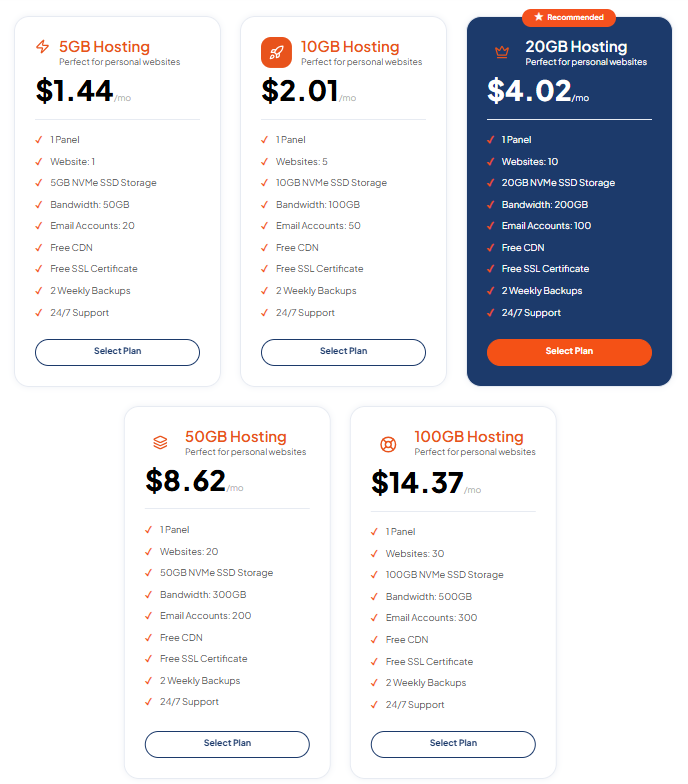
TezHost DirectAdmin plans currently start at $1.44 per month and include NVMe storage, free SSL, CDN, two weekly backups, and 24/7 support. Available resources and features vary by plan.
The objective is not to push every customer toward the most expensive server. It is to help them select a hosting environment that fits their website’s actual needs.
Explore TezHost DirectAdmin hosting or visit the TezHost homepage to review available solutions.
Not sure which package is right for your website? Speak with our team and explain your traffic, application, and performance requirements.
Frequently Asked Questions
1. How do I know if my web host is making my website slow?
Check TTFB, server resource usage, storage I/O, and server logs. If your website consistently experiences high response times alongside resource saturation, hosting may be contributing to the problem. Compare results across different times and locations before reaching a conclusion.
2. Why is my site slow even though I have a good hosting plan?
A good hosting plan cannot compensate for every application problem. Large images, inefficient database queries, excessive plugins, unoptimized JavaScript, and poor caching can all slow down a website. Review both server-side and front-end performance.
3. Can changing web hosting improve website speed?
Yes. Changing hosting can improve performance when the current server has insufficient resources, slow storage, poor network connectivity, or unsuitable configuration. However, migration will not automatically fix problems caused by website code, plugins, or large media files.
4. What is a good TTFB for a website?
A TTFB below 200 milliseconds is a useful optimization target in many situations, but actual performance depends on the website, server location, caching, network conditions, and application processing. Evaluate TTFB alongside other performance metrics.
5. Is NVMe hosting faster than regular SSD hosting?
NVMe storage can provide higher throughput and lower latency than many traditional SATA SSD configurations. However, the actual website speed improvement depends on the workload, server configuration, database activity, and other infrastructure components.
6. Should I upgrade my hosting plan if my website is slow?
Not immediately. First identify the bottleneck. If CPU, RAM, PHP workers, storage I/O, or bandwidth limitations affect performance, upgrading may help. If the problem is caused by unoptimized images or application code, fixing those issues may be more effective.
Conclusion: Fix the Cause, Not Just the Symptoms
Learning to diagnose hosting performance issues is essential when your website takes too long to load. The problem could be server resources, network latency, storage performance, database queries, or front-end optimization.
If you’re still asking why is my site slow, start with measurable evidence instead of immediately changing providers. Identify recurring patterns, review server performance, and determine whether your web host is causing a slow website.
If your current hosting environment is genuinely limiting performance, consider moving to a solution that offers the resources, storage, and support your website needs.
At TezHost, we offer hosting options for different stages of business growth, from affordable shared hosting to more powerful server solutions.
Explore TezHost hosting plans or register today.
Have questions about your hosting performance? Talk to our sales team and discuss the right solution for your website.
Your website deserves more than a speed test. It deserves an infrastructure that can keep up with your business.