Managed vs unmanaged hosting is an important decision for businesses, developers, and website owners who want to choose a hosting environment that matches their technical skills and available time.
Both options provide the infrastructure needed to run websites and applications. The difference is how much responsibility you take for maintaining that infrastructure. With managed hosting, the provider handles an agreed set of technical tasks, such as server maintenance, security updates, backups, and performance optimization. With unmanaged hosting, you take responsibility for most server administration yourself.
So, which hosting needs less work? Managed hosting generally requires less day-to-day technical administration, while unmanaged hosting offers greater control for users who have the knowledge and time to manage their own servers.
If you’re planning to launch a website or move an existing project, you can register with TezHost to explore available hosting solutions. You can also talk to a TezHost sales agent to discuss your technical requirements.
Let’s compare both hosting management options across seven important areas.
1. What Is the Difference Between Managed and Unmanaged Hosting?
The main difference is who handles server administration. Managed hosting transfers an agreed portion of routine technical work to the hosting provider. Unmanaged hosting gives the customer more responsibility for configuring, maintaining, securing, and troubleshooting the server.

In a managed environment, the provider may handle tasks such as:
- Operating system and server software maintenance.
- Security patches and updates.
- Server monitoring.
- Backup configuration and recovery assistance.
- Performance and resource optimization.
- Technical troubleshooting within the service scope.
The exact inclusions depend on the hosting plan. Some managed services cover the operating system and infrastructure, while others also include application-level maintenance, such as WordPress updates.
With unmanaged hosting, the customer generally handles these tasks independently. This can include configuring the web server, managing databases, installing security tools, applying patches, and resolving software conflicts.
| Area | Managed Hosting | Unmanaged Hosting |
|---|---|---|
| Server setup | Provider handles agreed setup | Customer configures server |
| OS maintenance | Usually provider-managed | Customer-managed |
| Security patches | Included in many plans | Customer’s responsibility |
| Backups | May be included or optional | Customer arranges them |
| Monitoring | Depends on service scope | Customer configures it |
| Troubleshooting | Provider assists within scope | Customer investigates |
| Root access | Depends on the plan | Usually available |
| Technical workload | Lower | Higher |
The important distinction is not simply who owns the server. It is who is responsible for keeping the environment operational.
For a broader explanation of managed infrastructure, read the benefits of managed hosting.
2. Which Hosting Needs Less Work for Daily Server Management?
Managed hosting generally requires less daily administration because the provider handles agreed maintenance and infrastructure tasks. This allows website owners and business teams to spend more time on their core activities instead of monitoring server health or applying routine updates.

Consider a business running a WordPress website. Even after the website is launched, the technical work continues:
- WordPress core and plugin updates.
- PHP version compatibility checks.
- Database maintenance.
- Security monitoring.
- Backup verification.
- Server resource monitoring.
- Troubleshooting performance issues.
With managed WordPress hosting, several of these responsibilities may be included in the hosting service. TezHost, for example, describes its managed WordPress solution as including automatic updates, security features, backups, and technical support.
With unmanaged hosting, the website owner or administrator must coordinate these activities. That is manageable for an experienced system administrator, but it can become a significant workload for a small team without dedicated technical staff.
Example: A marketing agency managing several client websites may prefer managed hosting because it reduces routine server administration. A developer who enjoys configuring Linux environments and already has monitoring and deployment processes may prefer unmanaged hosting.
The right choice depends on whether you want to spend your time managing infrastructure or developing your business and applications.
3. How Do Managed and Unmanaged Hosting Handle Security and Updates?
Managed hosting can reduce the security workload by including maintenance and protection services, but it does not eliminate the customer’s security responsibilities. Unmanaged hosting provides more control over security configuration, while also requiring the customer to maintain and monitor those controls.

Server security involves multiple layers:
Operating system updates: Linux distributions and server software require regular security patches. Delayed updates can leave known vulnerabilities exposed.
Firewall configuration: Rules should restrict unnecessary ports and limit access to administrative services.
Access management: SSH keys, strong authentication, restricted user permissions, and secure credentials help reduce unauthorized access.
Malware protection: Websites and applications need appropriate scanning and protection against malicious files and activity.
SSL certificates: Encrypted connections protect data exchanged between websites and visitors.
Backup protection: Recoverable backups help restore data after accidental deletion, compromise, or technical failure.
In managed hosting, the provider may take responsibility for several infrastructure-level controls. However, customers should still secure their applications, use strong passwords, review user permissions, and keep third-party software updated where required.
TezHost’s managed WordPress offering lists free SSL certificates, automated daily backups, malware protection, and DDoS mitigation among its security features. You can also read how managed WordPress hosting enhances site security.
For unmanaged hosting, you need the technical knowledge to configure and maintain these controls yourself. This can be a good fit for experienced administrators who require specific security policies, but it creates additional operational responsibility.
4. Does Managed Hosting Improve Performance and Reduce Troubleshooting?
Managed hosting can reduce performance-related work because the provider may handle server optimization, monitoring, and technical troubleshooting. However, performance still depends on application code, resource allocation, database queries, caching, and traffic patterns.

For example, a WordPress website may become slow because of:
- Inefficient plugins or themes.
- Poorly optimized database queries.
- Insufficient CPU or RAM.
- Uncached dynamic content.
- Large images and uncompressed assets.
- Incorrect PHP or web server configuration.
A managed hosting provider may help identify infrastructure-level issues and maintain an optimized hosting environment. But not every application problem falls within the provider’s responsibility.
Unmanaged hosting gives developers more freedom to tune Nginx, Apache, PHP-FPM, MySQL or MariaDB, caching layers, and other components. The trade-off is that they must understand the impact of those changes and troubleshoot problems when they occur.
TezHost’s managed WordPress platform uses NVMe SSD storage and LiteSpeed Web Server technology, with the aim of improving page loading and Core Web Vitals. For more information, explore managed WordPress hosting and the benefits of managed WordPress hosting.
5. Is Unmanaged Hosting Better for Developers and Technical Teams?
Unmanaged hosting can be a better option for experienced developers and system administrators who need root-level control, custom configurations, and direct responsibility for their infrastructure.

It is particularly useful when a project requires:
- Custom Linux configurations.
- Specific versions of runtime environments.
- Docker containers and orchestration tools.
- Custom firewall and network rules.
- Specialized database configurations.
- CI/CD pipelines and deployment automation.
- Custom monitoring and logging systems.
For example, a development team deploying containerized applications may want complete control over Docker, Nginx, application dependencies, and deployment workflows. A managed service may restrict some configurations or require support involvement for certain changes.
However, managed vs unmanaged hosting is not a simple choice between beginner and expert users. An experienced developer may still choose managed hosting to reduce operational overhead. Likewise, a technically capable business may choose unmanaged hosting because it already employs a dedicated infrastructure team.
The deciding factor should be the level of control your application requires and the resources available to maintain it.
If you are comfortable managing websites through a control panel but do not need full server administration, TezHost DirectAdmin Hosting is another option to consider. DirectAdmin provides a graphical interface for managing websites, domains, and email accounts without requiring every routine task to be performed through command-line tools.
6. Which Option Is More Cost-Effective: Managed or Unmanaged Hosting?
Unmanaged hosting may have a lower initial hosting cost, but managed hosting can offer better overall value when you consider the time, staff, tools, and operational effort required to maintain a server.

A fair cost comparison should include more than the monthly hosting fee.
| Cost factor | Managed Hosting | Unmanaged Hosting |
|---|---|---|
| Hosting fee | May be higher | Often lower |
| Server administration | Included to an agreed extent | Customer provides it |
| Security tools | May be included | Customer selects and maintains |
| Backup services | Depends on plan | Customer arranges |
| Technical staff | Less administration time needed | Skilled staff may be required |
| Monitoring tools | May be provided | Customer configures |
| Downtime troubleshooting | Provider assists within scope | Customer investigates |
For a small business without an IT administrator, unmanaged hosting can become expensive when technical issues require external assistance. A managed plan may cost more each month but reduce the need to hire or outsource routine server administration.
For a software company with an experienced DevOps team, unmanaged hosting may be more economical because the necessary skills and tools are already available.
Before choosing, calculate the total cost of ownership. Include hosting fees, licenses, backups, security tools, staff time, and potential recovery expenses.
Also consider the cost of your time. If server maintenance takes several hours every week, those hours have a business value.
7. How Is TezHost Making Hosting Management More Flexible?
TezHost offers hosting options for different technical requirements, from managed WordPress hosting to DirectAdmin hosting and reseller solutions. This allows customers to select a service based on how much control and administration they want to handle themselves.
Rather than assuming every customer needs the same hosting environment, TezHost provides different solutions for website owners, developers, agencies, and hosting businesses.
Managed WordPress hosting for reduced maintenance
TezHost’s Managed Hosting for WordPress is designed for users who want a WordPress-focused environment without handling every technical task independently.
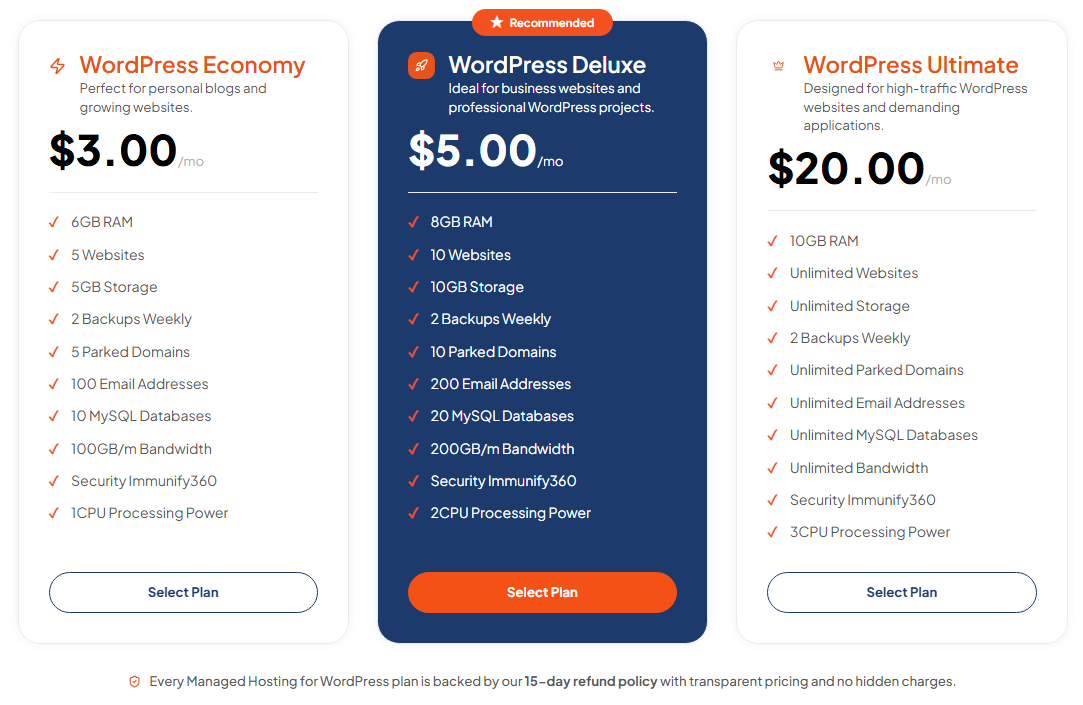
The current offering lists features such as:
- NVMe SSD storage and LiteSpeed Web Server technology.
- Free SSL certificates.
- Automated daily backups.
- Malware protection and DDoS mitigation.
- WordPress-focused optimization.
- Technical support.
The listed plans include WordPress Economy at $3 per month, WordPress Deluxe at $5 per month, and WordPress Ultimate at $20 per month. Plan inclusions differ, so review the current package details before purchasing.
Businesses operating online stores can also explore managed WordPress hosting for WooCommerce, while users prioritizing protection can review secure managed WordPress hosting.
For more detailed comparisons, see managed vs shared WordPress hosting and affordable managed WordPress hosting plans.
DirectAdmin hosting for users who want a control panel
Not every customer needs a fully managed server. Some users simply want a straightforward control panel to manage websites, databases, domains, and email.
TezHost DirectAdmin hosting includes NVMe storage, free SSL, CDN, two weekly backups, and 24/7 support according to its current service page. Plans start at $1.44 per month, with different storage and website limits across packages.
This can suit individuals and small businesses that want practical hosting management without taking responsibility for administering an entire server.
Reseller hosting for agencies and hosting businesses
Agencies, freelancers, and developers managing multiple client websites may consider DirectAdmin Reseller Hosting.


The current plans list features such as DirectAdmin access, custom package creation, two weekly backups, and unlimited accounts and websites, subject to the selected plan’s resource limits and terms.
Support for different technical requirements
TezHost’s approach is to provide options for different levels of technical involvement. Whether you need managed WordPress hosting, a control-panel-based hosting account, or reseller hosting, the goal is to match the service to your actual workload.
You can register with TezHost to explore available services or speak with a sales agent to discuss which hosting management option is suitable for your website or application.
Frequently Asked Questions About Managed vs Unmanaged Hosting
Is managed hosting better for beginners?
Yes, managed hosting is generally more suitable for beginners because the provider handles agreed server maintenance and technical tasks. It allows website owners to focus on their content, customers, and business rather than server administration.
Is unmanaged hosting difficult to maintain?
It can be. Unmanaged hosting requires knowledge of server configuration, operating system updates, security, backups, monitoring, and troubleshooting. The workload depends on the complexity of the application and the administrator’s experience.
Does managed hosting include backups and security?
Not always. Features vary by provider and plan. Check whether backups, malware protection, firewall management, SSL, updates, and recovery assistance are included or offered as optional services.
Can I use managed hosting without technical knowledge?
Yes. Managed hosting is designed to reduce the technical workload for customers. You may still need basic website or application knowledge, but you generally do not need to perform every server administration task yourself.
Can developers use managed hosting?
Absolutely. Developers may choose managed hosting to reduce infrastructure maintenance and focus on application development. However, they should check whether the service allows the configurations, software versions, and access levels their projects require.
Can I switch from unmanaged to managed hosting?
Yes, in many cases. The process usually involves migrating website files, databases, email accounts, application configurations, and DNS records. Check compatibility and migration support with your new provider before making the move.
Conclusion: Choose Hosting That Matches Your Technical Resources
When comparing managed vs unmanaged hosting, the option that requires less work is generally managed hosting. It reduces the amount of routine server administration your team must perform and can provide access to maintenance, security, backups, and technical support within the agreed service scope.
Unmanaged hosting is more suitable for developers, system administrators, and businesses with the technical expertise to configure, secure, monitor, and maintain their own infrastructure. It offers greater control, but that control comes with additional responsibility.
Before making a decision, consider your technical skills, available staff, application requirements, budget, and the amount of time you can dedicate to server management.
TezHost offers managed WordPress hosting, DirectAdmin hosting, and reseller hosting to support different website and business requirements.
Ready to choose a hosting solution that fits your workload?
- Explore TezHost hosting services
- View managed WordPress hosting
- Explore DirectAdmin hosting
- Register with TezHost
- Talk to a sales agent
You can also register a domain with TezHost and bring your website and hosting requirements together.