
How much bandwidth do I need for my website? It’s an important question, but one that many website owners overlook when choosing a hosting plan.
Choose too little, and you may run into resource limits, slow performance, or unexpected service interruptions as traffic grows. Choose too much, and you could end up paying for resources your website doesn’t use.
The goal is to find a hosting plan that supports your current visitors while leaving enough room for growth.
Whether you’re running a personal blog, business website, WordPress platform, or online store, understanding your hosting storage and bandwidth needs can help you make a smarter decision.
If you’re ready to explore hosting options, register with TezHost or speak with a sales agent to discuss a suitable plan.
Let’s look at how to calculate your requirements and choose the right resources.
1. Understand the Difference Between Storage and Bandwidth
Before deciding how much bandwidth do I need, understand that storage and bandwidth measure two different things.
Storage is the space available on your hosting account for website files. Bandwidth is the amount of data transferred between your website and its visitors over a given period, usually monthly.

Think of your website as a physical shop:
- Storage is the space available to keep your products and equipment.
- Bandwidth is the amount of activity moving in and out of your shop.
What counts as hosting storage?
Your hosting storage may include:
- WordPress core files and website applications.
- Themes, plugins, and extensions.
- Images, videos, and downloadable documents.
- Databases and website content.
- Email accounts and stored messages.
- Logs, temporary files, and other application data.
For example, a business website with a few service pages and optimized images may require considerably less storage than an ecommerce website with thousands of product images.
Storage technology matters too. NVMe SSD storage can provide faster data access than traditional hard drives. However, faster storage does not automatically mean you have more storage capacity or bandwidth.
Read more about the benefits of SSD storage.
What counts as bandwidth?
Bandwidth usage increases whenever visitors download or load resources from your website.
Examples include:
- Opening website pages.
- Loading images and graphics.
- Downloading PDFs and other files.
- Accessing scripts, stylesheets, and fonts.
- Downloading product catalogues.
- Loading other media hosted on your server.
Your hosting storage and bandwidth needs should therefore be evaluated separately. A website can have relatively small storage requirements but consume significant bandwidth if it receives substantial traffic.
2. How Much Bandwidth Do You Actually Need?
The amount of bandwidth you need depends mainly on monthly traffic, average page size, and how many pages visitors view during each session.

A practical starting formula is:
Monthly bandwidth = Monthly visitors × Average pages per visitor × Average page size
For example, suppose your website receives:
- 5,000 visitors per month.
- 3 page views per visitor.
- An average page size of 2 MB.
Your estimated monthly bandwidth consumption would be:
5,000 × 3 × 2 MB = 30,000 MB, or approximately 30 GB.
This is a simplified estimate. Actual usage can vary because of repeat visits, browser caching, CDN delivery, bots, downloads, and other requests.
For planning purposes, add around 25–50% as a starting safety margin, then compare that estimate with your actual hosting usage.
Example bandwidth requirements
| Website traffic | Average page views | Average page size | Estimated monthly transfer |
|---|---|---|---|
| 1,000 visitors | 3 | 1.5 MB | 4.5 GB |
| 5,000 visitors | 3 | 2 MB | 30 GB |
| 10,000 visitors | 4 | 2 MB | 80 GB |
| 20,000 visitors | 3 | 2 MB | 120 GB |
| 50,000 visitors | 4 | 2 MB | 400 GB |
These are illustrative estimates, not fixed hosting requirements.
If you’re asking how much bandwidth do I need for a new website, start with a realistic traffic forecast rather than purchasing the largest package available. Monitor actual consumption and upgrade when your data shows that you need more.
For help comparing hosting options, read how to choose the best web hosting.
3. How Much Storage Does Your Website Need?
Your storage requirement depends on the size of your website, the number of files you upload, and how frequently you publish new content.
A simple company website may operate comfortably with a few gigabytes. A media-heavy website or ecommerce store may need significantly more.

Consider these general starting estimates:
| Website type | Illustrative starting storage |
|---|---|
| Personal website | 1–5 GB |
| Small business website | 5–10 GB |
| Professional blog | 5–15 GB |
| Portfolio or photography website | 10–30 GB |
| Small ecommerce website | 10–30 GB |
| Large media or product website | 30 GB or more |
These are planning estimates, not guaranteed requirements. Your actual hosting storage and bandwidth needs depend on the size and format of your content.
Don’t forget databases and email storage
Website owners often calculate storage based only on website files.
However, databases, email messages, attachments, logs, and application data also consume space.
For WordPress websites, for example, the database stores posts, pages, settings, user information, and other content. As your website grows, the database may also grow.
Email storage can become another significant factor, particularly for businesses that maintain years of correspondence and attachments.
Keep backups in mind
Backups are important, but you should understand how your hosting provider handles them.
Some providers store backups separately from your allocated hosting storage, while others may count certain backup files toward your account quota.
Check the backup policy before choosing a package. Also, avoid keeping unnecessary duplicate files and outdated backups inside your live hosting account.
4. How Do Website Type and Traffic Affect Resource Requirements?
Two websites receiving the same number of visitors may consume very different amounts of bandwidth and storage.
The difference comes down to what visitors are accessing.

Business websites
A typical business website contains service pages, contact forms, company information, and a few images.
Its storage requirements are generally modest, and bandwidth consumption depends on visitor numbers and page optimization.
A smaller hosting package may be sufficient when traffic is predictable.
WordPress blogs and content websites
Blogs publish articles, images, downloadable resources, and sometimes embedded media.
A text-focused blog may use relatively little bandwidth per visitor. A website containing large images, downloadable guides, and extensive media will consume more.
Optimizing images and using caching can reduce unnecessary data transfers.
Ecommerce websites
Online stores have additional requirements.
Product images, category pages, shopping cart requests, customer accounts, and checkout processes all contribute to server activity.
A store with thousands of products and frequent traffic spikes needs more careful resource planning than a small catalogue website.
Media-heavy websites
Photography portfolios, video platforms, and websites offering large downloadable files can consume substantial bandwidth.
If you regularly distribute large files, consider using a CDN or dedicated file delivery service instead of serving every download directly from your web hosting account.
This is especially important when calculating how much bandwidth do I need for websites with large media libraries.
5. Seven Practical Ways to Right-Size Your Hosting Plan
Choosing the right hosting plan is not simply about buying more storage and bandwidth. It is about understanding what your website actually consumes.

Here are seven practical ways to avoid paying for unnecessary resources or running out of capacity.
1. Calculate your current traffic
Review your analytics and hosting statistics to understand monthly visitors, page views, and traffic patterns.
Use actual data wherever possible instead of relying entirely on estimates.
2. Measure your average page size
Check the total transfer size of important pages, including images, scripts, stylesheets, and other assets.
Large page sizes can increase bandwidth consumption even when visitor numbers are relatively low.
3. Optimize images and media
Compress images, choose appropriate formats, resize oversized graphics, and avoid uploading unnecessary high-resolution files.
This can reduce storage consumption and the amount of data transferred to visitors.
4. Enable caching and CDN delivery
Caching allows frequently requested content to be served without repeatedly processing the same requests.
A CDN distributes cached content through geographically distributed delivery points, reducing the amount of content that needs to be served directly from your origin server.
Remember that CDN delivery does not automatically eliminate all bandwidth consumption. Your origin traffic and CDN transfer should be reviewed separately.
5. Monitor database and email usage
Check database size, email quotas, attachment storage, and temporary files.
Cleaning outdated data and removing unnecessary files can help you manage your hosting storage more efficiently.
6. Leave room for growth
Don’t choose a plan that only supports your current usage with no additional capacity.
A reasonable growth margin helps accommodate marketing campaigns, seasonal demand, new products, and increased website traffic.
7. Review usage regularly
Check your hosting resource statistics every month.
If bandwidth consumption is increasing consistently, investigate the reason before upgrading. It could be genuine traffic growth, large downloads, bots, inefficient images, or unexpected application requests.
If you’re still unsure how much bandwidth do I need, talk to a TezHost sales agent about your website type and expected usage.
6. Which Hosting Plan Should You Choose?
The right hosting plan depends on your storage requirements, monthly data transfer, technical needs, and expected growth.
| Hosting type | Suitable for | Resource considerations |
|---|---|---|
| Shared hosting | Personal and small business websites | Cost-effective, with defined account limits |
| WordPress hosting | WordPress websites and blogs | Consider storage, traffic, caching, and WordPress resource usage |
| VPS hosting | Growing websites and developers | More control over allocated server resources |
| Cloud hosting | Websites with changing or higher resource demands | Flexible resource scaling, depending on the provider |
| Dedicated servers | Large platforms and demanding workloads | Greater control over server resources and configuration |
A small business website does not necessarily need a VPS or dedicated server just because it expects more visitors. First, evaluate its actual storage, bandwidth, CPU, and memory requirements.

If you operate a website in Pakistan, our guide on choosing the right web hosting in Pakistan explains other factors to consider when selecting a provider.
What should you check before purchasing?
Don’t compare hosting plans based on storage alone.
Review these specifications:
- Allocated storage capacity and storage type.
- Monthly bandwidth or data-transfer allowance.
- Website and database limits.
- Email account capacity.
- CPU and RAM limits, where applicable.
- Backup frequency and restoration options.
- CDN availability and caching support.
- Upgrade options and technical support.
A plan advertising large storage capacity may still have a limited bandwidth allowance. Always check both specifications.
7. How TezHost Helps You Choose the Right Hosting Resources
At TezHost, the objective is to help customers select hosting resources based on their website requirements rather than simply encouraging them to purchase the largest available package.
Our DirectAdmin Hosting plans provide different storage and bandwidth allocations, allowing customers to choose a package according to their website size and expected traffic.
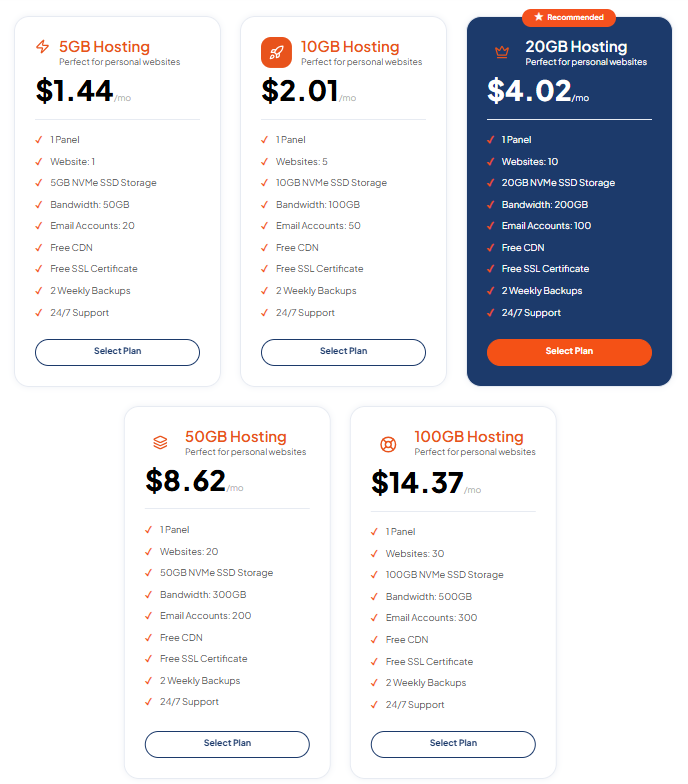
For example, the current monthly DirectAdmin plans include:
| Plan | NVMe SSD storage | Monthly bandwidth | Monthly price |
|---|---|---|---|
| 5GB Hosting | 5 GB | 50 GB | $1.44 |
| 10GB Hosting | 10 GB | 100 GB | $2.01 |
| 20GB Hosting | 20 GB | 200 GB | $4.02 |
| 50GB Hosting | 50 GB | 300 GB | $8.62 |
| 100GB Hosting | 100 GB | 500 GB | $14.37 |
These plans also include free SSL, CDN, two weekly backups, and 24/7 support. Check the TezHost DirectAdmin Hosting page for the latest specifications and pricing.
The aim is to make resource selection easier for different website owners:
- Personal websites: Smaller packages can provide a practical starting point.
- Business websites: More storage and bandwidth can support additional pages, media, and visitors.
- Growing websites: Larger packages provide additional capacity as requirements increase.
- Developers and agencies: Multiple website allowances can help manage several projects from one hosting account, subject to plan limits.
Our approach also focuses on accessible management, NVMe storage, security features, and support.
If you are building a new website, you can register a domain with TezHost and explore hosting options in one place.
Not sure which package matches your hosting storage and bandwidth needs? Speak with our sales team. Share your website type, expected traffic, and storage requirements so you can make a more informed decision.
Frequently Asked Questions
How much bandwidth do I need for 1,000 visitors per month?
For 1,000 monthly visitors viewing three pages each, with an average page size of 1.5 MB, estimated transfer is approximately 4.5 GB per month. Allow additional capacity for overhead, downloads, bots, and traffic growth.
Is 50 GB bandwidth enough for a small website?
It can be enough for a small business website or personal blog with moderate traffic and optimized pages. However, large images, file downloads, and frequent visitors can increase consumption. Check your actual usage before deciding.
Is 10 GB of storage enough for WordPress?
It is often sufficient for a small WordPress website with optimized images, a limited plugin collection, and manageable email and database usage. A media-heavy website may require more.
Does unlimited bandwidth mean unlimited resources?
No. An unlimited or unmetered bandwidth label does not mean a server has unlimited processing capacity. Hosting providers may apply fair-use policies, resource limits, or other service terms. Always review the provider’s acceptable-use policy.
Does using a CDN reduce bandwidth usage?
A CDN can reduce the amount of data your origin server delivers directly by serving cached content from its network. However, CDN traffic may still count toward the CDN provider’s transfer allowance, and uncached requests still reach your origin server.
What happens if my website exceeds its bandwidth limit?
The outcome depends on your hosting provider’s policy. Your website may be temporarily restricted, additional charges may apply, or you may need to upgrade your plan. Check the terms before purchasing.
Should I buy more storage or more bandwidth?
Choose based on the resource you are actually running short of. If your website contains many large files, you may need more storage. If visitors are downloading or loading substantial amounts of data, you may need more bandwidth.
Conclusion: Choose Resources That Match Your Website
So, how much bandwidth do I need? There is no universal number that works for every website.
A small business website, a WordPress blog, and a busy ecommerce store have different resource requirements. The best approach is to calculate your expected traffic, estimate average page size, measure your existing storage usage, and leave room for growth.
Don’t pay for resources you don’t need, but don’t underestimate what your website may require as it develops.
At TezHost, you can explore hosting packages with different NVMe storage and bandwidth allocations to find a suitable starting point.
Ready to choose a hosting plan that fits your website?
Explore TezHost DirectAdmin Hosting | Register here | Talk to a sales agent
Visit TezHost to explore domains and hosting services for your next project.