Do I need a DBA for cloud infrastructure, or can my existing IT team manage everything? The answer depends on the applications you run, the importance of your data, and the complexity of your environment. A small website may operate comfortably without a dedicated database administrator. A business processing customer orders, financial transactions, or large datasets may need specialist database expertise.
The same applies to DevOps. Not every business needs a full-time engineer, but teams that deploy frequently, manage multiple environments, or depend on automated releases can benefit from DevOps for cloud servers.
The goal is not to hire people simply because you use cloud technology. It is to make sure every important operational responsibility has a capable owner. Your cloud staffing needs should match your workload, risks, and growth plans.
If you are planning a cloud deployment, register with TezHost to explore server options. You can also talk to a TezHost sales agent about the infrastructure your application may require.
1. Do I Need a DBA for Cloud Servers?
Not every cloud server needs a dedicated DBA. You need database administration expertise when the reliability, security, performance, or recovery of your data requires skills your current team does not have.
A Database Administrator (DBA) is responsible for the health and operation of database systems. Depending on the environment, this can include:
- Installing, configuring, upgrading, and maintaining database software.
- Creating database users, roles, permissions, and access policies.
- Monitoring queries, indexes, connections, memory, and storage.
- Investigating slow queries, locks, and performance bottlenecks.
- Planning backups and regularly testing restoration.
- Managing replication, high availability, and disaster recovery.
- Applying security patches and reviewing database access.
For example, a small WordPress website with a modest MySQL database may need only routine maintenance from an experienced system administrator. A busy ecommerce platform with thousands of transactions may need a DBA to investigate query performance, connection limits, replication, and recovery procedures.
So, do i need a dba for cloud? Consider the consequences of a database failure. If an outage could stop sales, interrupt essential services, or expose sensitive information, you need reliable access to database expertise. That does not always mean employing someone full-time; a specialist on a part-time or contracted basis may be sufficient.
Do i need a dba for cloud support also depends on whether your team can monitor database health and restore service within an acceptable time.
2. What Does a DevOps Engineer Do for Cloud Servers?
A DevOps engineer improves the way software is built, tested, deployed, and operated. The role brings development and IT operations together through automation, monitoring, repeatable processes, and collaboration.
DevOps for cloud servers is particularly useful when teams release updates frequently or maintain separate development, testing, and production environments.
Common responsibilities include:
- Building and maintaining continuous integration and continuous deployment (CI/CD) pipelines.
- Automating application deployment and infrastructure configuration.
- Managing containers and orchestration platforms where required.
- Monitoring application performance, server health, and logs.
- Managing version-controlled configuration and infrastructure as code.
- Creating rollback procedures and release controls.
- Improving deployment security and access management.
Imagine a software company that manually uploads application files every time developers release an update. As the application grows, manual deployments become slower and more error-prone. A DevOps engineer can create a pipeline that runs tests, packages approved changes, and deploys them through a controlled process.
DevOps for cloud servers should be considered when manual releases create avoidable delays, inconsistent configurations, or production risk. This is where cloud staffing needs become more visible: someone must design, maintain, and troubleshoot the automation.
TezHost’s guides to Azure DevOps and Azure hosting services for businesses offer useful context on development workflows and cloud infrastructure.
3. DBA vs DevOps: Which Role Does Your Business Need?
A DBA and a DevOps engineer solve different problems. They often work together, but their responsibilities should not be treated as interchangeable.
| Responsibility | DBA | DevOps engineer |
|---|---|---|
| Database design and administration | Primary responsibility | Supports deployment workflows |
| Query and index optimization | Primary responsibility | May monitor related metrics |
| Database backup and recovery | Designs database-level processes | Can automate backup workflows |
| CI/CD pipelines | Supports database release changes | Primary responsibility |
| Infrastructure automation | May contribute to database configuration | Primary responsibility |
| Application deployment | Coordinates database changes | Primary responsibility |
| Database permissions | Primary responsibility | Supports secure deployment access |
| Infrastructure monitoring | Database health and performance | Server and application operations |
If an application is slow because of inefficient SQL queries, a DBA can review execution plans, indexes, locks, and database configuration. If an application becomes unavailable after a release, DevOps expertise may be needed to inspect the pipeline, deployment configuration, and rollback process.
When reviewing cloud staffing needs, start with the problems your team must solve rather than the job titles you think you should hire. A small company may need one experienced infrastructure professional with database knowledge. A larger organization may need separate specialists.
4. Can a Small Business Manage Cloud Servers Without Dedicated Specialists?
Yes. A small business can often manage a straightforward cloud environment without hiring a full-time DBA or DevOps engineer, provided someone competent owns the routine technical work.
You may not need dedicated specialists when:
- You operate a small website or a simple business application.
- Database usage is modest and predictable.
- Deployments happen occasionally.
- Your software uses a standard, well-documented stack.
- Someone can apply updates and monitor resource usage.
- Backups are configured and restoration has been tested.
- You can access qualified technical support when an issue exceeds your team’s skills.
For example, a company hosting a corporate website or a small internal application may be able to work with a capable developer or system administrator. However, not hiring a specialist does not remove the work. Someone must still manage operating system updates, firewall rules, access permissions, backups, monitoring, storage, and incident response.
The question do i need a dba for cloud should therefore be considered alongside the size and criticality of your database. If you have limited cloud staffing needs, you can assign routine tasks internally and arrange external DBA support for complex work.
If you are comparing infrastructure options, explore TezHost Cloud Servers and talk to a sales agent about the resources your workload requires.
5. Seven Signs You Need DBA or DevOps Expertise
You do not need to wait until your company reaches enterprise scale before bringing in specialist skills. These warning signs can indicate that your current team is reaching its operational limits.

1. Database performance is unpredictable. Slow queries, database locks, connection limits, and rising resource consumption may require DBA investigation.
2. Deployments regularly cause downtime. If releases frequently break applications or require manual recovery, DevOps for cloud servers can help introduce automated testing, controlled deployments, and rollback procedures.
3. Your business depends on critical data. Customer records, orders, financial information, and operational databases need suitable access controls, backup policies, and recovery testing.
4. Your infrastructure is becoming complex. Multiple servers, APIs, containers, and development environments increase the number of systems that must be configured and monitored.
5. Backups are not tested. A completed backup job does not prove that your business can restore its data. Recovery procedures need to be tested and assigned to someone.
6. Repetitive work is consuming technical time. Manual deployments, server configuration, user provisioning, and routine maintenance can slow down development.
7. Security requirements are increasing. More sensitive information means greater attention to permissions, encryption, audit logs, patching, and access management.
These warning signs also help you estimate cloud staffing needs. You may need a permanent hire, a specialist consultant, or a better-defined support arrangement. The right choice depends on how often the work occurs and how much risk is involved.
6. Can One Person Handle Both DBA and DevOps Responsibilities?
Yes, one experienced professional can sometimes manage both areas, particularly in a startup or a small business with a relatively simple environment. However, combining responsibilities has practical limits.
A professional with experience in Linux administration, database management, scripting, monitoring, cloud infrastructure, and CI/CD can be valuable to a small team. But expecting one person to provide continuous coverage, optimize complex databases, maintain deployment pipelines, respond to every incident, and manage security can create a bottleneck.
The distinction between DBA work and DevOps for cloud servers still matters. Database architecture, query optimization, and recovery planning require database-specific expertise. Pipeline design, infrastructure automation, and release engineering require a different set of skills.
A sensible arrangement may be to assign routine administration to an internal system administrator, automate repeatable tasks, and bring in a DBA or DevOps specialist when the work requires deeper knowledge. Document who owns backups, patching, deployments, monitoring, and incident escalation.
This approach can keep cloud staffing needs proportionate without leaving critical responsibilities unassigned.
7. Can GitLab CE and Automation Reduce Manual Cloud Work?
Yes. The right tools can reduce repetitive work and make software delivery more consistent. They do not remove the need for technical ownership, but they can help a small team accomplish more with its available resources.
GitLab Community Edition (GitLab CE) is an open-source platform that provides Git repository management, issue tracking, code review, and CI/CD capabilities. A development team can use it to:
- Store and manage source code.
- Review changes before merging them.
- Track development tasks and issues.
- Run automated tests through CI/CD pipelines.
- Standardize application deployment workflows.
- Maintain a record of code and configuration changes.
Read TezHost’s guide to what GitLab CE is to understand its features. If you want to operate your own development platform, see the guide to self-hosting GitLab CE.
Self-hosting introduces its own responsibilities, including server updates, user access, backups, monitoring, and application maintenance. Automation can make these tasks easier, but it does not eliminate them.
For teams evaluating DevOps for cloud servers, GitLab CE can be part of a broader workflow. The important question is who will maintain the platform, protect its repositories, manage runners, and troubleshoot failed pipelines. Include those responsibilities in your cloud staffing needs rather than treating the tool as a complete replacement for technical staff.
8. How TezHost Supports a Practical Cloud Infrastructure Strategy
Choosing cloud infrastructure involves more than comparing CPU, RAM, and storage. Businesses also need to consider how they will deploy applications, manage access, maintain databases, and support their technical teams.
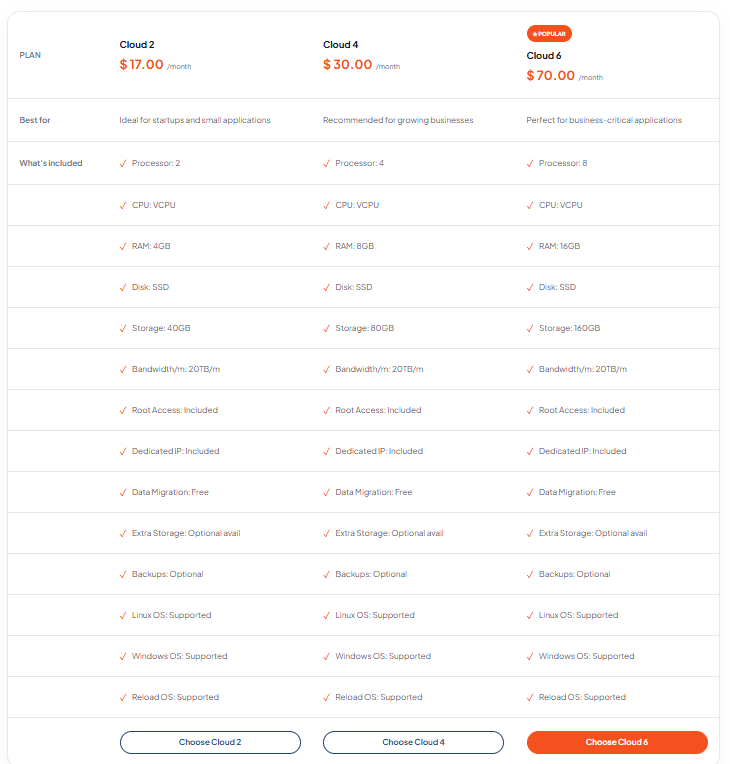
TezHost offers cloud server options for different workloads. Its listed cloud plans start at $17 per month and use AMD EPYC processors, DDR5 memory, and Gen4 NVMe SSD storage. The plans list root access, a dedicated IP, 20TB monthly bandwidth, free data migration, and Linux and Windows operating system support. Backups are optional, so customers should plan their backup requirements separately. Review the current TezHost Cloud Server plans for specifications and pricing.
For workloads designed for AWS, TezHost also provides AWS server options. Compare the available configurations with your application’s operating system, resource, and deployment requirements before choosing.
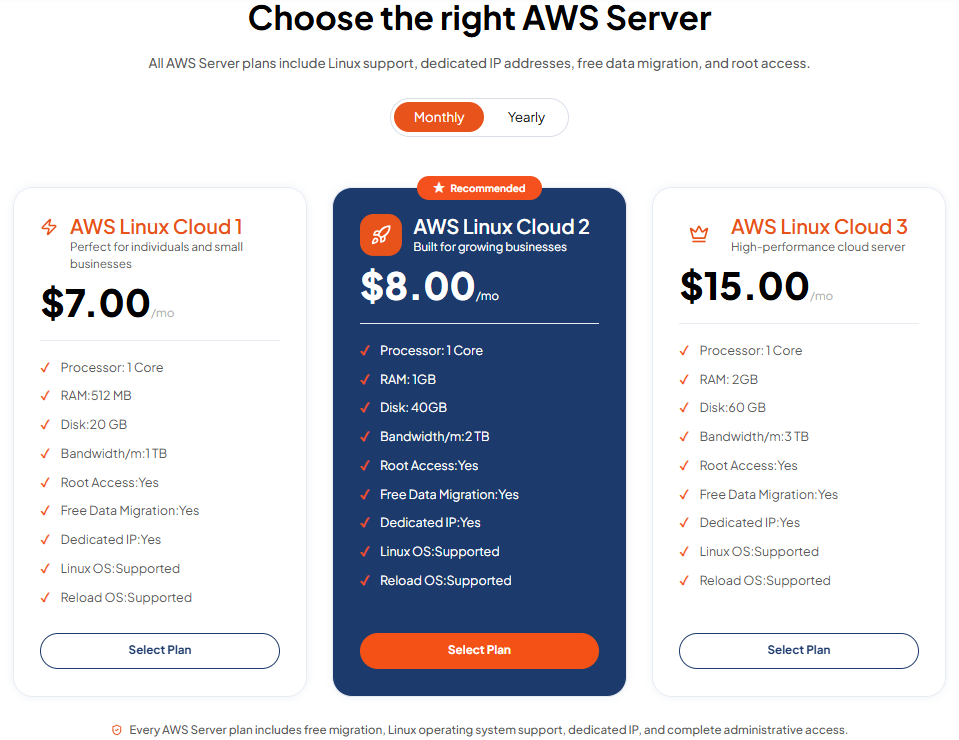
This infrastructure flexibility helps businesses select resources based on actual workload instead of immediately over-provisioning. Root access gives customers administrative control to configure supported software, databases, and development environments. It also means customers need to understand which management tasks remain their responsibility.
A cloud server does not automatically include a dedicated DBA, DevOps engineer, managed database, or application operations team. Confirm the service and support scope before deployment. This is especially important when assessing do i need a dba for cloud: server capacity and database expertise are separate requirements.
TezHost’s content on GitLab CE, Azure DevOps, and Azure hosting also helps businesses explore development and deployment workflows alongside infrastructure choices. If you want to discuss a suitable configuration, contact the TezHost sales team or register here.
9. How Should You Plan Your Cloud Staffing Needs?
Start by listing your applications, databases, environments, and operational responsibilities. Then decide which tasks need daily attention, which can be automated, and which require specialist knowledge.
| Environment | Practical staffing approach |
|---|---|
| Small website or simple application | Developer or system administrator with technical support available |
| Small business with a production database | System administrator plus DBA support when required |
| Application with frequent releases | Developer or system administrator with DevOps expertise |
| Database-heavy business application | DBA or ongoing database specialist |
| Multiple production applications | DevOps engineer and DBA with defined responsibilities |
| Business-critical or regulated workloads | Clear technical ownership, specialist coverage, tested recovery, and documented escalation |
These are guidelines, not fixed hiring rules. Your architecture, uptime expectations, data sensitivity, deployment frequency, and internal skills should determine the final structure.
Your cloud staffing needs should include backup coverage so essential tasks do not depend on one employee being available. Cloud staffing needs should also account for coverage. Who responds when a database becomes unavailable outside office hours? Who checks whether backups completed? Who approves production deployments? Who investigates a security alert? If the answer to every question is “the same person,” make sure that arrangement is realistic and supported by documented procedures.
Finally, compare the cost of specialist support with the cost of operational failure. A full-time hire may not be justified, but prolonged downtime, failed recovery, or repeated deployment errors can be much more expensive than planned technical assistance.
Conclusion: Build the Right Team for Your Cloud Environment
So, do i need a dba for cloud servers? Not automatically. You need database expertise when data performance, security, integrity, or recovery requires specialist attention. You need DevOps for cloud servers when deployments, automation, monitoring, and infrastructure workflows become too complex for your existing team.
Smaller environments may be managed by a capable developer or system administrator, supported by specialists when necessary. As applications become more complex or business-critical, separate DBA and DevOps responsibilities may be the safer choice.
The objective is not to build the largest IT department. It is to make sure every important task has a capable owner and that your cloud staffing needs grow in line with your infrastructure.
Explore TezHost Cloud Servers and AWS server options to review infrastructure for your workloads. For help discussing your requirements, talk to our sales team.
Frequently Asked Questions
Do I need a DBA for cloud databases?
Not always. Small databases with predictable workloads may be managed by an experienced developer or system administrator. A DBA becomes more important when databases support critical operations, handle high transaction volumes, or require advanced performance, security, and recovery planning.
Do cloud providers manage databases automatically?
No, not in every case. Managed database services may handle selected tasks such as patching, backups, and infrastructure maintenance. With a self-managed database on a cloud virtual machine, the customer may remain responsible for installation, configuration, security, updates, backups, and performance.
Is DevOps necessary for cloud servers?
No. A simple server with occasional deployments may not need a dedicated DevOps engineer. DevOps for cloud servers becomes more valuable when you need automated deployments, CI/CD pipelines, infrastructure as code, container management, or repeatable release processes.
Can a system administrator replace a DBA?
An experienced system administrator may handle basic database maintenance. Advanced query optimization, replication design, database architecture, and complex recovery planning generally require deeper database expertise.
Can developers manage cloud servers themselves?
Yes, if they have the necessary operating system, networking, security, and infrastructure skills. Application development and production server administration are different responsibilities, so ownership should be clearly assigned.
Should a startup hire a DevOps engineer from day one?
Usually not. A startup can begin with a developer or system administrator who understands its infrastructure and deployment requirements. Dedicated DevOps expertise becomes more valuable as release frequency, application complexity, and uptime expectations increase.
What is the difference between managed and self-managed cloud servers?
With a self-managed server, the customer generally configures and maintains the operating system, applications, security, and backups. A managed service may include some of these tasks, depending on the provider’s defined scope. Confirm exactly what is included before selecting a plan.
How can I reduce cloud management costs without compromising reliability?
Choose resources based on actual workload, automate repetitive tasks, monitor usage, maintain tested backups, and obtain specialist support when required. Avoid hiring before the workload justifies it, but never leave critical systems without an accountable technical owner.