

Can you change domain name after registration? Yes, you can move your website and brand to a different domain, but you generally cannot rename the domain already registered. You need to register a new domain, connect it to your website, and carefully move your digital presence.
A domain name often becomes part of a company’s identity. But businesses evolve. You may expand into new services, enter new markets, merge with another company, or discover that your current name no longer reflects your brand. In these situations, you may decide to rebrand your domain and switch domain name without losing customers, search visibility, or business email.
If you are considering a new online identity, register your domain through TezHost and explore available extensions. Need help choosing a suitable name? Talk to a TezHost sales agent before making the change.
1. Can You Change a Domain Name After Registration?
If you want to change domain name after registration, you need to register a different available name; you cannot directly edit or rename the existing domain. A domain is registered as a specific name under a domain extension, such as .com, .net, or .pk. If you want a different name, you must register that new domain separately, provided it is available.

For example, if your current domain is oldbrand.com and your new brand is newbrand.com, you cannot convert the first registration into the second. You register newbrand.com, configure it, and migrate your website and services.
This distinction matters because domain registration and domain transfer are different processes:
- New domain registration: You obtain a different domain name that is available for registration.
- Domain transfer: You move the management of an existing domain from one registrar or provider to another. The domain name itself stays the same.
- Website migration: You move website files, databases, applications, or hosting services to a new domain or environment.
If you only want to change the company managing your current domain, you may need a transfer rather than a rebrand. Read TezHost’s guide to confirming you own your domain and review the domain transfer options.
2. Why Would a Business Switch to a New Domain?
Businesses often switch domain name when their current address no longer represents their direction, audience, or products. The right reason should be strategic, not simply because a different name sounds more fashionable.

Common reasons include:
- Rebranding: The company has changed its name, identity, or market positioning.
- Business expansion: The existing domain is too specific for new products, services, or locations.
- Mergers and acquisitions: Two businesses are combining under one brand.
- A confusing domain: Customers regularly misspell the address or confuse it with another business.
- A better extension: The company wants an extension that better suits its market or audience.
Before you rebrand your domain, consider whether the new name will still make sense in three to five years. Choose a name that is easy to spell, pronounce, remember, and communicate verbally. Avoid unnecessary hyphens, numbers, and complicated wording.
When you switch domain name, the change should strengthen brand recognition rather than create another identity that customers must learn. If you change domain name after registration, explain the reason for the move clearly to customers and business partners. If you need inspiration, prepare a shortlist and check domain availability before announcing the rebrand. A clear plan to rebrand your domain helps customers connect the new name with the business they already know.
3. How Do You Choose and Register the New Domain?
To change domain name after registration successfully, start by identifying the exact replacement domain you want, including its extension. Then check availability, registration costs, renewal rates, and any extension-specific restrictions.

A practical selection process:
- Create three to five domain name options.
- Check the spelling, pronunciation, and brand relevance.
- Search the preferred name with different extensions.
- Review first-year and renewal pricing.
- Check for possible trademark conflicts or confusingly similar brands.
- Register the domain using accurate registrant information.
- Keep the registration confirmation and account access details secure.
TezHost’s domain registration service lists more than 45 domain extensions, including options such as .com, .org, .info, and .shop. The domain management service also describes DNS controls for records such as A, CNAME, MX, TXT, SPF, DKIM, and DMARC. Availability and prices can change, so confirm the final details before checkout.
Explore TezHost domain registration to compare available options. If you are unsure which extension fits your business, speak with a sales agent for guidance.
When you switch domain name, remember that registering a new domain does not automatically move your website, email accounts, search rankings, or customer traffic. Those need a separate migration plan.
4. What Should You Prepare Before Changing Your Domain?
Before you change domain name after registration, document how your current website and connected services work. A domain is more than the address visitors type into a browser. It can be connected to hosting, DNS, email, payment systems, analytics, APIs, and third-party platforms.
Prepare an inventory that includes:
- Website files, databases, CMS settings, and application configurations.
- Current DNS records, nameservers, and DNS hosting provider.
- Email accounts, MX records, and email authentication settings.
- SSL/TLS certificates for the new domain.
- Subdomains, redirects, and important URL paths.
- Analytics, advertising pixels, Search Console, and webmaster tools.
- Payment gateways, CRM systems, API integrations, and external logins.
Export or record the existing DNS zone before making changes. Common records include A and AAAA records for server addresses, CNAME records for aliases, MX records for email routing, and TXT records for verification and email authentication.
If your business uses domain-based email, plan the mailbox migration separately. Recreating the website on a new domain does not automatically move historical email, contacts, or mailbox settings. Check SPF, DKIM, and DMARC records to help maintain email authentication and deliverability.
Also arrange a valid SSL/TLS certificate for the new domain. Without it, visitors may see browser security warnings or experience connection problems. Test the new website over HTTPS before directing customers to it.
5. How Do You Move a Website Without Losing SEO?
When you change domain name after registration, search visibility can be affected because search engines treat the new domain as a different web address. You can reduce disruption by mapping old URLs to their closest relevant new URLs and using permanent redirects.

If you change domain name after registration, a careful migration usually follows these steps:
Map every important URL. Prepare a spreadsheet of existing pages and their matching destinations on the new domain. Do not redirect every old URL to the new homepage if relevant page-level destinations exist.
Use permanent 301 redirects. Configure server-side 301 redirects from each old URL to its corresponding new URL. Keep paths and content as consistent as possible where practical. Avoid redirect chains and loops.
Update internal links. Change navigation, images, canonical tags, structured data, XML sitemaps, and links within your website so they point directly to the new domain.
Check robots.txt and indexing. Make sure the new website is crawlable and important pages are not accidentally blocked by robots directives or noindex tags.
Update Google Search Console. Verify ownership of both domains, submit the new sitemap, monitor indexing, and use Google’s Change of Address process when its eligibility requirements apply.
Monitor performance. Track organic clicks, impressions, rankings, crawl errors, redirects, and conversions after launch. Compare performance with the period before migration.
If you switch domain name, do not cancel the old domain immediately. Keep it registered and maintain the redirects for as long as possible. Customers may still use old bookmarks, emails, printed materials, and backlinks. A well-planned rebrand protects those pathways while the new identity gains recognition.
6. What Happens to Your Business Email and DNS?
When you change domain name after registration, your email addresses also need attention. An address such as info@oldbrand.com does not automatically become info@newbrand.com.
Create the new mailboxes or aliases, configure the new domain’s MX records, and update SPF, DKIM, and DMARC. Test sending and receiving messages from external providers before announcing the change. If you need to preserve historical messages, plan mailbox migration and backups before changing mail routing.
DNS changes may take time to appear consistently because resolvers cache records according to their TTL values. Lowering TTL in advance can help reduce the time some resolvers retain old information, but it does not guarantee instant global propagation.
Keep a record of the old and new DNS zones. Check website resolution, email delivery, subdomains, verification records, and any integrations that rely on the old hostname.
For domain management, TezHost provides DNS controls and domain services through its domain registration page. You can also review what is included in domain registration before choosing a package. For help planning the technical change, contact the TezHost sales team.
7. How Is TezHost Making Domain Changes Easier?
Helping customers change domain name after registration involves several connected tasks: finding a suitable name, registering it, managing DNS, arranging transfers when needed, and keeping website services connected. TezHost brings key domain management options together so businesses can handle these steps with support.
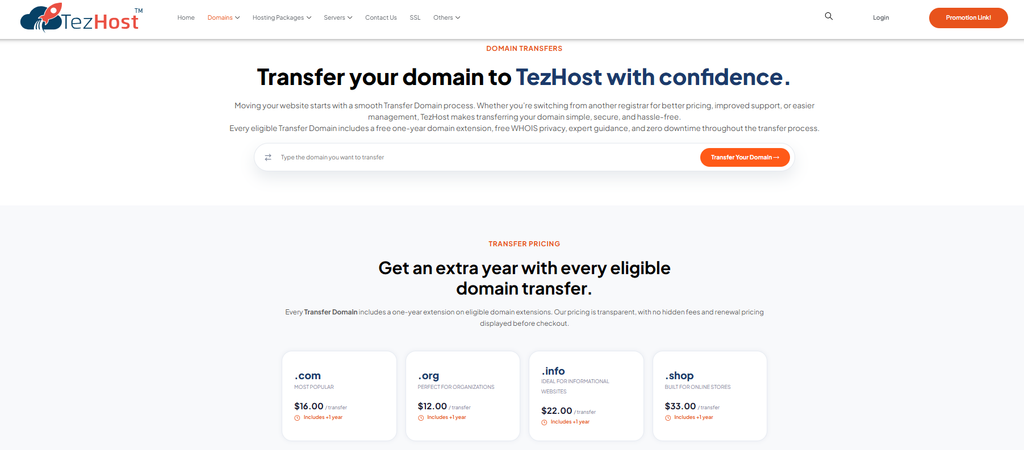
Its domain registration page lists more than 45 extensions and provides a search facility to check names. Domain management features include DNS record controls, domain privacy options, transfer assistance, and access to related services. The available features and conditions can vary by extension and registration.
TezHost also provides domain registration support to help customers review available names and understand the registration process. If you are planning to rebrand your domain, you can start by checking the new name, reviewing the registration terms, and discussing the migration requirements before making DNS changes.
Visit TezHost to explore domain and hosting services, register your new domain, or talk to a sales agent about the next steps.
Frequently Asked Questions
Can I change my domain name without buying a new one?
No. A registered domain cannot normally be renamed. You need to register a different available domain and migrate your website and connected services to it.
Will changing my domain affect my Google rankings?
It can. Search engines need to discover and process the new URLs. Correct 301 redirects, updated internal links, canonical tags, XML sitemaps, and Search Console monitoring can help reduce disruption, but rankings and traffic are not guaranteed to remain unchanged.
Can I keep my old domain after rebranding?
Yes. Keeping the old domain is recommended so you can redirect visitors to the new website, preserve access to old links, and reduce the risk of someone else registering the former brand address.
Is changing a domain name the same as transferring a domain?
No. A domain transfer changes the registrar or provider managing the same domain. A domain change means registering a different name and migrating your website or services to it.
Will my business email change when I change my domain?
Your old email addresses will remain associated with the old domain. You need to create new addresses under the new domain, configure mail records, and plan mailbox migration if you want to retain existing messages.
Conclusion: Make Your Domain Change a Planned Rebrand
You can change domain name after registration as part of a rebrand, but the process requires more than choosing a new name. You must register the new domain, prepare DNS and email, migrate website content, configure redirects, and monitor SEO performance.
Before you switch domain name, confirm that the new address supports your long-term brand strategy and that the old domain will remain under your control. A structured migration helps protect customer access, search traffic, and business communications while your new identity takes shape.
Ready to move forward? Explore domain registration with TezHost, register your preferred domain, or talk to a sales agent for assistance.