Cloud server setup time can range from a few minutes to several days. The difference depends on whether you need a basic virtual server or a production-ready environment with application deployment, security controls, data migration, monitoring, and testing.
If you are planning a new project, understanding the cloud server setup time helps you set realistic launch dates and avoid rushing important technical work. You can register with TezHost to explore available cloud server configurations, or talk to a sales agent about your requirements before selecting a plan.
1. How Long Does It Usually Take to Set Up a Cloud Server?
A basic cloud server may be provisioned within minutes or a few hours, while a fully configured production environment can take several days or longer. The cloud server setup time depends on the operating system, application stack, security requirements, migration complexity, and testing.

Here is a practical planning estimate. These are indicative ranges, not guaranteed provider activation times:
| Deployment task | Typical planning range |
|---|---|
| Basic virtual server provisioning | Minutes to a few hours |
| Operating system and initial access | 30 minutes to a few hours |
| Web server, runtime, and database setup | A few hours to 1 day |
| Security hardening and monitoring | Several hours to 1–2 days |
| Application deployment and testing | 1–3 days |
| Complex migration or integrations | Several days to weeks |
These tasks can overlap, and an experienced administrator may complete a simple deployment faster. However, a server being provisioned does not mean the application is ready for customers.
2. What Factors Affect Cloud Server Setup Time?
The biggest factors are infrastructure provisioning, application complexity, security configuration, data migration, and the availability of people who can complete the work. A realistic cloud server setup time includes preparation and validation, not just the provider’s provisioning step. When estimating how long to deploy cloud server infrastructure, consider the entire path from ordering to a tested production launch.
Server specifications and operating system: Selecting a supported Linux or Windows image is usually straightforward. Custom images, specific versions, partitioning, or additional storage can add work.
Application stack: A basic web server takes less time to configure than a multi-tier application with APIs, background workers, databases, caching, and container orchestration.
Network and DNS: Firewall rules, private networking, DNS records, SSL certificates, and external integrations need to be configured and tested. DNS propagation can add time after records are changed.
Security requirements: Access policies, SSH keys, multi-factor authentication, patching, firewall configuration, and audit logging should be planned before launch.
Migration and data volume: Moving a small website is different from transferring large databases, file repositories, or applications with strict downtime limits.
The cloud implementation timeline should include these dependencies rather than counting only the time needed to create a virtual machine.
3. What Does a Typical Cloud Implementation Timeline Look Like?
A practical cloud implementation timeline has distinct stages: planning, provisioning, configuration, deployment, testing, and launch. For a relatively straightforward website or application, these stages may fit into one to three working days. Complex environments need more time.

- Requirements and sizing: Identify the application, expected traffic, operating system, CPU, RAM, storage, bandwidth, and security needs.
- Provisioning: Select the plan, deploy the server, and confirm administrative access.
- System configuration: Apply updates, configure users, set hostname and networking, and install required packages.
- Application setup: Configure the web server, runtime, database, application files, and environment variables.
- Security and backups: Restrict access, configure firewall rules, install SSL, and arrange backups.
- Testing: Check application functionality, performance, permissions, logs, recovery, and external integrations.
- Go-live: Point DNS to the new environment, monitor traffic, and keep a rollback plan available.
This cloud implementation timeline gives project owners a clearer view of the work involved. For a production system, do not remove testing simply to meet an aggressive launch date.
4. How Long Does It Take to Deploy Cloud Server Applications?
Application deployment can take from a few hours to several days, depending on the software and its dependencies. If you are asking how long to deploy cloud server applications, the key question is whether the application is already packaged and tested or still needs development and configuration.
A static website or simple PHP application may be deployed relatively quickly. A Node.js or Python application may require runtime installation, process management, environment variables, database connectivity, and reverse proxy configuration. Containerized applications may need Docker, image registries, orchestration, secrets management, and persistent storage.
A production deployment should also include:
- Dependency and version checks.
- Database migrations and data validation.
- Environment-specific configuration.
- SSL/TLS and secure application secrets.
- Logging, monitoring, and error reporting.
- A rollback procedure for failed releases.
For foundational context, read the basics of cloud computing. If you are moving an existing service, review industries moving to cloud to understand why different workloads have different migration and deployment needs.
5. Can You Set Up a Cloud Server in One Day?
Yes, a simple cloud server can often be provisioned and configured in a day if the requirements are clear, the operating system and application are supported, and no complex migration is involved. However, the cloud server setup time for a secure production environment may extend beyond one day.
A one-day setup is more realistic when:
- You already know the required CPU, RAM, storage, and operating system.
- The application is ready to deploy.
- There are no major database or infrastructure migrations.
- DNS and domain access are available.
- A technical person can configure and test the environment.
- Security and backup requirements are straightforward.
If the project includes a large database, custom networking, compliance checks, high availability, or multiple integrations, allow additional time. A fast initial deployment is useful, but a rushed production launch can create outages and expensive rework.
6. How Can You Reduce Cloud Deployment Delays?
You can shorten the cloud implementation timeline by preparing requirements and dependencies before ordering the server. Keeping cloud server setup time predictable means resolving compatibility, access, and migration questions before deployment. Most avoidable delays come from missing information, incompatible software, unclear responsibilities, or discovering security and migration needs too late.
Use this checklist:
- Document the workload: List the application, framework, database, expected traffic, and operating system.
- Choose resources realistically: Estimate CPU, RAM, storage, and bandwidth using current usage data where available.
- Prepare deployment files: Keep application code, configuration templates, and dependencies ready.
- Confirm access: Make sure you have domain, DNS, database, repository, and administrator credentials.
- Plan security early: Define firewall rules, SSH access, user permissions, patching, and SSL requirements.
- Set backup and recovery expectations: Decide what must be backed up, how often, and how quickly it should be restored.
- Assign responsibility: Identify who handles infrastructure, application configuration, testing, and approval.
A clear cloud implementation timeline also depends on provider communication. Before purchasing, confirm what provisioning, migration, and technical assistance are included. TezHost explains its service approach in Cloud Customer Service Expectations.
7. What Should You Check Before Choosing a Cloud Server Provider?
When comparing providers, remember that cloud server setup time is affected by more than advertised provisioning speed. Check the infrastructure specifications, operating system options, migration arrangements, support scope, backup options, and upgrade process.
TezHost’s published cloud server plans start at $17 per month. The Cloud 2 configuration lists 2 vCPU, 4GB RAM, 40GB storage, 20TB monthly bandwidth, root access, a dedicated IP, free data migration, and Linux or Windows support. The Cloud 4 plan is listed at $30 per month with 4 vCPU, 8GB RAM, and 80GB storage. Backups are optional, so include a separate backup plan in your deployment schedule and budget. See the TezHost Cloud Servers page for current specifications.

These resources provide a starting point for developers and businesses, but the right plan depends on actual workload requirements. Ask whether your chosen operating system, application stack, and migration method are supported before placing an order.
How TezHost Is Making Cloud Deployment More Accessible
Cloud server setup time is not only about how quickly a virtual machine becomes available. It also depends on whether customers can select suitable resources, get the right operating system, migrate workloads, and access assistance when they need it.
TezHost offers cloud server configurations built on AMD EPYC processors, DDR5 memory, and Gen4 NVMe SSD storage. Its published plans include root access, a dedicated IP, 20TB monthly bandwidth, Linux and Windows support, and free data migration. Customers can choose from entry-level configurations for smaller applications through larger plans for more demanding workloads.
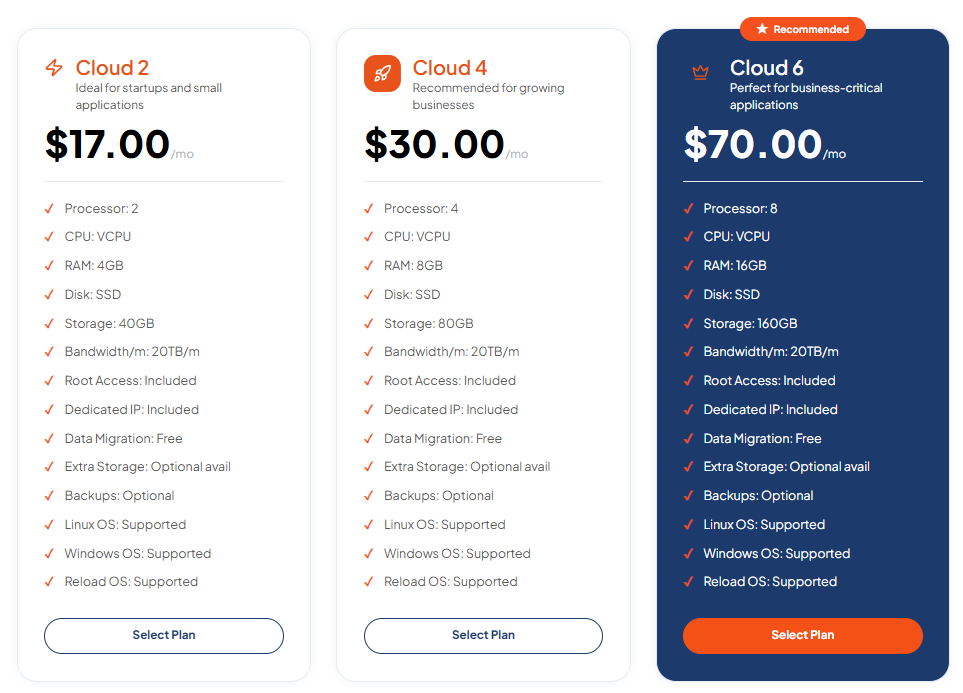
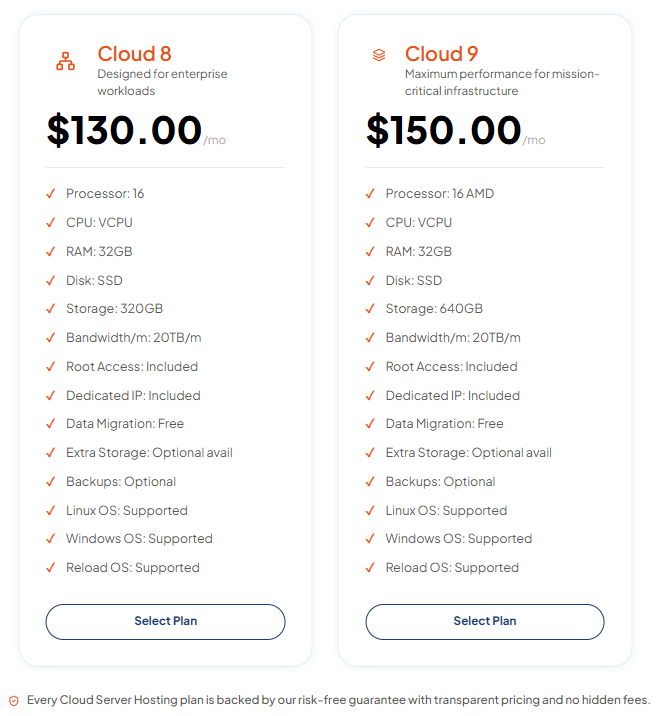
This range gives developers and businesses a way to match resources to their current needs and consider upgrades as workloads grow. Free data migration is listed as a plan feature, but the scope and scheduling of a particular migration should be confirmed with the team. Backups are optional and should be arranged according to the project’s recovery requirements.
Explore TezHost Cloud Servers or visit the TezHost website to review available services. If you want to confirm compatibility, expected deployment steps, or migration requirements, talk to a TezHost sales agent before ordering.
Conclusion: Plan the Setup, Not Just the Server
Cloud server setup time can be as short as minutes for basic provisioning, but a reliable production deployment often requires hours or days of configuration, security work, application deployment, migration, and testing.
The best way to estimate how long to deploy cloud server infrastructure is to define the workload first. Identify the software stack, resources, network requirements, security controls, backup strategy, and launch criteria. Then build a cloud implementation timeline that allows enough time for validation and recovery planning.
Ready to plan your deployment? Register with TezHost to explore cloud server options, or contact a sales agent to discuss your technical requirements.
Frequently Asked Questions
How long does cloud server provisioning take?
Basic virtual server provisioning may take minutes to a few hours, depending on provider processes, selected operating system, and configuration. Application setup and production readiness take additional time.
How long to deploy cloud server infrastructure for a business website?
A straightforward business website may be ready within one to three working days if the application is prepared and no complex migration is required. Custom applications and production controls can extend the schedule.
Can a cloud server be ready in a few minutes?
The virtual machine may be provisioned quickly, but that does not mean it is secured, configured, backed up, or ready to serve production traffic.
What takes the longest during cloud deployment?
Complex application configuration, data migration, security reviews, integrations, and testing often take longer than basic server provisioning.
Does cloud migration include server setup?
Migration may include transferring files, databases, and application configurations, but the exact scope varies by provider and service. Confirm what is included, how downtime is handled, and who validates the migrated application.
What information should I prepare before ordering a cloud server?
Prepare your operating system, application and framework versions, CPU and RAM estimates, storage requirements, bandwidth expectations, database details, security needs, and migration requirements.
Does TezHost offer cloud servers for Linux and Windows?
Yes. TezHost’s published cloud server plans list support for both Linux and Windows operating systems, with root access, a dedicated IP, 20TB monthly bandwidth, and free data migration. Check the live plan page for current details.