Looking for a cloud migration guide that helps you migrate servers to cloud infrastructure without losing important data or disrupting your business?
Imagine moving your entire business infrastructure to a new environment, only to discover that your website is down, your applications aren’t working, or important files are missing.
Sounds stressful, doesn’t it?
That’s exactly why cloud migration requires more than simply copying files from one server to another.
A successful server to cloud transition involves planning, backups, security, compatibility checks, and careful testing.
But here’s the good news: Migrating your servers to the cloud doesn’t have to be complicated when you follow a structured process.
Whether you’re moving a business website, an application, or an entire server environment, this cloud migration guide explains seven essential steps to help you prepare.
At TezHost, businesses can explore cloud hosting solutions suited to different technical requirements. You can register with TezHost to get started or talk to our sales team about your migration requirements.
Let’s get started!
1. Why Should You Migrate Servers to Cloud Infrastructure?
Businesses migrate servers to cloud infrastructure to gain more flexible computing resources, support changing workloads, and reduce dependence on maintaining their own physical hardware.
Traditional servers can work well, but expanding their capacity may require additional equipment, installation, and maintenance.
Cloud infrastructure can offer more flexible resource allocation, depending on the service and provider.
Potential Benefits of Cloud Migration
- Scalability: Adjust computing resources as business requirements change.
- Flexibility: Choose configurations that suit different applications.
- Infrastructure management: Reduce the need to maintain physical hardware yourself.
- Accessibility: Host applications and services in an environment accessible through appropriate network connections.
- Business growth: Explore infrastructure options as your workload expands.
However, moving to the cloud doesn’t automatically guarantee lower costs, stronger security, or zero downtime.
Those outcomes depend on the architecture, configuration, provider, and migration process.
The goal of cloud migration isn’t simply to change servers. It’s to create an infrastructure environment that better supports your business.
Explore TezHost Cloud Servers to learn about available cloud hosting options.
2. How Do You Plan a Successful Cloud Migration?
Start by assessing your existing infrastructure, identifying application dependencies, estimating resource requirements, and deciding what should move to the cloud.
The biggest migration mistakes often happen before anyone transfers a single file.
Businesses rush into the process without understanding what their current servers actually do.

Before starting your server to cloud transition, prepare a simple inventory.
Your Pre-Migration Checklist
Identify:
- Websites and applications hosted on each server.
- Databases and their sizes.
- CPU, RAM, and storage requirements.
- Operating systems and software versions.
- Network configurations and firewall rules.
- Domain names and DNS records.
- Application dependencies and integrations.
- Backup requirements and acceptable downtime.
Next, decide whether you need a straightforward server replacement or a more complex migration involving application changes.
For example, moving a website to a compatible cloud VPS may be relatively simple.
Migrating several interconnected business applications could require a phased approach.
A successful cloud migration guide begins with understanding what you already have.
Not sure which resources your applications need? Speak with a TezHost sales agent to discuss available hosting configurations.
3. How Do You Choose the Right Cloud Server?
Choose a cloud server based on your application’s CPU, RAM, storage, operating system, network, security, and scalability requirements—not just the advertised price.
One of the most common mistakes businesses make is choosing a server that looks affordable but cannot support their actual workload.

Before you migrate servers to cloud infrastructure, compare the following:
| Factor | What to Check |
|---|---|
| CPU | Processing power required by your applications |
| RAM | Memory needed during normal and peak usage |
| Storage | Capacity, disk performance, and future growth |
| Operating System | Compatibility with existing applications |
| Network | Bandwidth, latency, and connectivity |
| Security | Firewall, access controls, and backup options |
| Scalability | Available upgrades as your business grows |
| Support | Assistance included with your selected plan |
Don’t forget to consider where your users are located.
A server’s location and network connectivity can affect latency, particularly for applications that frequently exchange data.
How Can TezHost Help?
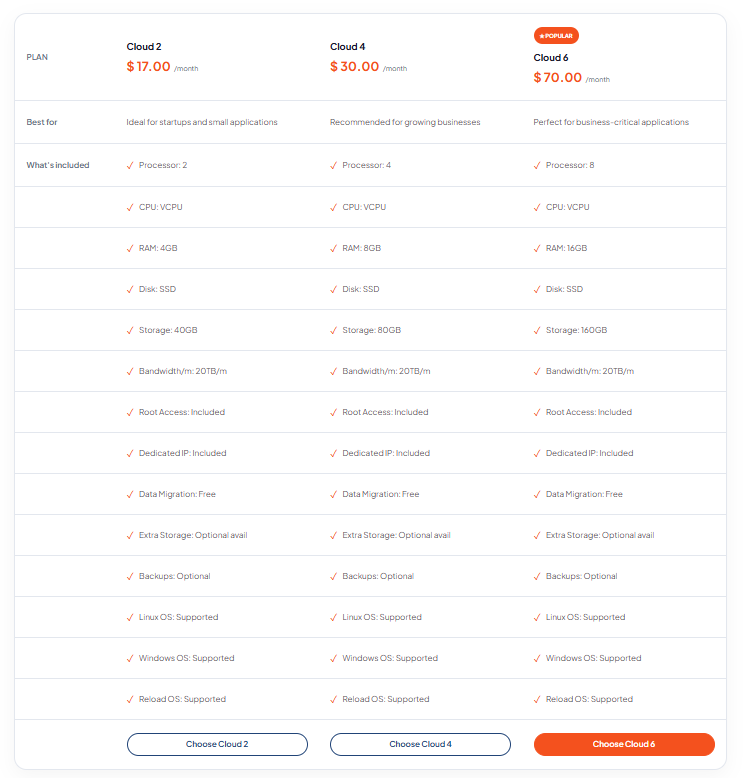
With TezHost Cloud Servers, businesses can explore different resource configurations for websites and applications.
Instead of automatically choosing the largest server, evaluate your workload and expected growth.
Need help comparing options? Contact TezHost before making your decision.
4. How Do You Back Up Your Data Before Cloud Migration?
Create a complete, verified backup of your files, databases, application settings, and important configurations before transferring anything to the cloud.
Think of backups as your safety net.
Even a carefully planned migration can encounter unexpected problems.

A reliable backup gives you a recovery option if something goes wrong.
What Should You Back Up?
- Website files and directories.
- Databases and database users.
- Email data, where applicable.
- Application configuration files.
- SSL/TLS certificates and related settings.
- DNS records.
- Scheduled tasks and automation configurations.
- Important server settings.
For databases that continue receiving updates, plan how to synchronize changes made after the initial backup.
Important: Don’t assume a backup is usable simply because the backup process completed.
Test that you can restore it.
Also establish a rollback plan so your team knows how to return to the original environment if the migration fails.
A dependable cloud migration guide should always include both backup verification and recovery planning.
For additional migration considerations, read our Web Host Migration Guide.
5. How Do You Migrate Servers to Cloud Without Losing Data?
To migrate servers to cloud infrastructure safely, prepare the destination environment, transfer data securely, synchronize changes, and validate the new server before switching live traffic.
The exact migration process depends on your operating system, applications, and hosting environment.
However, most migrations follow a similar sequence.
Step 1: Prepare the New Cloud Server
Set up the operating system, required software, firewall rules, and access permissions.
Make sure the new environment supports your applications.
Step 2: Transfer Your Files
Use a suitable secure transfer or migration method to copy website files and application data.
Step 3: Migrate Your Databases
Export and import databases using methods compatible with your database software.
For applications that remain active, consider replication or a final synchronization process to avoid missing recent changes.
Step 4: Update Configurations
Review application settings, database connections, file permissions, scheduled tasks, and server-specific paths.
Step 5: Test the New Environment
Confirm that websites, databases, applications, email services, and integrations work as expected.
Step 6: Switch Production Traffic
When testing is complete, update the relevant DNS records, load balancer settings, or routing configuration.
Step 7: Monitor and Verify
Check logs, application errors, performance, and data consistency after the switch.
Remember: DNS changes may take time to reach users, and applications that accept new data require special care to avoid inconsistencies during the transition.
Keep the original environment available until the new setup is stable and the rollback window has passed.
6. How Can You Reduce Downtime and Cloud Migration Costs?
Reduce migration downtime by testing in advance, synchronizing changing data, scheduling a controlled cutover, and maintaining a rollback plan. Control costs by estimating storage, data transfer, software, and operational expenses before moving.
This is where many businesses underestimate the complexity of a server to cloud transition.
Moving data isn’t always the expensive part.
Unexpected downtime, additional bandwidth charges, and application problems can increase the total cost.
How to Minimize Downtime
- Test applications on the destination server before going live.
- Schedule migration during lower-traffic periods.
- Lower DNS TTL values in advance where appropriate.
- Synchronize databases and changing files carefully.
- Prepare a clear rollback procedure.
- Monitor the website and applications after cutover.
Can you migrate with zero downtime?
Sometimes, near-zero-downtime migration is achievable with the right architecture and synchronization methods.
However, zero downtime cannot be guaranteed for every workload, especially when applications require database changes or maintenance windows.
What About Cloud Migration Costs?
Your expenses may include:
- New server charges.
- Temporary overlap between old and new infrastructure.
- Data transfer fees.
- Backup storage.
- Software licensing.
- Migration assistance.
- Application testing and configuration.
Some cloud providers charge for certain types of outbound data transfer, so it’s important to review the relevant pricing terms.
Read our guide to Cloud Data Transfer Costs to understand what to consider before transferring large amounts of data.
Want to avoid unnecessary migration expenses? Talk to a TezHost sales agent to discuss your requirements and available services.
7. How Is TezHost Revolutionizing Cloud Migration for Businesses?
TezHost simplifies the process of exploring cloud infrastructure by offering cloud server solutions and access to sales guidance, helping businesses compare options before making the move.
We understand that businesses don’t migrate servers just because cloud technology is popular.
They migrate because their websites, applications, and operations have changing requirements.
At TezHost, our approach focuses on helping customers make practical infrastructure decisions.
Cloud Infrastructure for Different Workloads
Explore TezHost Cloud Servers to compare available configurations for websites, applications, and business projects.
Domain and Hosting Solutions in One Place
A successful migration may also involve reviewing DNS settings and domain management.
With TezHost Domain Services, customers can explore domain registration alongside hosting options.
Guidance Before You Migrate
Choosing the right infrastructure requires understanding your existing applications and future requirements.
Our sales team can help you explore available plans and discuss your hosting needs.
For complex migrations, confirm the scope of any technical migration assistance before purchasing.
A Practical Approach to Cloud Adoption
We encourage businesses to consider:
- Their existing server requirements.
- Application compatibility.
- Data protection and backup planning.
- Expected traffic and resource usage.
- Long-term infrastructure costs.
- Opportunities for future expansion.
Our goal is to help businesses choose cloud hosting that fits their requirements rather than simply moving them to a bigger, more expensive server.
Ready to explore your options?
Register with TezHost or speak with our sales team to discuss your server requirements.
Frequently Asked Questions
How Long Does It Take to Migrate Servers to Cloud Infrastructure?
A simple website migration may take a few hours, while complex applications and large databases can require days or longer. The timeline depends on data volume, dependencies, testing, and acceptable downtime.
Is Cloud Migration Expensive?
Cloud migration costs vary based on server resources, data volume, software requirements, and the complexity of the move. Include temporary infrastructure and ongoing operational costs in your budget.
Can I Migrate My Existing Website to a Cloud Server?
Yes, many websites can be migrated to compatible cloud servers. Check your application’s software requirements, database compatibility, and configuration before transferring it.
Will I Lose My Data During Cloud Migration?
Data loss is not inevitable, but it is a risk that must be managed. Verified backups, secure transfers, data synchronization, and testing help reduce that risk.
Do I Need to Change My Domain When Migrating?
No. You can usually keep your existing domain name. You may only need to update DNS records or related routing settings to point visitors toward the new hosting environment.
Can TezHost Help Me Choose a Cloud Server?
Yes. You can explore TezHost Cloud Servers and contact the sales team to discuss available configurations and your hosting requirements.
Conclusion: Make Your Cloud Migration a Smart Business Move
Migrating servers to the cloud can be an important step toward building more flexible and scalable infrastructure.
But success depends on preparation.
A reliable cloud migration guide should help you assess your current environment, select suitable resources, protect your data, manage costs, and test everything before switching production traffic.
If you’re planning to migrate servers to cloud infrastructure, remember these essentials:
Plan carefully. Back up everything. Test thoroughly. Monitor after migration.
Don’t rush into a move simply because cloud hosting sounds more advanced.
Choose infrastructure that supports your applications, budget, and long-term business goals.
At TezHost, we help businesses explore cloud hosting solutions suited to different technical requirements.
Ready to take the next step?
One final question: What’s stopping your business from moving to the cloud—downtime, security concerns, or migration costs?
Share your thoughts in the comments!