Looking for a reliable web hosting transfer service but worried about losing your website, customer data, or search engine rankings?
Imagine waking up to discover that your website has disappeared after switching hosting providers.
Your customers can’t place orders. Your emails aren’t working. Your database is missing important information.
And the person you hired to migrate everything isn’t responding.
Sounds like a nightmare, doesn’t it?
The good news? A professional website migration doesn’t have to turn into a technical disaster.
With the right planning, a qualified specialist, and a compatible hosting environment, you can significantly reduce migration risks.
But here’s the real question:
How do you hire someone who actually knows how to migrate your website safely?
Whether you’re moving a WordPress website, an ecommerce store, or a custom application, this guide explains seven important things to check before hiring a migration specialist.
If you’re considering a new hosting provider, register with TezHost to explore your options, or talk to a TezHost sales agent to discuss your website’s hosting requirements.
Let’s make your next website migration a smarter one.
1. What Is a Web Hosting Transfer Service?
A web hosting transfer service helps move your website’s files, databases, configurations, and other necessary components from one hosting environment to another.
Think of it as relocating your business.
You wouldn’t move an entire office without checking that the new location has electricity, internet connectivity, and enough space.
Your website deserves the same preparation.

A professional website migration may involve:
- Transferring website files and directories.
- Exporting and importing databases.
- Configuring the new hosting environment.
- Updating database connection settings.
- Reviewing DNS records.
- Installing or configuring SSL certificates.
- Testing website functionality.
- Checking email services and application integrations.
- Monitoring the website after migration.
However, not every migration provider includes all these tasks.
Some services only transfer website files and databases. Others may offer broader technical assistance.
Always confirm exactly what’s included before purchasing a migration service.
For a closer look at the process, read our Web Host Migration Guide.
2. When Should You Hire Help for Web Host Migration?
You should consider professional migration assistance when your website is business-critical, technically complex, or difficult to move without risking downtime or data inconsistencies.
Not every website requires a specialist.
A simple static website may be relatively straightforward to transfer.

But what if your website processes hundreds of orders, stores customer information, or connects to multiple external applications?
That’s where things become more complicated.
Signs You May Need Professional Assistance
Consider hiring help if:
- Your website uses a large database.
- You operate an ecommerce store.
- Your applications require specific server configurations.
- You’re migrating between different hosting control panels.
- Your business relies on uninterrupted website availability.
- You’re unfamiliar with DNS, databases, or server administration.
- You need to move several websites or email accounts.
For example, migrating a basic WordPress blog between compatible cPanel accounts may be simpler than moving a custom Node.js application to an entirely different server environment.
The more complex your website, the more important it becomes to evaluate the specialist’s technical experience.
Before you hire help for web host migration, identify the systems your website depends on.
You can also speak with TezHost’s sales team to explore hosting options compatible with your requirements.
3. What Skills Should a Website Migration Specialist Have?
A qualified migration specialist should understand your website’s technology stack, server configuration, database requirements, security controls, and DNS management.
Here’s something many website owners overlook:
Someone who can build a website isn’t necessarily qualified to migrate its entire hosting environment.
A web designer might be excellent at creating WordPress pages but unfamiliar with Linux permissions, database replication, or reverse proxy configurations.
Before hiring a web hosting transfer service, check the technical skills relevant to your project.

Essential Technical Skills to Look For
| Technical Area | What the Specialist Should Understand |
|---|---|
| Web servers | Apache, Nginx, or the software your website uses |
| Control panels | cPanel, DirectAdmin, or your existing panel |
| Databases | MySQL, MariaDB, PostgreSQL, or your database engine |
| DNS | A, AAAA, CNAME, MX, and relevant TXT records |
| Security | SSH/SFTP, access permissions, SSL/TLS |
| Backups | Backup verification and restoration |
| Applications | WordPress, PHP, Node.js, Python, or your specific stack |
| Troubleshooting | Error logs, connectivity, and application failures |
What About Different Hosting Technologies?
Your destination hosting environment must support your application’s requirements.
For example:
WordPress and PHP websites: Explore TezHost cPanel Web Hosting for applicable hosting options.
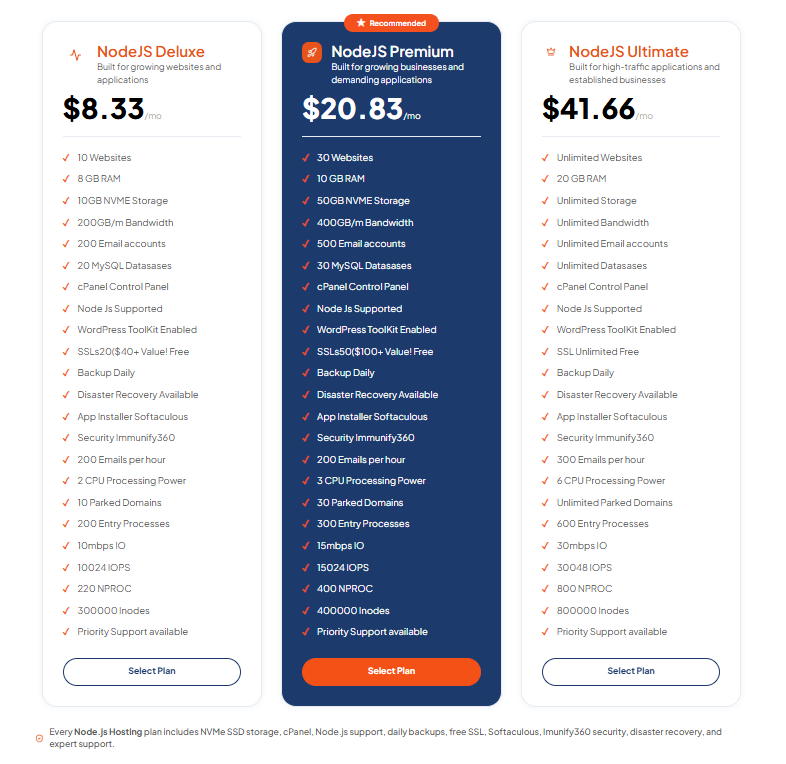
Node.js applications: Review TezHost Node.js Hosting and check runtime compatibility.
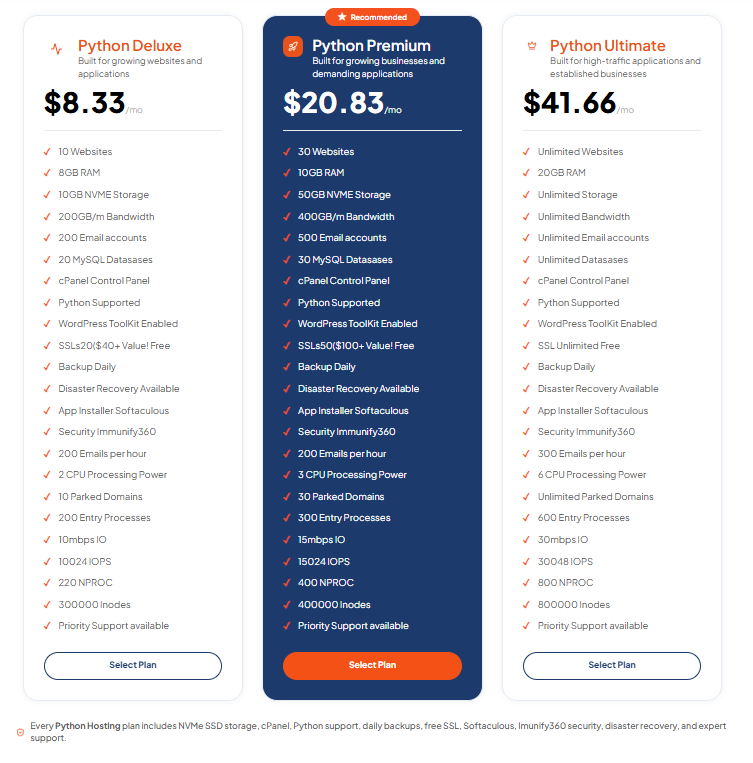
Python applications: Consider TezHost Python Hosting and verify framework and deployment requirements.
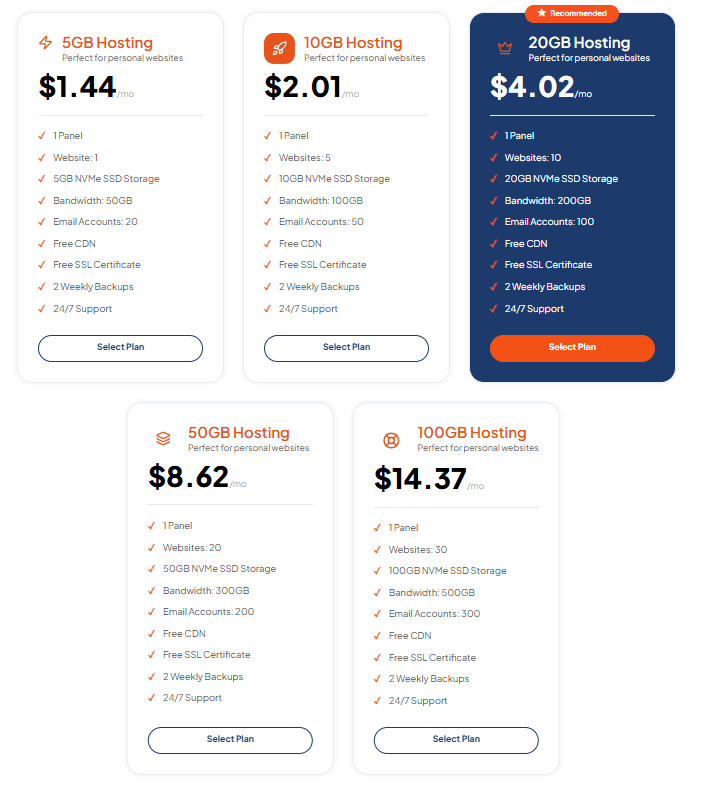
DirectAdmin environments: Explore TezHost DirectAdmin Hosting when considering a compatible control panel.
The right hosting environment depends on your application’s actual requirements.
Technical compatibility should always come before price comparisons.
4. What Questions Should You Ask Before Hiring a Migration Specialist?
Ask about relevant experience, backups, downtime, testing, security, rollback procedures, and post-migration support before agreeing to a website transfer.
A confident promise of a quick migration isn’t enough.
You need to understand how the specialist intends to protect your website.

7 Important Questions to Ask
1. Have you migrated websites using my technology stack?
Experience with similar applications can reduce the learning curve.
2. Will you create and verify a complete backup?
A backup should include all required files, databases, and configurations.
3. How will you minimize downtime?
Look for a clear plan involving testing, data synchronization, and a controlled cutover.
4. How will you protect sensitive information?
Ask about encrypted transfers, temporary credentials, and access management.
5. Will you test the website before updating DNS?
The destination environment should be validated before production traffic is redirected.
6. What happens if the migration fails?
A professional should explain the rollback procedure and its limitations.
7. Is post-migration troubleshooting included?
Confirm how long support remains available and what issues are covered.
Watch Out for These Warning Signs
Be cautious if someone:
- Promises zero downtime without evaluating your website.
- Wants unrestricted access without explaining security precautions.
- Doesn’t mention backups.
- Cannot explain their migration process.
- Offers no testing or rollback strategy.
- Refuses to clarify the scope of work.
A reliable web hosting transfer service should offer a clear process—not just a reassuring promise.
5. How Does Professional Website Migration Work?
Professional website migration typically involves assessing the existing environment, preparing the destination server, backing up data, transferring website components, testing functionality, and switching live traffic.
Although the exact procedure varies, most migrations follow a similar technical workflow.

Step 1: Audit the Existing Website
The specialist reviews:
- Website files and database sizes.
- PHP, Node.js, Python, or other runtime versions.
- Installed extensions and dependencies.
- DNS and email configurations.
- Cron jobs and scheduled tasks.
- Storage and resource requirements.
This helps identify compatibility issues before migration begins.
Step 2: Prepare the New Hosting Environment
The destination server must be configured with the required software, database engine, security settings, and application dependencies.
For example, a Python application may need a particular framework version and WSGI/ASGI configuration.
A Node.js application may require environment variables, a process manager, and reverse proxy settings.
Step 3: Create and Verify Backups
Before transferring anything, the specialist should create recoverable backups.
These may include:
- Website files.
- Databases.
- Application configurations.
- Email data, where applicable.
- DNS settings.
- SSL-related configurations.
A backup should be tested wherever practical.
Step 4: Transfer Files and Databases
Files can be transferred using secure methods such as SFTP, SSH-based tools, or compatible hosting migration utilities.
Databases should be exported and imported using appropriate tools.
For frequently updated websites, the specialist must account for changes made during migration.
Step 5: Test the Website
Testing should cover:
- Homepage and internal pages.
- Login and registration.
- Contact forms.
- Checkout and payment integrations.
- Database connections.
- File uploads.
- Email functionality.
- Scheduled tasks.
- SSL/TLS configuration.
A successful file transfer doesn’t automatically mean a successful website migration.
Step 6: Update DNS and Switch Traffic
After testing, the specialist updates the relevant DNS records or routing configuration.
DNS changes can take time to propagate because of caching.
For dynamic applications, a final data synchronization or brief maintenance window may be necessary.
Step 7: Monitor and Verify
The specialist checks server logs, website performance, application errors, and data consistency.
The previous hosting environment should remain available until the migration is verified and the rollback period has passed.
This structured approach helps make a professional website migration more predictable.
6. How Much Does a Web Hosting Transfer Service Cost?
Website migration costs depend on the website’s complexity, data volume, technology stack, required downtime, and the level of technical assistance involved.
There’s no universal migration price.
A simple WordPress website may require significantly less work than a custom ecommerce application with multiple databases and integrations.

What Influences Migration Costs?
| Factor | Why It Matters |
|---|---|
| Website size | Larger file and database transfers may take longer |
| Number of websites | Multiple websites increase configuration and testing work |
| Technology stack | Custom applications may need specialized expertise |
| Control panel compatibility | Different panels may require additional configuration |
| Email migration | Mailboxes, records, and synchronization add complexity |
| Downtime requirements | Low-downtime migrations may require more planning |
| Security requirements | Sensitive systems may require additional precautions |
| Post-migration support | Extended monitoring and troubleshooting may affect pricing |
Is Free Website Migration Always Better?
Not necessarily. A free migration offer may be valuable, but you should confirm what it includes and whether your website is eligible.
Some providers may limit migration assistance to certain hosting plans, control panels, or website types.
Before making a decision, ask whether the quoted service covers:
- Files and databases.
- Email accounts.
- DNS configuration.
- SSL setup.
- Application testing.
- Troubleshooting after migration.
Also consider temporary hosting overlap and any third-party software or licensing costs.
The cheapest migration can become expensive if it results in prolonged downtime or missing data.
If you’re comparing hosting environments, contact a TezHost sales agent to discuss available plans and confirm whether migration assistance is offered for your particular setup.
7. How Can You Avoid Downtime, Data Loss, and SEO Problems?
Reduce migration risks by creating verified backups, testing the destination environment, synchronizing changing data, preserving URLs, and monitoring the website after DNS changes.
A website migration isn’t only an infrastructure task.
It can also affect your customers, business operations, and search visibility.

Protect Your Website Data
Ensure the migration plan includes:
- Complete backups.
- Database consistency checks.
- Secure file transfers.
- Appropriate access controls.
- A documented rollback procedure.
For active ecommerce websites, coordinate order processing and database changes carefully.
Otherwise, transactions completed during the transition could be missing from the new environment.
Protect Your Search Rankings
A hosting change alone doesn’t require changing your website’s URLs.
Whenever possible, preserve:
- Existing URL structures.
- Page content.
- Canonical tags.
- Robots.txt rules.
- XML sitemaps.
- Redirect configurations.
- HTTPS availability.
If URLs must change, implement appropriate permanent redirects and test them.
Monitor indexing, crawl errors, and website performance after migration.
A professional website migration should protect both your technical infrastructure and your visitors’ experience.
Don’t Forget Email and Domains
Your domain registration and hosting services may be managed separately.
Changing your web host doesn’t automatically mean transferring your domain registration.
However, DNS records may need updating.
Review A, AAAA, MX, TXT, and other relevant records to avoid disrupting your website or email.
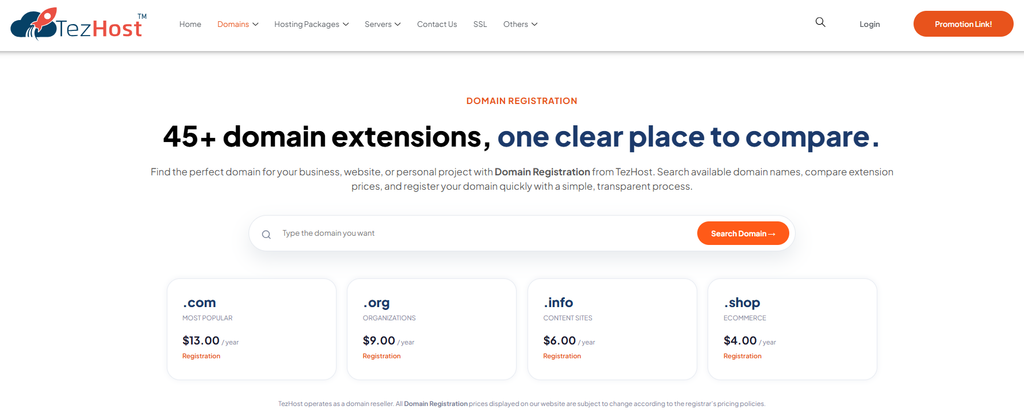
You can explore TezHost Domain Registration if you’re also reviewing your domain management options.
How Is TezHost Revolutionizing the Website Migration Experience?
TezHost helps businesses approach website migration more confidently by offering different hosting technologies, domain services, and access to guidance when choosing a suitable destination environment.
At TezHost, we understand that businesses don’t change hosting providers simply for the sake of moving.
They move because they need better-fitting resources, different technologies, room to grow, or a hosting environment that supports their changing requirements.
That’s why choosing the destination infrastructure matters just as much as transferring the website.
Hosting Options for Different Technologies
Every website is different.
A WordPress blog doesn’t necessarily need the same environment as a Node.js application or a Python-based platform.
With TezHost, businesses can explore:
- cPanel Web Hosting for suitable websites and hosting workflows.
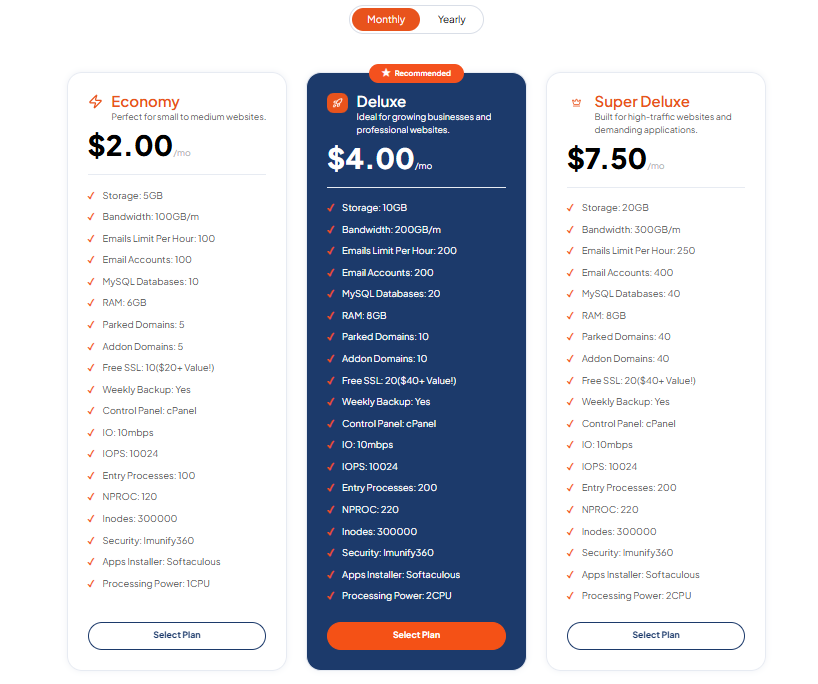
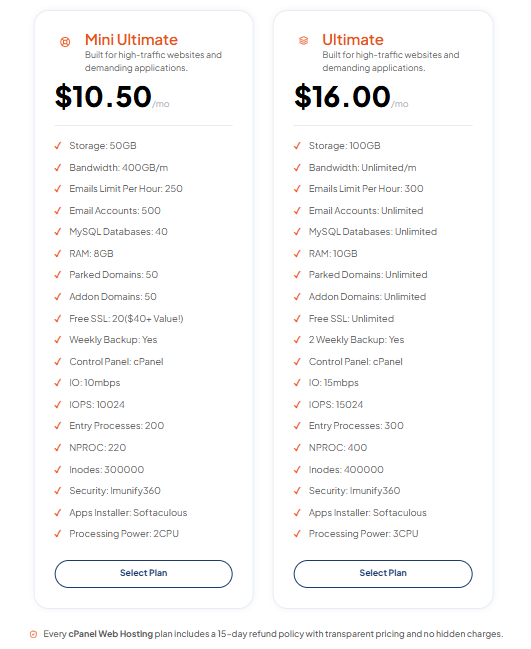
- Node.js Hosting for compatible JavaScript applications.
- Python Hosting for supported Python applications.
- DirectAdmin Hosting for customers considering that control panel.
Our approach focuses on helping customers choose hosting based on technical requirements rather than simply selecting the lowest advertised price.
Domain and Hosting Solutions Together
Website migrations often involve DNS configuration and domain management.
Through TezHost Domain Services, customers can explore domain registration alongside their hosting options.
Guidance Before You Move
Not sure whether your current website is compatible with a particular hosting plan?
Our sales team can help you review available hosting options and discuss your requirements.
For a migration involving custom applications, email accounts, or specialized configurations, confirm the scope, eligibility, and cost of any technical migration assistance before purchasing.
Helping Businesses Plan for Growth
The goal shouldn’t be to move a website today and discover that the new hosting environment is unsuitable tomorrow.
A good hosting decision considers:
- Current website requirements.
- Expected traffic.
- Application compatibility.
- Security and backup needs.
- Future scalability.
- Long-term hosting costs.
TezHost aims to make these decisions easier by providing hosting choices and guidance that help businesses plan their next move.
Ready to explore your options?
Register with TezHost or talk to our sales team.
Frequently Asked Questions
Can I Hire Someone to Transfer My Website to Another Host?
Yes. You can hire a qualified freelancer, migration specialist, or hosting provider offering website migration assistance. Confirm the service scope and technical experience before proceeding.
How Long Does Professional Website Migration Take?
A simple website migration may take a few hours, while complex applications can require days or longer. The timeline depends on website size, dependencies, testing, and downtime requirements.
Will My Website Go Offline During Migration?
Not necessarily. Some migrations can be completed with little disruption, but zero downtime isn’t guaranteed. Database synchronization and controlled cutovers may be required.
Can I Transfer My Website Without Losing SEO Rankings?
Yes, a hosting migration can preserve existing SEO signals when URLs, content, redirects, and technical configurations remain consistent. However, performance or configuration problems can affect search visibility.
Do I Need to Transfer My Domain Name Too?
No. You can usually keep your domain with its existing registrar and update DNS records to point to the new hosting environment.
Can I Migrate a WordPress Website From cPanel to DirectAdmin?
Yes, in many cases. However, differences between control panels may require additional configuration, particularly for email accounts, databases, and server settings.
Is It Safe to Give a Migration Specialist My Hosting Credentials?
It can be necessary, but access should be controlled. Use temporary or limited credentials where possible, enable multifactor authentication, avoid sharing unnecessary secrets, and revoke temporary access after completion.
Does TezHost Offer Website Migration Assistance?
You can contact TezHost to discuss your migration requirements and confirm what assistance is available for your chosen hosting plan. The scope and eligibility should be verified before purchasing.
Talk to a TezHost Sales Agent.
Conclusion: Hire the Right Help and Make Your Migration Count
Switching web hosting providers can be a smart business decision.
But the success of your move depends on more than finding someone willing to transfer your files.
A reliable web hosting transfer service should understand your website’s technology, protect your data, minimize unnecessary disruption, and verify that everything works after migration.
Before hiring someone, remember these seven essentials:
- Understand what migration services include.
- Know when professional help is necessary.
- Check technical skills and experience.
- Ask the right questions.
- Understand the migration process.
- Compare the full costs.
- Protect your website, data, and SEO.
Your website is an important business asset. Don’t leave its migration to guesswork.
At TezHost, we help businesses explore hosting solutions suited to different technical requirements.
Whether you’re moving a WordPress website, a custom application, or several business websites, choosing the right destination environment is an important first step.
Ready to plan your next hosting move?
Explore TezHost Hosting Solutions | Register with TezHost | Talk to a Sales Agent
One final question: What’s your biggest concern about switching web hosting providers—downtime, data loss, technical complexity, or migration costs?
Share your thoughts in the comments!