Web hosting red flags are warning signs that a hosting provider may not deliver the reliability, security, performance, support, or value your website needs. Common examples include unrealistic pricing, unclear renewal fees, frequent downtime, poor customer support, inadequate security, and restrictive hosting plans.
Your website might have an attractive design, excellent content, and a strong marketing strategy. But if your hosting provider cannot keep it running smoothly, all that effort could be wasted.
Imagine launching an important marketing campaign only to discover that your website is unavailable.
Or receiving your hosting renewal invoice and realizing the price has increased far beyond what you expected.
Unfortunately, these situations can happen when businesses choose hosting providers without carefully evaluating their services.
The cheapest hosting plan isn’t necessarily the best deal, and the most expensive plan isn’t automatically the most reliable.
The key is understanding what you’re paying for and recognizing potential problems before they affect your business.
At TezHost, we believe choosing web hosting should be based on informed decisions, realistic expectations, and the actual requirements of your website.
If you’re exploring hosting options, register with TezHost today to get started.
In this guide, we’ll discuss nine important warning signs, explain how to evaluate a hosting provider, and help you avoid common mistakes when choosing your next web host.
1. Unrealistically Cheap Hosting Plans
One of the most common web hosting red flags is a hosting package that appears unusually cheap without clearly explaining what is included.
Affordable hosting is not necessarily bad.
Many providers offer competitive introductory prices, promotional discounts, or entry-level plans designed for small websites.
The problem begins when low prices are used to attract customers while important limitations remain unclear.
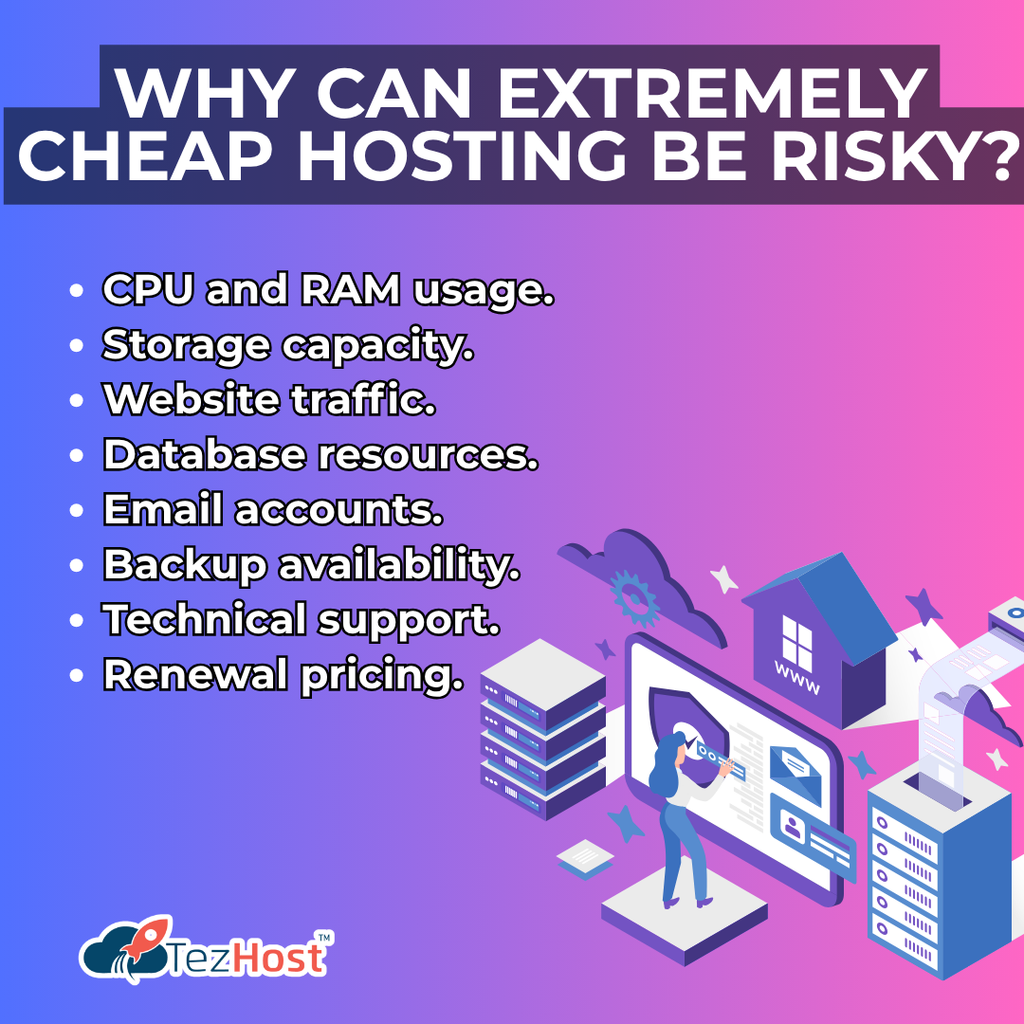
Why Can Extremely Cheap Hosting Be Risky?
Some low-cost plans may have restrictions involving:
- CPU and RAM usage.
- Storage capacity.
- Website traffic.
- Database resources.
- Email accounts.
- Backup availability.
- Technical support.
- Renewal pricing.
For example, a hosting plan advertised at $1 per month might require a multi-year commitment or renew at a substantially higher rate.
What Should You Check Before Buying?
Always compare the introductory price with the renewal price.
Also review the actual resources included in the package.
A slightly more expensive hosting plan may offer better value if it provides resources and features that suit your website.
Our recommendation: Evaluate the total cost of ownership rather than choosing a provider based only on its advertised starting price.
For more guidance, read How to Choose the Best Web Hosting.
2. Frequent Downtime and Unclear Uptime Guarantees
Frequent website outages are among the most serious web hosting red flags.
Your hosting provider is responsible for maintaining the underlying infrastructure needed to keep your website accessible.
If that infrastructure experiences repeated problems, your visitors may encounter errors or be unable to access your website.
Why Is Website Uptime Important?
Website downtime can affect:
- Customer experience.
- Online sales.
- Lead generation.
- Brand reputation.
- Marketing campaign performance.
- Access to important business applications.
For an e-commerce website, even a short outage during a busy shopping period can result in missed orders.

Is 99.9% Uptime Good?
A 99.9% uptime target corresponds to approximately 43.2 minutes of downtime in a 30-day month.
However, an uptime guarantee doesn’t mean downtime can never occur.
You should also understand how the provider measures uptime and what compensation, if any, applies when the guarantee is not met.
Questions to Ask Your Hosting Provider
- Do you offer an uptime service-level agreement?
- How is uptime calculated?
- Are scheduled maintenance periods excluded?
- What happens if the uptime commitment is not met?
- Do you provide incident updates?
Our recommendation: Look for clearly documented uptime commitments and investigate the provider’s reliability history.
3. Poor Customer Support and Slow Response Times
One of the easiest web hosting red flags to overlook is poor customer support.
Many businesses focus on server specifications and pricing but forget to evaluate what happens when something goes wrong.
Imagine your website suddenly becomes inaccessible.
You contact your hosting provider, but nobody responds for several hours.
For a business that depends on online sales or customer inquiries, that delay can become a serious problem.
How Can You Identify Bad Hosting Support?
Watch for these warning signs:
- Unclear support hours.
- Limited contact methods.
- Repeated generic responses.
- Poorly documented escalation procedures.
- Difficulty reaching technical personnel.
- Unclear responsibilities between the host and customer.
- No explanation of what support services are included.
Does 24/7 Support Guarantee Good Service?
No.
A provider may advertise round-the-clock support while offering only basic assistance outside normal business hours.
You should evaluate the quality of support, not just its availability.
How Can You Test Support Before Purchasing?
Contact the provider’s sales or support team with a few technical questions.
Ask about backups, server resources, migrations, and troubleshooting procedures.
Evaluate whether the responses are clear, relevant, and helpful.
At TezHost, we encourage customers to ask questions before choosing a hosting package.
Talk directly to a TezHost sales agent to discuss your website requirements and available hosting options.
4. Hidden Charges and Confusing Renewal Policies
Unexpected expenses are important web hosting red flags, especially for businesses operating on fixed budgets.
Some hosting packages appear affordable initially but become significantly more expensive after the promotional period.
Other plans may charge separately for features that customers assumed were included.
Which Hosting Charges Should You Investigate?
| Potential Charge | What to Check |
|---|---|
| Renewal Fees | Does the price increase after the first term? |
| Domain Registration | Is the domain included or billed separately? |
| SSL Certificates | Are certificates included, and are there limitations? |
| Backups | Are backups included or charged separately? |
| Website Migration | Is migration assistance free or paid? |
| Email Hosting | Are email accounts included? |
| Additional Storage | What happens when storage limits are reached? |
| Software Licenses | Are control panel or operating system licenses included? |
| Cancellation | Are there cancellation fees or refund restrictions? |
Are Higher Renewal Prices a Red Flag?
Not automatically.
Introductory discounts are common in the hosting industry.
The warning sign is a lack of transparency about the regular price and billing conditions.
How Can You Avoid Unexpected Costs?
Read the hosting plan details, billing terms, and refund policy before purchasing.
If anything is unclear, request clarification in writing.
Our recommendation: Compare the first-year cost and the expected renewal cost before committing to a hosting plan.
5. Weak Security Features and Unreliable Backups
Inadequate security is one of the most concerning web hosting red flags.
Your website may contain customer information, business data, application files, and other valuable digital assets.
A hosting provider should clearly explain which security measures are available and which responsibilities remain with the customer.
What Security Features Should You Look For?
Important considerations include:
SSL/TLS Support
Your website should support encrypted HTTPS connections.
Malware Protection
Evaluate whether malware scanning or protection tools are available.
Server Updates
Understand how the provider manages infrastructure security updates.
Access Controls
Check whether secure authentication and account management options are available.
Backup Services
Determine whether backups are automatic, how frequently they are created, and how long they are retained.
Recovery Procedures
Understand how backups can be restored if something goes wrong.
Is Free SSL Enough to Keep a Website Secure?
No.
SSL/TLS helps protect data transmitted between visitors and your website, but it doesn’t prevent every security threat.
Website security also depends on application updates, strong credentials, access permissions, monitoring, and other protective measures.
What Is the Biggest Backup Warning Sign?
A provider that cannot clearly explain its backup and restoration procedures deserves additional scrutiny.
Backups are only useful when they can be successfully restored.
Our recommendation: Maintain independent backups of important website data, even when your hosting provider offers backup services.
6. Limited Server Resources and Misleading Unlimited Hosting Claims
Unclear resource limits are another major category of web hosting red flags.
Some providers advertise unlimited storage or bandwidth, which can sound attractive to website owners.
However, shared hosting environments still operate on finite physical resources.
Providers may apply fair-use policies, inode limits, CPU restrictions, or other usage conditions.
Is Unlimited Hosting Really Unlimited?
Not in every sense.
An unlimited or unmetered feature may mean that a provider doesn’t impose a particular fixed quota under normal usage conditions.
It doesn’t necessarily mean that every resource is available without restriction.
Which Resources Should You Evaluate?
CPU
Determines how much processing capacity is available for your applications.
RAM
Affects how much memory your applications can use.
Storage
Determines how much website data can be stored.
Bandwidth
Affects how much data can be transferred between your website and visitors.
Database Resources
Can influence the performance of dynamic websites and applications.
Concurrent Processes
May affect how many requests your website can handle simultaneously.
How Do You Know Whether a Hosting Plan Has Enough Resources?
Start by identifying your website’s requirements.
A small portfolio website may need relatively few resources.
A busy online store or custom application may require significantly more.
For resource-intensive workloads, consider whether a dedicated server is appropriate.
Read our guide on the Reasons to Choose Dedicated Server Hosting for Your Website.
Our recommendation: Choose hosting based on measurable requirements rather than promotional claims.
7. No Clear Upgrade Path or Scalability Options
Limited scalability is one of the web hosting red flags that may not become obvious until your website starts growing.
Your hosting requirements can change as your business expands.
A website that initially receives a few hundred visitors per month may eventually attract thousands.
Your applications may also require additional storage, processing power, or software flexibility.
Why Does Hosting Scalability Matter?
Without suitable upgrade options, businesses may encounter:
- Performance bottlenecks.
- Resource limitations.
- More complicated migrations.
- Unexpected infrastructure expenses.
- Difficulty deploying new applications.
What Should You Ask About Upgrades?
- Can I upgrade my hosting plan?
- Will an upgrade require website downtime?
- Can I increase CPU, RAM, or storage?
- Are VPS or dedicated server options available?
- Can I move to another hosting environment later?
- Will technical assistance be available during migration?
Does Every Growing Website Need a Dedicated Server?
No.
Some websites can continue operating effectively on shared hosting.
Others may benefit from VPS, cloud, or dedicated infrastructure.
The right solution depends on workload requirements, not simply the number of visitors.
Our recommendation: Choose a provider that offers a practical path for future growth.
8. Limited Technology Support and Outdated Hosting Environments
Another category of web hosting red flags is a provider that cannot support the technologies your website or application requires.
Not every hosting plan is suitable for every project.
For example, a basic WordPress website has different technical requirements from a Python application, a Node.js service, or a Windows-based application.
What Should Developers Check Before Buying Hosting?
Confirm support for:
- Required programming languages.
- Framework versions.
- Database engines.
- Operating systems.
- SSH access.
- Git deployment workflows.
- Scheduled tasks.
- Application processes.
- Server configuration requirements.
- Control panel compatibility.
Which Hosting Type Is Best for Different Applications?
The best hosting type depends on your application’s technical requirements and how much server control you need.
Here are some options available through TezHost.
| Hosting Solution | Suitable Use Cases |
|---|---|
| DirectAdmin Hosting | Websites requiring a DirectAdmin control panel |
| DirectAdmin Reseller Hosting | Businesses managing hosting accounts for clients |
| Node.js Hosting | JavaScript-based server applications |
| Python Hosting | Python websites and compatible applications |
| Plesk Windows Hosting | Websites requiring supported Windows hosting technologies |
Can You Run Every Application on Shared Hosting?
No.
Some applications require persistent background processes, custom server software, root access, or specific system configurations.
These requirements may not be supported by standard shared hosting plans.
Our recommendation: Confirm application compatibility with the hosting provider before purchasing.
For technical guidance, contact a TezHost sales agent and explain your application’s requirements.
9. Negative Reviews, Unclear Policies, and Poor Business Transparency
The final warning signs in our web hosting red flags guide relate to reputation and transparency.
A hosting provider should make it reasonably easy for customers to understand its services, billing terms, support policies, and business practices.
What Are the Signs of an Unreliable Hosting Provider?
Watch for:
- Repeated complaints about unresolved outages.
- Consistent reports of poor customer support.
- Unclear refund or cancellation policies.
- Missing service terms.
- Confusing billing practices.
- Difficulty finding legitimate contact information.
- Promises that sound technically unrealistic.
- A pattern of unresolved customer complaints.
Should You Trust Online Hosting Reviews?
Reviews can be useful, but they should be evaluated carefully.
A single negative review doesn’t prove that a hosting provider is unreliable.
Similarly, a large number of positive reviews doesn’t guarantee excellent service.
Look for patterns across independent sources.
Pay particular attention to how the provider responds to problems.
What Should You Check Before Making a Final Decision?
Read the provider’s service terms, support policies, billing information, and refund conditions.
If possible, contact the provider directly before making a long-term commitment.
For additional guidance, explore:
Our recommendation: Prioritize transparent policies and realistic service commitments over exaggerated marketing promises.
Web Hosting Red Flags Checklist: What Should You Check Before Buying?
Use this practical web hosting red flags checklist when comparing providers.
| Warning Sign | What to Investigate | Why It Matters |
|---|---|---|
| Unrealistically Low Prices | Resource limits and renewal fees | Avoid unexpected restrictions |
| Frequent Downtime | Uptime commitments and incident history | Protect website availability |
| Poor Support | Response quality and support scope | Reduce troubleshooting delays |
| Hidden Charges | Billing terms and optional services | Control hosting expenses |
| Weak Security | Security tools and responsibilities | Protect applications and data |
| Unclear Resource Limits | CPU, RAM, storage, and fair-use policies | Avoid performance problems |
| Limited Scalability | Upgrade and migration options | Support business growth |
| Technology Restrictions | Supported languages and frameworks | Ensure application compatibility |
| Poor Transparency | Reviews, policies, and business details | Make an informed purchase |
What Is the Most Important Thing to Check Before Choosing a Web Host?
The most important factor is whether the hosting service can reliably meet your website’s technical and business requirements.
This includes sufficient resources, appropriate security, understandable pricing, and support that matches your needs.
A hosting plan is only good value when it provides the services your website actually requires.
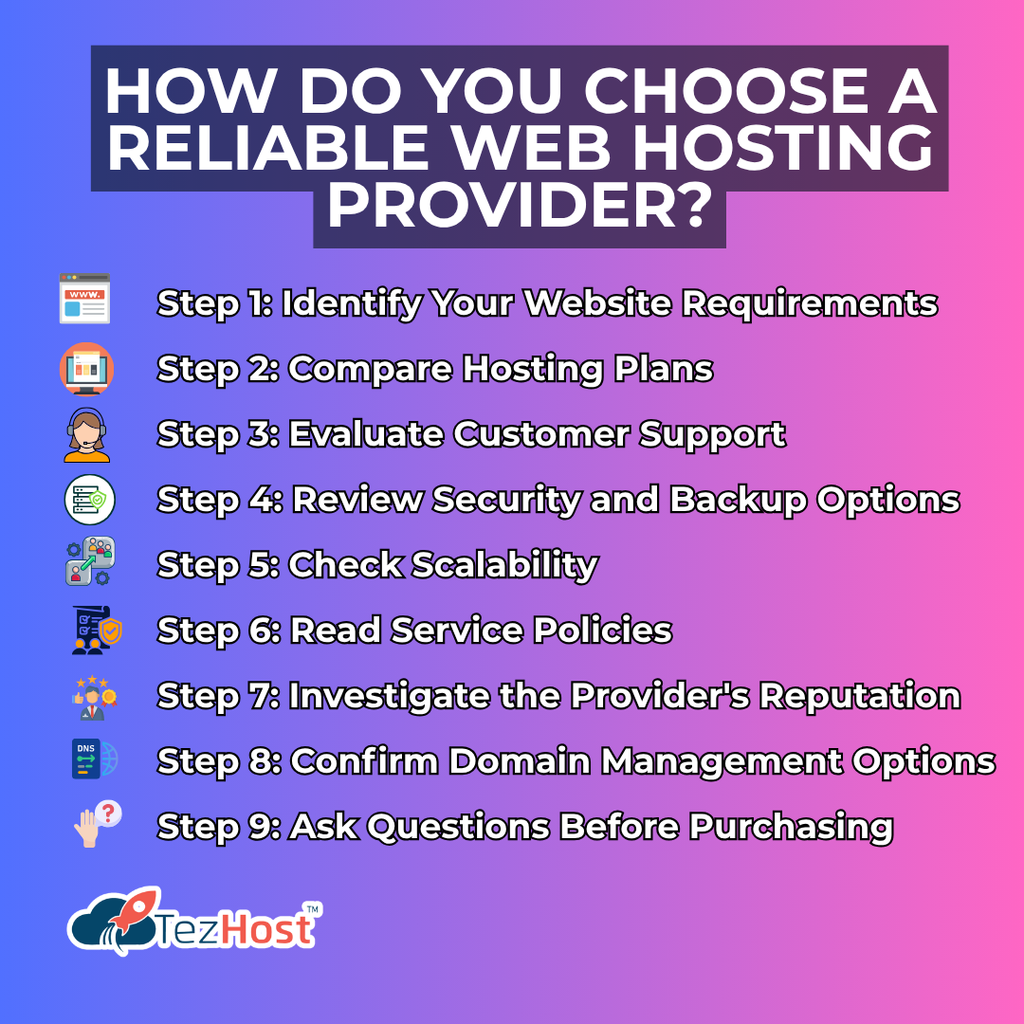
How Do You Choose a Reliable Web Hosting Provider?
Avoiding web hosting red flags is easier when you evaluate providers using consistent criteria.
Instead of comparing only prices, assess the complete hosting service.
Step 1: Identify Your Website Requirements
Determine what type of website or application you plan to host.
Consider traffic, storage, databases, software, and expected growth.
Step 2: Compare Hosting Plans
Review resource allocations, features, billing terms, and support arrangements.
Step 3: Evaluate Customer Support
Ask technical questions before purchasing.
Step 4: Review Security and Backup Options
Understand the available protections and recovery procedures.
Step 5: Check Scalability
Determine whether you can upgrade your hosting environment as your requirements change.
Step 6: Read Service Policies
Review renewal prices, refund conditions, acceptable-use policies, and cancellation terms.
Step 7: Investigate the Provider’s Reputation
Look for consistent feedback patterns and realistic service claims.
Step 8: Confirm Domain Management Options
If you also need a domain name, understand the provider’s registration, renewal, DNS management, and transfer services.
Explore TezHost Domain Registration to learn more about available domain options.
Step 9: Ask Questions Before Purchasing
If a feature or policy is unclear, request clarification.
Need help choosing a hosting package?
Talk to a TezHost sales agent to discuss your website and application requirements.
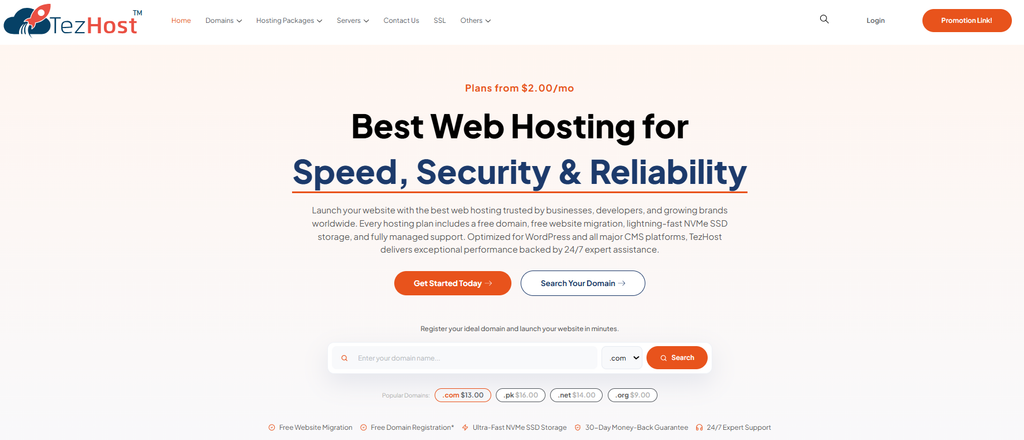
How Is TezHost Revolutionizing Web Hosting with Its Customer-Focused Approach?
At TezHost, we believe avoiding web hosting red flags begins with helping customers understand what they actually need.
Choosing a hosting provider shouldn’t require customers to become server administration experts.
Our approach focuses on accessible hosting options, practical guidance, and solutions for different types of websites and applications.
1. Hosting Options for Different Business Requirements
Not every website needs the same hosting environment.
A personal blog may work well on a basic hosting plan.
A custom application may require specialized technology support.
A resource-intensive business platform may need more dedicated infrastructure.
TezHost offers a range of hosting solutions so customers can explore options based on their workloads.
2. Supporting Different Technologies
Modern businesses rely on more than traditional websites.
Developers and organizations may require Python, Node.js, Windows-based hosting, or other specialized environments.
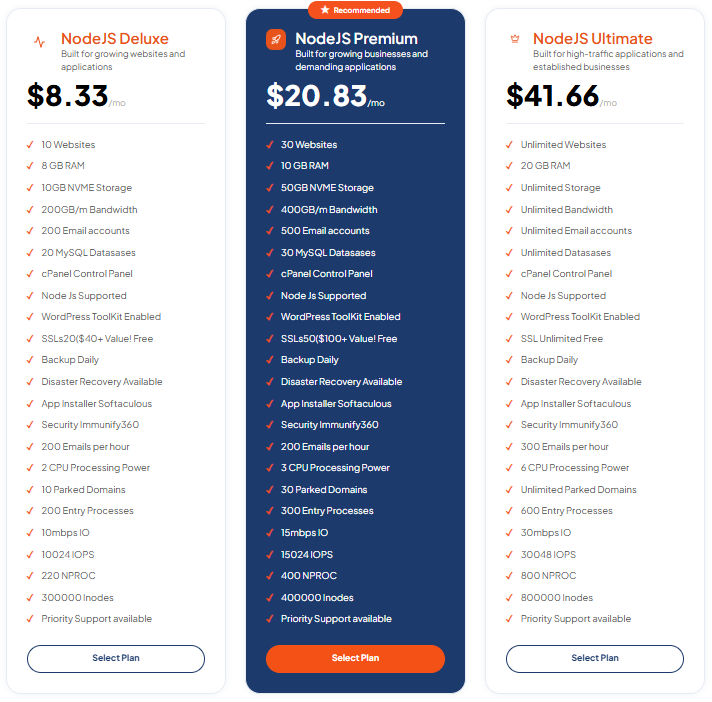
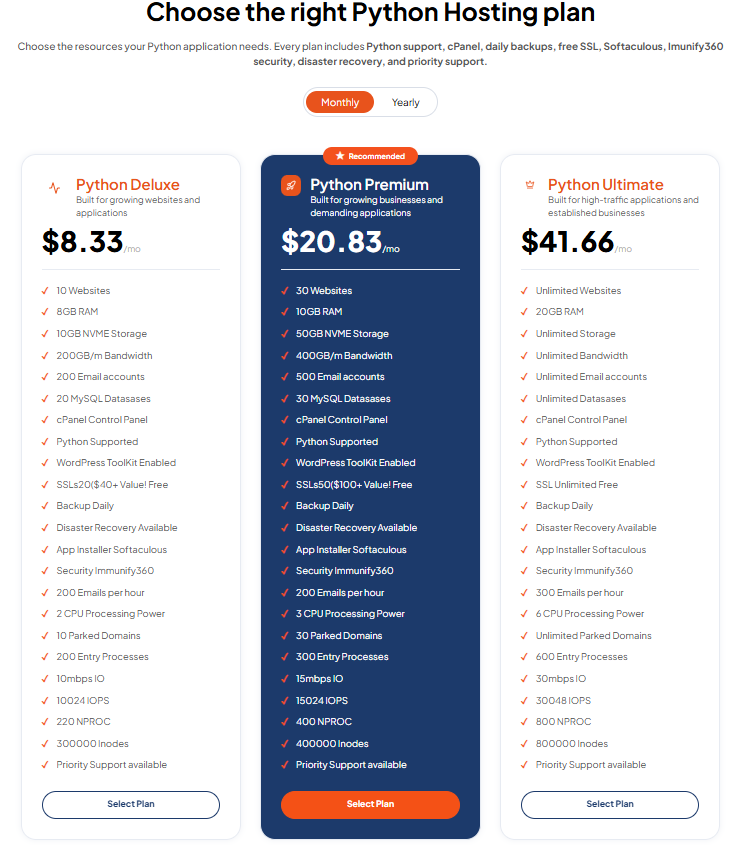
TezHost provides different hosting categories to address a variety of technical needs.
3. Helping Customers Make Informed Decisions
We believe customers should understand important hosting factors before purchasing.
These include:
- Server resources.
- Storage requirements.
- Software compatibility.
- Hosting control panels.
- Available support.
- Upgrade possibilities.
- Billing and renewal conditions.
Our goal is to help customers evaluate the hosting options available to them.
4. Solutions for Hosting Resellers
Some customers need hosting for their own websites.
Others want to build businesses that provide hosting services to clients.
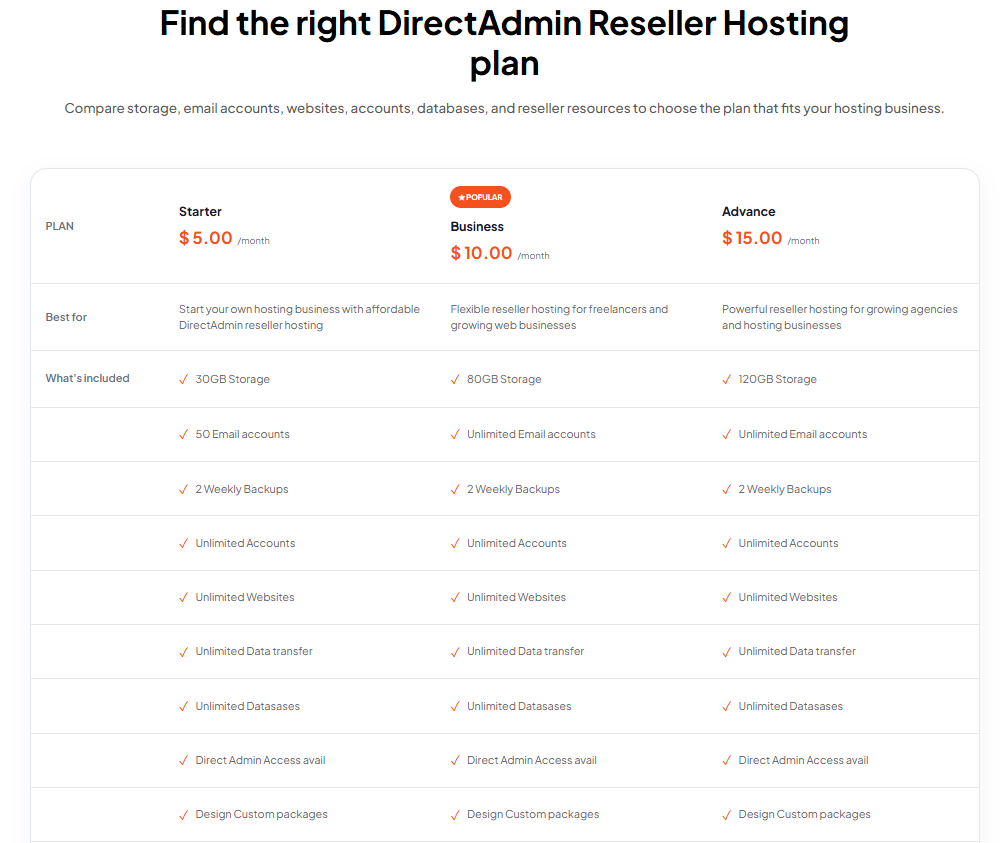
TezHost offers reseller hosting options for customers interested in managing multiple hosting accounts.
If you’re considering this business model, read our guide on How to Choose the Right Web Hosting Reseller Program.
5. Making Domain and Hosting Services Accessible
Businesses often need domain registration alongside website hosting.
TezHost provides domain registration and hosting services, allowing customers to explore both as part of their online presence.
6. Customer-Focused Sales Assistance
One of the most frustrating experiences for website owners is purchasing a hosting plan that doesn’t meet their needs.
We encourage customers to explain their requirements before choosing a package.
Whether you’re launching a website, deploying an application, or exploring reseller hosting, our sales team can help you review available options.
Why risk choosing the wrong hosting plan when you can ask questions first?
Speak directly with a TezHost sales agent and explore a suitable hosting solution.
Visit TezHost to learn more about our hosting services.
Frequently Asked Questions About Web Hosting Red Flags
1. What are the biggest web hosting red flags?
The biggest web hosting red flags include frequent downtime, poor customer support, unclear pricing, weak security, unreliable backups, restrictive resource limits, and confusing service policies.
These warning signs can indicate that a provider may not meet your website’s requirements.
2. How do I know if a web hosting provider is bad?
Look for repeated service outages, unresolved customer complaints, poor support responses, unclear billing terms, and limitations that aren’t properly explained.
Evaluate several sources rather than relying on one review.
3. Is cheap web hosting bad?
No.
Affordable hosting can be suitable for small websites and businesses.
The important factors are whether the provider offers sufficient resources, reliable service, appropriate security, and transparent pricing.
4. What uptime should a web hosting provider offer?
Many providers advertise uptime targets such as 99.9%.
However, you should also review how uptime is measured, what exclusions apply, and whether the provider offers compensation for failing to meet its commitment.
5. How can I test web hosting customer support before buying?
Contact the provider with questions about server resources, backups, migration procedures, and technical support.
Evaluate response clarity, accuracy, and whether the provider explains the limits of its services.
6. Are unlimited hosting plans really unlimited?
Not necessarily.
Unlimited or unmetered plans may still have restrictions involving CPU, RAM, storage usage, processes, or fair-use policies.
Always review the service terms.
7. What security features should a good web host provide?
Important features may include SSL/TLS support, access controls, infrastructure updates, malware protection options, and backup services.
Customers must also maintain secure applications and account configurations.
8. How important are backups when choosing a web host?
Backups are essential for recovering website data after accidental deletion, application failures, or security incidents.
Choose a provider with clearly documented backup arrangements and maintain independent backups where possible.
9. Can a bad web host affect SEO?
Yes.
Frequent downtime, slow website responses, and technical reliability problems can negatively affect user experience and may influence search performance.
However, hosting is only one factor in overall SEO.
10. Should I change hosting providers if my website is slow?
Not immediately.
Slow performance can result from server limitations, unoptimized images, inefficient code, database problems, or other issues.
Investigate the cause before deciding whether migration is necessary.
11. What should I check before buying reseller hosting?
Evaluate account management tools, resource allocations, support arrangements, billing terms, scalability, and the services included.
Read our guide on Choosing the Right Web Hosting Reseller Program.
12. How do I choose reliable web hosting in Pakistan?
Compare infrastructure resources, pricing, support quality, uptime commitments, server locations, security options, and customer feedback.
You can also review our guide on Choosing Web Hosting in Pakistan.
13. Can I move my website if I’m unhappy with my hosting provider?
Generally, yes.
Most websites can be migrated to another hosting provider, although the process depends on the website’s technology, data, domain configuration, and service agreements.
Prepare backups and a migration plan before switching.
14. Does expensive hosting guarantee better performance?
No.
Higher prices may reflect additional resources or services, but they don’t automatically guarantee better performance.
Choose hosting based on actual workload requirements and documented service features.
15. Where can I get help choosing the right hosting plan?
You can contact a TezHost sales agent to discuss your website’s requirements and explore available hosting options.
Conclusion: Avoid These Web Hosting Red Flags Before It’s Too Late
Recognizing web hosting red flags before purchasing a plan can help protect your website, budget, and business reputation.
From unrealistic pricing and unreliable uptime to weak security and inadequate customer support, the warning signs are often visible when you know what to look for.
The best hosting provider isn’t necessarily the cheapest or the most expensive.
It’s the provider that offers the right combination of resources, reliability, security, support, and transparent service terms for your needs.
Before making your next hosting decision, take time to compare providers, ask questions, and understand the services included.
At TezHost, we believe informed customers make better hosting decisions.
Whether you’re launching your first website, running an online business, or deploying a custom application, selecting the right hosting environment is an important step toward long-term success.
Ready to Choose Hosting with Confidence?
Don’t wait until downtime, slow performance, or unexpected charges become a problem.
Explore your hosting options before making the wrong decision.
Visit TezHost to discover our hosting services.
Not sure which plan is right for your website?
Talk directly to a TezHost sales agent today and discuss your requirements.
Or register with TezHost to get started.
Avoid the red flags. Choose wisely. Build a stronger online presence.