
Cloud computing is one of the most exciting areas in IT. But what if your dream cloud career comes with challenges that nobody mentioned?
Cloud engineering offers opportunities to work with advanced infrastructure, automation, cybersecurity, and scalable applications. It can also open doors to roles in DevOps, cloud architecture, and site reliability engineering.
But let’s look at the other side.
Are cloud engineers constantly expected to learn new technologies? Do they have less control over infrastructure? Can cloud responsibilities become stressful when systems fail or costs spiral?
The reality is that cloud careers aren’t automatically better than traditional on-premises IT jobs.
Understanding the cloud career downsides can help you decide whether cloud infrastructure is the right professional path—or whether an on-premises role better matches your interests and working style.
If you’re exploring cloud infrastructure hands-on, you can register with TezHost to explore available server options. You can also talk to a TezHost sales agent about your technical requirements.
Let’s examine seven challenges worth considering before choosing your next IT role.
1. Constant Learning Can Become Exhausting
One of the biggest cloud career downsides is the pressure to keep learning.
Cloud platforms evolve quickly. New services, security features, APIs, automation tools, and deployment methods appear regularly.
A cloud engineer may need to understand:
- Virtual machines and networking.
- Linux and Windows administration.
- AWS, Microsoft Azure, or Google Cloud.
- Docker and Kubernetes.
- Infrastructure as Code (IaC).
- CI/CD pipelines.
- Cloud security and identity management.
- Monitoring and observability tools.
And knowing how to use a service isn’t always enough. You must understand how it interacts with the rest of the infrastructure.
For example, deploying an application may require configuring virtual networks, firewall rules, load balancers, IAM permissions, storage, and monitoring.
Why Is This a Challenge?
Technology changes faster than many traditional infrastructure environments.
What you learned last year may need updating today.
This doesn’t mean you must master every new tool. However, you should be comfortable learning continuously.
How to manage it: Focus on transferable fundamentals such as networking, Linux, scripting, security, and troubleshooting. These skills remain useful across different cloud providers.
2. Cloud Jobs Can Involve Unpredictable Workloads
Another important cloud career downside is the responsibility that comes with managing services customers expect to remain available.
Cloud platforms make infrastructure accessible, but they don’t eliminate operational problems.
A failed deployment, misconfigured firewall, expired certificate, storage issue, or application outage can require immediate attention.
Depending on the organization, cloud engineers may also participate in:
- On-call rotations.
- Incident response.
- Disaster recovery.
- Production deployments.
- Performance troubleshooting.
- Service availability monitoring.
Does Cloud Engineering Involve Stressful On-Call Work?
It can. However, on-call responsibilities depend on the employer, team structure, service criticality, and operational maturity.
A cloud engineer supporting a business-critical application may experience more pressure than someone working primarily on development environments.
On-premises infrastructure teams face similar responsibilities, particularly when managing critical systems.
How to manage it: Ask about on-call frequency, escalation procedures, incident response expectations, and workload distribution before accepting a role.
A good engineering team should have documented processes rather than relying on one person to solve every emergency.
3. You May Have Less Direct Control Over Infrastructure
If you enjoy working directly with physical servers, networking equipment, storage systems, and data center infrastructure, cloud computing may feel restrictive.
This is one of the more interesting cloud career downsides.
In an on-premises environment, infrastructure teams may have direct access to:
- Physical servers.
- Network switches and routers.
- Storage arrays.
- Hardware monitoring.
- Data center facilities.
- BIOS and firmware configurations.
In public cloud environments, the provider manages much of the underlying physical infrastructure.
Cloud engineers typically work through APIs, management consoles, automation tools, and virtualized resources.
Does Cloud Mean You Lose Control?
Not entirely. You still control many important infrastructure components, including virtual machines, operating systems, applications, access policies, networking configurations, and storage settings.
However, physical hardware maintenance and some lower-level infrastructure decisions remain the provider’s responsibility.
For engineers who enjoy hardware-level troubleshooting, on-premises infrastructure may offer a more satisfying experience.
How to manage it: Consider hybrid infrastructure roles if you enjoy both physical systems and cloud technologies.
4. Cloud Costs Can Create Additional Pressure
Cloud infrastructure is flexible, but flexibility can become expensive without proper cost management.
This is another significant cloud career downside, particularly for engineers responsible for production environments.
Unlike a traditional infrastructure setup where organizations may purchase hardware upfront, cloud environments often involve recurring resource-based charges.
Costs can increase because of:
- Overprovisioned virtual machines.
- Unused storage volumes.
- Excessive data transfers.
- Unnecessary snapshots.
- Idle development environments.
- Poorly configured autoscaling.
- Unmonitored resource consumption.
Can Cloud Infrastructure Become More Expensive Than On-Premises?
Yes. Depending on workload, utilization, licensing, data transfer, and operational requirements, cloud infrastructure can cost more than an on-premises setup.
For example, a business running virtual machines continuously may find that reserved or owned infrastructure is more economical over a longer period.
However, cloud infrastructure can reduce upfront hardware investment and provide flexibility when demand changes.
The right choice requires a proper total cost of ownership (TCO) comparison.
How to manage it: Learn FinOps fundamentals, monitor resource consumption, set budgets and alerts, and regularly review idle infrastructure.
Understanding cost optimization can make you a more valuable cloud engineer.
5. Vendor Dependency Can Limit Your Flexibility
Cloud engineers often become deeply familiar with one provider.
For example, an AWS-focused engineer may work extensively with EC2, S3, IAM, VPC, and other AWS services.
An Azure engineer may specialize in Azure Virtual Machines, Virtual Networks, Entra ID, and Azure Monitor.
These skills are valuable, but depending too heavily on provider-specific services can create challenges when an organization changes platforms.
What Is Vendor Lock-In?
Vendor lock-in occurs when moving applications, data, or workloads away from a particular provider becomes difficult or expensive because of technical dependencies, proprietary services, or migration complexity.
For engineers, this can mean needing to learn another platform or redesign parts of an existing architecture.
How to manage it: Build transferable knowledge in networking, virtualization, containers, Kubernetes, Terraform, Linux, and automation.
Understanding cloud architecture principles across providers is often more valuable than memorizing individual console workflows.
6. Cloud Security and Compliance Responsibilities Can Be Complex
Security is another area where cloud career downsides become apparent.
Cloud providers offer security features, but customers remain responsible for configuring and managing many aspects of their environments.
This is commonly explained through the shared responsibility model.
Depending on the service, responsibilities may include:
- Identity and access management.
- Network segmentation.
- Firewall configuration.
- Encryption.
- Secrets management.
- Logging and monitoring.
- Vulnerability management.
- Backup and recovery.
- Compliance controls.
Is Cloud Security More Difficult Than On-Premises Security?
Not necessarily, but cloud security introduces different challenges.
For example, an incorrectly configured storage bucket or overly permissive IAM policy can expose sensitive data.
In an on-premises environment, teams face different risks involving physical access, hardware security, network segmentation, patching, and internal infrastructure.
Neither environment is automatically secure.
How to manage it: Develop practical knowledge of IAM, least-privilege access, encryption, security monitoring, and incident response.
Cloud engineers who understand security are better equipped to design and maintain reliable infrastructure.
7. The Cloud Job vs On-Prem Job Debate Isn’t Always Straightforward
Perhaps the biggest cloud career downside is the assumption that moving to cloud computing is automatically a career upgrade.
It isn’t necessarily.
Some professionals enjoy automation, distributed systems, and working with cloud platforms.
Others prefer physical infrastructure, direct hardware access, and predictable environments.
The right choice depends on your interests and the type of work you want to do.
Infrastructure Job Comparison: Cloud vs On-Premises
| Factor | Cloud Job | On-Prem Job |
|---|---|---|
| Infrastructure access | Primarily virtual and API-driven | Direct access to physical infrastructure |
| Hardware management | Mostly provider-managed in public cloud | Often part of the IT team’s responsibility |
| Scalability | Resources can be provisioned rapidly | May require hardware procurement |
| Cost model | Often recurring usage-based costs | Higher upfront investment in many setups |
| Learning requirements | Frequent platform and tool updates | Hardware, networking, OS, and infrastructure updates |
| Automation | Extensive use of APIs and IaC | Varies by organization |
| Security | Shared responsibility model | Organization manages more infrastructure layers |
| Vendor dependency | Can be significant | Depends on hardware and software suppliers |
| On-call work | Depends on role and service criticality | Depends on infrastructure and business needs |
Which Career Should You Choose?
Choose cloud engineering if you enjoy automation, distributed systems, infrastructure as code, scalability, and working with modern platforms.
Consider on-premises infrastructure if you prefer physical hardware, data center operations, direct infrastructure control, and traditional systems administration.
You don’t have to choose one forever, either.
Hybrid infrastructure roles can provide experience across both environments.
For a deeper technical comparison, read our guide to Cloud vs On-Premises Infrastructure.
How Is TezHost Making Cloud Infrastructure More Accessible for Technical Professionals?
TezHost helps developers and businesses access cloud server environments with dedicated resources, root access, and support for Linux and Windows operating systems.
Learning cloud infrastructure shouldn’t be limited to reading documentation or watching tutorials.
Technical professionals benefit from practical experience.
You need to deploy applications, configure networking, manage operating systems, troubleshoot errors, and understand how infrastructure behaves under real workloads.
That’s where accessible server environments can help.
1. Practical Infrastructure Experience
TezHost Cloud Servers provide full root access, allowing users to manage operating systems, applications, and server configurations.
This creates opportunities to practise:
- Linux and Windows server administration.
- SSH and remote access.
- Firewall configuration.
- Web server deployment.
- Application hosting.
- Monitoring and troubleshooting.
- Server resource management.
2. Performance-Focused Infrastructure
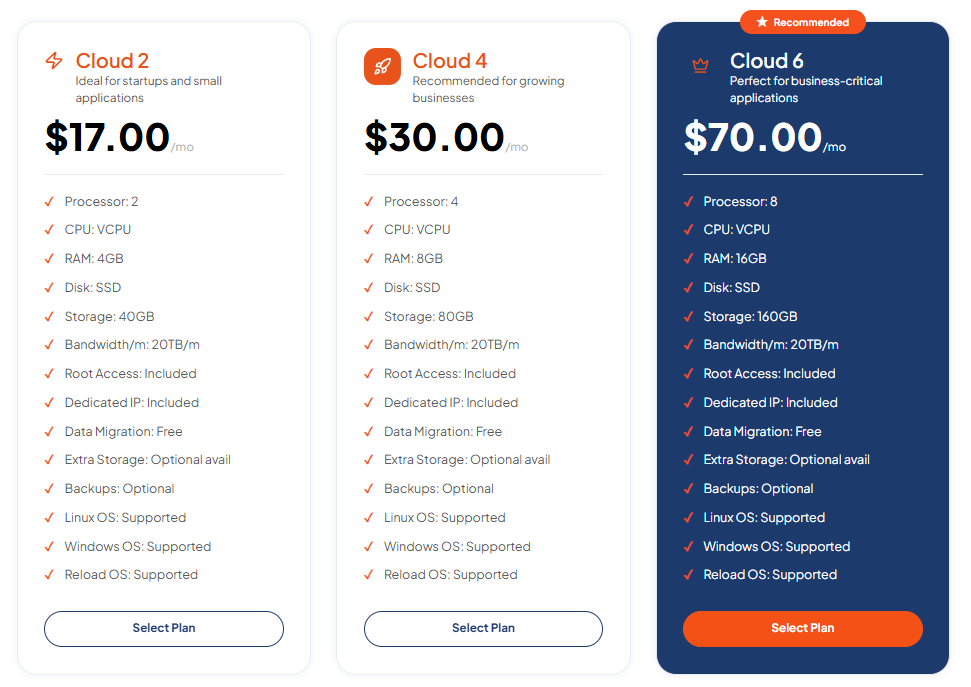
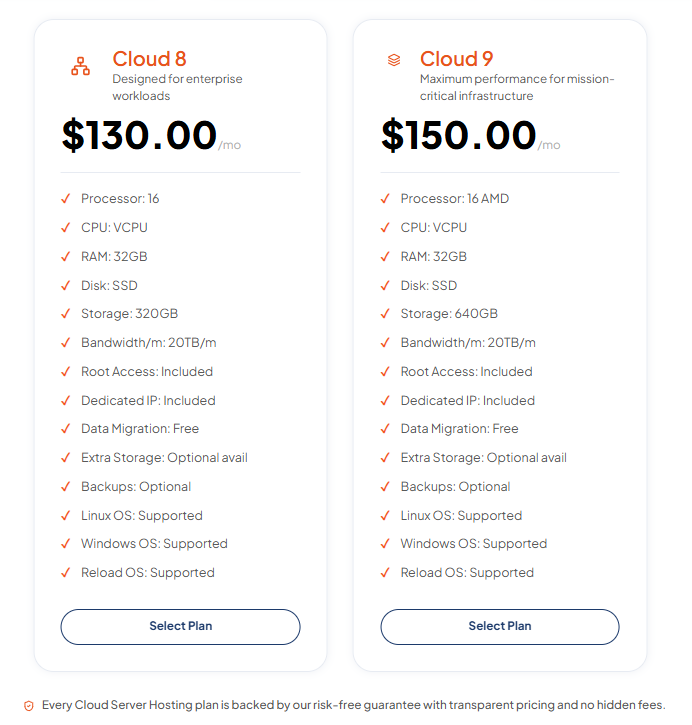
TezHost Cloud Servers use AMD EPYC processors, DDR5 memory, and Gen4 NVMe SSD storage.
Plans start at $17 per month, with the Cloud 2 plan offering 2 processors, 4GB RAM, and 40GB storage.
Other available features include dedicated IP addresses, full root access, Linux and Windows support, and 20TB monthly bandwidth. Free data migration is also included, while backups are optional. <Cite refs={[“turn587916view2”]}/>
3. Infrastructure That Can Grow With Your Projects
Different projects require different resources.
A developer experimenting with a small application may need fewer resources than a business running production workloads.
TezHost offers multiple cloud server configurations so customers can select resources according to their requirements.
4. Support for Developers and Businesses
Whether you’re building a development environment, hosting applications, or managing business infrastructure, you can explore the available TezHost Cloud Server plans.
Not sure which configuration fits your workload?
Talk to a TezHost Sales Agent to discuss your requirements.
Our approach is to make practical cloud infrastructure more accessible, giving developers and businesses the resources to build, experiment, and manage their projects.
Frequently Asked Questions
Are Cloud Jobs More Stressful Than On-Premises Jobs?
Not always. Cloud roles can involve on-call duties, production incidents, and frequent changes, but on-premises infrastructure teams face similar responsibilities. Stress depends on the employer, workload, and team practices.
What Are the Biggest Cloud Career Downsides?
The main challenges include continuous learning, unpredictable workloads, cloud cost management, vendor dependency, security responsibilities, and reduced control over physical infrastructure.
Is an On-Premises IT Job Better Than a Cloud Job?
It depends on your interests and career goals. On-premises roles may suit professionals who enjoy hardware and direct infrastructure management, while cloud roles suit those interested in automation, scalability, and distributed systems.
Can I Move From On-Premises IT to Cloud Engineering?
Yes. Experience with Linux, Windows Server, networking, virtualization, storage, and security provides a strong foundation for moving into cloud engineering.
Do Cloud Engineers Need to Learn Multiple Cloud Platforms?
Not necessarily. You can begin by specializing in one platform, then expand your knowledge as your career develops. Transferable skills such as networking, scripting, and infrastructure as code remain important.
Is Cloud Computing Still Worth Learning in 2026?
Yes, if it aligns with your interests and career goals. Cloud technologies remain important across modern IT environments, but learning should include practical infrastructure skills rather than relying exclusively on certifications.
Conclusion: Is a Cloud Career Still Worth It?
Understanding the cloud career downsides doesn’t mean avoiding cloud computing.
It means making an informed career decision.
Cloud engineering can be rewarding, but it also brings responsibilities that aren’t always visible in job advertisements.
Constant learning, production pressure, cloud spending, vendor dependency, and security management are all part of the picture.
Before choosing your path, consider:
- Do you enjoy continuous learning?
- Are you comfortable troubleshooting production systems?
- Do you enjoy automation and scripting?
- Are you interested in cloud security and cost optimization?
- Do you prefer virtual infrastructure or physical hardware?
The best IT career isn’t necessarily the one with the most popular job title. It’s the one that matches your skills, interests, and long-term goals.
At TezHost, we believe practical infrastructure experience is an important part of developing technical confidence.
Explore our Cloud Server Solutions and start building your next project.
Let’s discuss: If you had to choose today, would you build your career in cloud computing or traditional on-premises infrastructure?
Share your thoughts in the comments!