
Speed and reliability are not optional for websites anymore: they can make or break your online presence. For instance, research shows that a one-second delay in page load time can reduce conversions by around 7%. Moreover, if load time increases from 1 to 5 seconds — a delay many poorly hosted sites experience — bounce rates (visitors leaving without interacting) can go up by 90%.
Given such high stakes, your choice of web host — its server type, configuration, infrastructure, and maintenance—becomes critical. A good hosting provider doesn’t just store your files; it profoundly influences how fast and reliably your site loads, how secure it remains, and ultimately how many users stick around, convert, or even find you in the first place.
In short: your web host is the foundation of user experience, search engine performance, and business outcomes.

How Hosting Influences Website Performance
1. Server Resources & Response Time
When you host a website, especially dynamic or content-heavy sites (like e-commerce, blogs with media, or web applications), server resources matter a lot. If the server’s CPU, RAM, storage I/O, and network bandwidth are limited — as in many low-cost or shared hosting plans — your site will struggle under high load or during traffic spikes. On the other hand, a well-provisioned server delivers faster response times and smoother user experiences.
A quality host ensures that server response time, often measured as Time to First Byte (TTFB), is low. When the server answers quickly, the rest of the page (HTML, CSS, images, scripts) can load faster. Poor resource allocation — common in shared hosting where many websites compete for the same resources — introduces latency, slow page generation, and inconsistent performance.
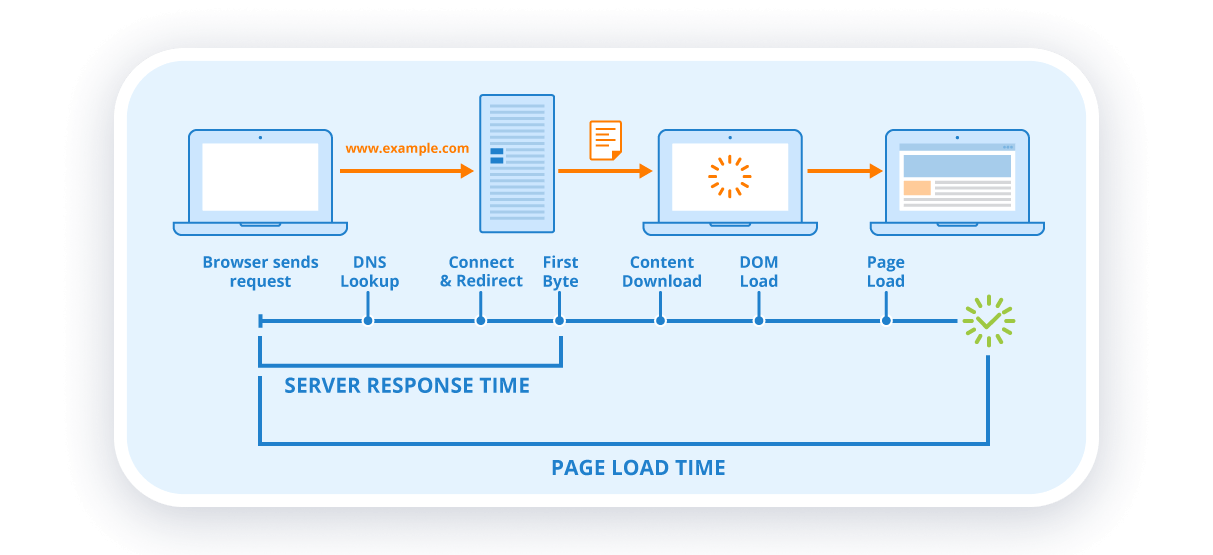
2. Storage & Data Handling (SSD vs. HDD, Database Access, I/O)
Not all server storage is equal. Many older / cheaper hosts still rely on HDD storage, which is slower in reading and writing data than SSD (or modern NVMe) storage. This affects everything: loading static files, retrieving database records, writing logs, handling uploads — all suffer delays on slower disks.
Moreover, for websites that rely heavily on dynamic content (database-driven CMS, user accounts, e-commerce carts, etc.), database query performance and I/O speed become critical. A good host optimizes database settings (e.g. indexing, caching) so that queries execute quickly. Many managed hosts take care of this behind the scenes.

3. Uptime, Reliability, and Server Stability
Website availability — the amount of time your site remains online and functional — is fundamental. If your hosting is prone to downtime (server crashes, maintenance, network issues), your visitors may get error pages, timeout messages, or broken content.
Reliable hosts aim for high uptime (often 99.9% or better), and invest in redundant systems, backups, failover, and proactive monitoring. This ensures that even under hardware failure, traffic spikes, or maintenance, your website remains accessible.
Frequent downtime damages user trust, hurts search engine rankings (since crawlers may find your site down during indexing), and can directly harm revenue or conversions.

4. Location, Latency & Global Reach
Server location matters especially if your audience is concentrated in a particular region. When server and visitor are far apart geographically, network latency increases — each file request takes longer, especially for heavy pages or many small resources (images, scripts, CSS).
A host with data centers closer to your main user base reduces latency, making pages load faster and improving user experience. For globally-targeted websites, combining server location with a CDN (Content Delivery Network) helps serve static resources from edge servers near the visitor — further reducing lag.
5. Caching, CDN, and Hosting-Enabled Performance Tools
A good web host often provides server-level optimizations: caching mechanisms, CDN integration, compression, and support for modern protocols. These significantly reduce load times.
- Caching: Server-side caching (or object caching, page caching) can serve repeat page views extremely fast since the server doesn’t need to regenerate the page.
- CDN integration: Distributes static content globally, reducing geographic latency and load on the origin server.
- Compression & optimized delivery (HTTP/2, HTTP/3): reduce file transfer time, especially for large assets like images, CSS, JS.
By leveraging these tools, a hosting environment can dramatically improve performance, making even heavy websites feel snappier.

6. Security, Maintenance & Stability
Performance isn’t just about speed — security, updates, and maintenance also affect reliability. A compromised server or neglected software (CMS, plugins, server software) can lead to slowdowns, crashes, or downtime. Good hosting providers offer built-in security: firewalls, regular patching, malware protection, SSL support — so your site stays safe and remains performant.
Also, managed hosts often handle backups, recovery, and monitor resource usage to prevent overload — protecting you from traffic spikes, heavy resource consumption, or malicious attacks that degrade performance.
What Is a “Managed Server” / Managed Hosting?
In simple terms, a “managed server” or managed hosting refers to a hosting arrangement where the hosting provider takes care of most of the technical administration: server setup, configuration, maintenance, security, updates, optimizations — rather than leaving all responsibilities to you (the website owner).
With managed hosting, the provider offers a full-service environment: optimized server software, efficient resource allocation, caching, security layers, backups, often CDN and staging environments, and support. Essentially, the provider manages the “plumbing,” while you focus on content, design, business operations.
Rather than just renting server space or raw virtual servers, managed hosting gives you a tuned, ready-to-go environment optimized for performance, security, and stability.
Benefits & Features of Managed Hosting
- High Performance & Fast Loading Times
Managed hosting providers typically use optimized server architecture: SSD (or NVMe) storage, enough CPU and RAM, high-speed I/O, tuned web servers (like NGINX or optimized Apache), and well-configured databases. This setup reduces server response times significantly.
Moreover, they enable advanced performance enhancements: server-side caching, HTTP compression, support for modern protocols, CDN integration, asset optimization (image compression, lazy loading, minification). These lead to faster page loads, reduced loading time, and improved perceived performance — especially important for mobile and global audiences.
- Reliability, Uptime & Stability
Managed hosting providers invest in stable infrastructure: redundant storage/network, regular maintenance, monitoring, and failover procedures. This results in high uptime guarantees, meaning your website stays live and responsive almost all the time.
This reliability reduces the risk of downtime during traffic spikes (e.g. promotions, sale events), server failures, or maintenance windows — which is crucial for e-commerce sites, businesses, or any platform that relies on constant availability.
- Scalability & Ability to Handle Growth
As your website traffic grows, or you add features (media-heavy pages, e-commerce capabilities, user accounts), resource demands increase. Managed hosting makes scaling easier: providers can allocate more CPU, RAM, storage, bandwidth — or switch to clustered/cloud setups — without you managing every detail.
This flexibility ensures that performance remains stable even during high-traffic periods, preventing slowdowns or crashes.
- Reduced Technical Burden & Maintenance Overhead
For many website owners — especially small businesses, bloggers, or teams without technical staff — managing updates, security patches, server configuration, backups, caching, CDN, database tuning, etc., is time-consuming and error-prone. Managed hosting offloads these tasks to experts, allowing you to focus on content, marketing, or services.
You don’t need deep server or DevOps knowledge, yet you benefit from a professionally managed environment that adheres to best practices, regularly maintained and optimized.
- Better Security & Data Protection
Security is a critical benefit of managed hosting. Providers often include firewalls, malware scanning, intrusion detection, automatic updates, secure configuration, and backups. This helps protect your site from hacking attempts, data loss, or downtime caused by malicious activity — all of which can drastically affect reputation, traffic, SEO, and conversions.
Regular backups and recovery mechanisms ensure that in case of accidental data deletion, crashes, or attacks, your site can be restored quickly.
Conclusion
Your web host is far more than just a place to store your website’s files — it’s the backbone of your site’s performance, reliability, and scalability. Every user interacts through it, every search engine bot visits through it. A poor host can lead to slow page loads, frequent downtime, security vulnerabilities, and lost traffic or revenue. A good host — especially a managed hosting solution — optimizes all the technical details for you, delivering fast load times, stable uptime, security, scalability, and ease of maintenance.
For any serious website — business, e-commerce, blog, or application — investing in managed hosting is not just convenience but a strategic decision: it protects user experience, ensures reliability, boosts conversions, supports growth, and ultimately maximizes the return on your online efforts.