What if cloud goes down while your business is processing customer orders, hosting applications, or managing important data? A cloud provider outage can temporarily make your website, database, email, or business applications unavailable. For an online business, even a short interruption can affect revenue, customer confidence, and daily operations.
Cloud infrastructure offers flexibility and scalability, but it is not immune to technical failures. Hardware problems, network disruptions, software errors, power failures, cyberattacks, and regional incidents can all affect service availability.
The important question is not simply whether your cloud provider can experience an outage. It is whether your business can continue operating when one happens.
If you are planning to launch or upgrade your infrastructure, you can register with TezHost to explore its cloud hosting solutions. You can also talk to a TezHost sales agent to discuss your server requirements and infrastructure options.
Let’s look at the risks, what happens during an outage, and how you can prepare your business for one in 2027.
1. What Happens If Your Cloud Server Provider Goes Down?
If your cloud server provider experiences an outage, your applications may become inaccessible until the affected infrastructure or services are restored, or your workload is moved to another functioning environment.
The impact depends on what has failed. A problem with one physical server may affect only a limited number of customers, while a network or regional outage can disrupt multiple services.
For example, consider an eCommerce business running its website and database on a cloud server. If that server becomes unavailable:
- Customers may be unable to access the website.
- Online orders and payments may stop.
- Staff may lose access to business applications.
- APIs connecting external services may fail.
- Scheduled tasks and background processes may be interrupted.
- Customer support teams may receive complaints about unavailable services.
A cloud reliability risk becomes more serious when several business-critical services depend on the same infrastructure.
It is also important to understand that not every outage means your data has disappeared. Your server may be temporarily unreachable while the underlying storage remains intact. However, hardware damage, data corruption, or a security incident can create more serious recovery requirements.
The key distinction: Service availability and data availability are not the same thing. Your website can be offline even when your data is still recoverable.
2. What Are the Biggest Cloud Reliability Risks Businesses Should Know?
The biggest cloud reliability risk is depending on infrastructure without understanding its possible failure points. Cloud providers operate complex systems, and different components can experience different types of disruptions.
Here are seven risks worth considering.
1. Hardware Failure
Cloud servers still depend on physical hardware, including processors, memory, storage devices, and networking equipment.
A failed storage device or physical host can interrupt the virtual machines and applications running on it. Infrastructure redundancy can reduce the impact, but it does not automatically protect every workload.
2. Network Connectivity Problems
Your cloud server may be operating normally while customers cannot reach it because of a network routing issue, connectivity failure, or DNS disruption.
This is why monitoring only server CPU and RAM is not enough. External availability checks are also important.
3. Data Centre or Regional Outages
A major power failure, cooling problem, natural disaster, or infrastructure incident can affect an entire facility or geographical region.
If your application operates from only one region, a regional disruption may affect the complete service.
4. Software and Configuration Errors
Not every cloud provider outage is caused by hardware. Incorrect updates, faulty configurations, operating system problems, and application errors can also interrupt services.
A deployment mistake can sometimes affect a perfectly healthy server.
5. Cyberattacks
Distributed denial-of-service (DDoS) attacks, ransomware, compromised credentials, and other security incidents can affect the availability or integrity of your infrastructure.
Security controls should therefore be part of your reliability strategy.
6. Storage and Database Problems
Your application may depend on a database or storage service that becomes unavailable, slow, or corrupted.
Even if the web server is functioning, a database failure can make the application unusable.
7. Provider-Level Service Disruption
A cloud provider may experience an incident affecting its management platform, networking, storage, APIs, or other shared services.
This can create wider consequences for customers using the same provider infrastructure.
The lesson is simple: cloud reliability risk is not limited to the physical server. Your entire application stack needs to be considered.
3. Can You Lose Your Data If a Cloud Provider Goes Down?
Not necessarily. A temporary cloud provider outage does not automatically mean your data is lost. However, if your only copy of important data is stored on infrastructure affected by a serious incident, recovery may become difficult.
The level of protection depends on your backup strategy, storage architecture, replication setup, and recovery procedures.
Consider these three situations:
| Situation | Possible Impact | Recommended Protection |
|---|---|---|
| Temporary server outage | Applications become unavailable | Monitoring and recovery procedures |
| Storage failure | Files or databases may become inaccessible or corrupted | Independent backups and tested restoration |
| Regional disruption | Entire workloads may become unavailable | Off-site backups and secondary recovery environment |
Backups Are Not the Same as Replication
This distinction is particularly important for technical teams.
Replication copies data between systems to help maintain availability or keep a secondary environment updated.
Backups preserve recoverable copies of data, often allowing restoration to an earlier point in time.
Replication alone is not a complete backup strategy. If unwanted changes, corruption, or malicious activity are replicated, the secondary copy may also be affected.
A stronger approach combines:
- Automated backups.
- Copies stored separately from the primary server.
- Access controls that protect backup data.
- Retention policies.
- Regular restoration tests.
- Documented recovery procedures.
Also remember that a backup is only useful if you can restore it within an acceptable timeframe.
If you are reviewing your server capacity, our guide on how much cloud server space you need explains why storage, RAM, CPU, databases, and backup requirements should be considered together.
4. How Can You Protect Your Business During a Cloud Provider Outage?
If you want to reduce the impact of a cloud provider outage, build a business continuity plan before an incident occurs. Your plan should explain how to detect a failure, protect data, restore critical applications, and communicate with customers.
These seven practices provide a practical starting point.
1. Maintain Independent Backups
Keep backups outside the primary production environment. Where possible, use a separate account, storage location, or provider so that a single incident does not affect both your live server and recovery copies.
2. Define Your RTO and RPO
Two technical measurements help determine how quickly your business needs to recover.
- Recovery Time Objective (RTO): The maximum acceptable time required to restore a service.
- Recovery Point Objective (RPO): The maximum acceptable amount of data loss, measured in time.
For example, an RTO of two hours means your target is to restore the service within two hours. An RPO of 15 minutes means you aim to recover data with no more than 15 minutes of changes lost.
These targets should reflect business requirements rather than arbitrary technical preferences.
3. Consider a Secondary Recovery Environment
For business-critical applications, consider maintaining a recovery environment in another availability zone, data centre, or cloud region.
A secondary environment can be configured in different ways:
- Backup and restore: Restore the application when needed. This is generally less expensive but takes longer.
- Pilot light: Keep essential components ready and activate additional resources during an incident.
- Warm standby: Maintain a smaller functioning environment that can be scaled up.
- Active-active: Run workloads in multiple locations and distribute traffic between them.
Not every business needs a multi-region architecture. The right approach depends on your downtime tolerance, application complexity, and budget.
AWS and Microsoft both explain these recovery approaches in their technical guidance: AWS disaster recovery planning and Microsoft’s multi-region disaster recovery guidance.
4. Monitor More Than Server Resources
Monitor the complete application, not just whether the server responds to a ping.
Useful monitoring checks include:
- HTTP and HTTPS availability.
- CPU and memory utilisation.
- Disk capacity and I/O performance.
- Database response times.
- Network latency and packet loss.
- Application error rates.
- SSL certificate validity.
- Backup completion status.
External monitoring is particularly useful because an internal monitoring service may also become inaccessible during an infrastructure incident.
5. Prepare DNS and Traffic Failover
If you operate a secondary environment, plan how traffic will reach it.
DNS-based failover, load balancing, and health checks can help direct visitors towards functioning infrastructure. However, DNS caching and TTL settings can delay changes, so DNS failover should not be treated as an instant solution.
6. Test Your Recovery Plan
Do not wait for an actual cloud provider outage to discover that your backup cannot be restored.
Run recovery exercises to confirm that:
- Backups are accessible.
- Databases can be restored.
- Applications start correctly.
- DNS and network configurations work.
- Required credentials and software are available.
- Your team understands its responsibilities.
Google Cloud’s reliability guidance also recommends testing regional failovers and data restoration to verify that recovery procedures work as expected.
7. Document Your Incident Response Process
Your technical team should know who is responsible for identifying the incident, contacting the provider, initiating recovery, and communicating with customers.
A written response plan reduces confusion when systems are unavailable and decisions need to be made quickly.
A cloud provider outage is much easier to manage when your recovery steps have already been documented and tested.
5. Is One Cloud Provider Enough for Business Continuity?
One cloud provider may be sufficient for many businesses, but it does not automatically protect you from every type of outage.
A well-designed deployment can use multiple availability zones within one provider to reduce the impact of individual infrastructure failures. However, if your entire application depends on one region or a shared provider service, some risks may remain.
Using a second cloud provider can provide additional independence, but it also introduces complexity.
| Approach | Reliability Benefit | Main Consideration |
|---|---|---|
| Single server | Simple infrastructure | Greater dependency on one server |
| Multiple servers in one location | Can reduce individual server failure risk | Shared location risks remain |
| Multi-zone deployment | Better protection against zone-level failures | Requires architecture and configuration planning |
| Multi-region deployment | Can protect against regional disruption | Higher cost and operational complexity |
| Multi-cloud deployment | Reduces dependency on one provider | Data synchronisation, compatibility, and management become more complex |
For many businesses, a properly configured multi-zone environment with independent backups is a sensible starting point. Multi-region or multi-cloud architecture should be considered when the business impact of a wider outage justifies the additional cost.
This is an important point when assessing cloud reliability risk: adding more infrastructure does not automatically make a system more reliable. Every component needs to be configured, monitored, and tested.
6. How Should You Choose a Cloud Server Provider for Better Reliability?
When evaluating a cloud provider, look beyond advertised uptime percentages. Check its infrastructure, backup options, support arrangements, service-level agreement, and recovery capabilities.

Here are some questions worth asking before choosing a provider:
- What uptime commitment does the provider publish?
- Does the infrastructure offer redundancy?
- Are backups included or optional?
- Can you restore your server or data independently?
- What support channels are available during an outage?
- Can CPU, RAM, and storage be upgraded as requirements grow?
- Are data migration and recovery options clearly explained?
- What are the provider’s service-credit terms and exclusions?
A cloud provider outage can affect businesses differently, so there is no single hosting plan that guarantees uninterrupted service for every workload.
You should also assess your actual infrastructure requirements before purchasing. A small application may not need the same resources or recovery architecture as a high-traffic eCommerce platform.
7. How Is TezHost Revolutionizing Cloud Hosting With a Practical Approach?
TezHost approaches cloud hosting by combining dedicated virtual resources, scalable infrastructure, full root access, and technical support for businesses and developers.
Its Cloud Servers are powered by AMD EPYC processors, DDR5 memory, and Gen4 NVMe SSD storage. The service is designed for websites, business applications, eCommerce stores, and SaaS workloads that require dedicated resources and flexibility.
Cloud Plans for Different Workloads
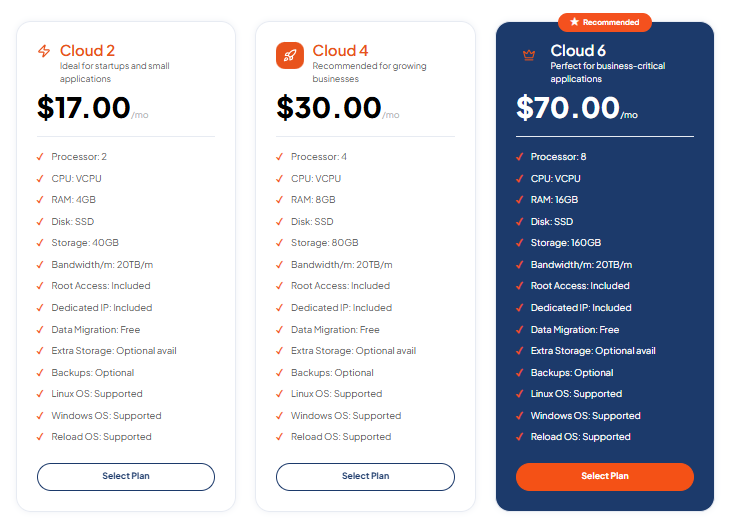
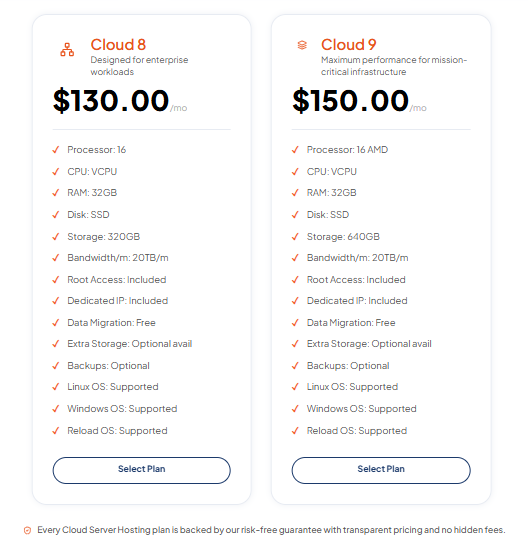
TezHost offers several cloud server configurations, allowing customers to choose resources according to their application requirements.
| Plan | vCPU | RAM | Storage | Monthly Price |
|---|---|---|---|---|
| Cloud 2 | 2 | 4GB | 40GB | $17 |
| Cloud 4 | 4 | 8GB | 80GB | $30 |
| Cloud 6 | 8 | 16GB | 160GB | $70 |
| Cloud 8 | 16 | 32GB | 320GB | $130 |
| Cloud 9 | 16 | 32GB | 640GB | $150 |
Every listed plan includes 20TB monthly bandwidth, full root access, a dedicated IP address, free data migration, and Linux and Windows operating system support. Backups are listed as optional, so customers should confirm the available backup arrangements and choose an independent backup strategy where required.
Infrastructure That Supports Growth
TezHost’s cloud servers offer dedicated resources and the ability to upgrade CPU, RAM, and storage as business requirements increase.
This flexibility is useful when an application experiences higher traffic, database growth, or increasing processing requirements.
Migration and Technical Support
Moving an application to a new server can involve databases, configurations, operating systems, and application dependencies.
TezHost includes free data migration with its listed cloud plans. Customers can discuss their technical requirements with the team before selecting a configuration.
Domain and DNS Management
Your cloud server is only one part of your online infrastructure. Your domain and DNS configuration also affect how users reach your applications.
Through TezHost domain services, customers can register and manage domains, configure DNS records, and access features such as Cloudflare integration.
A More Informed Hosting Decision
The goal should not be to purchase the largest server available. It should be to select infrastructure that matches your workload, budget, and continuity requirements.
You can register with TezHost to explore its cloud server plans or talk to a sales agent to discuss your CPU, RAM, storage, operating system, and migration requirements.
Explore the complete range of TezHost cloud servers to compare the available options.
Frequently Asked Questions About Cloud Provider Outages
What if cloud goes down while my website is running?
If the cloud server becomes unavailable, visitors may receive errors or be unable to access your website. The website will return when the affected service is restored or your application is moved to a functioning recovery environment.
Can a cloud provider outage cause permanent data loss?
A temporary outage does not normally mean permanent data loss. However, hardware damage, storage corruption, or security incidents can cause data loss. Independent backups and tested restoration procedures reduce this risk.
Does cloud hosting guarantee 100% uptime?
No. Cloud hosting does not guarantee that every component will remain available at all times. Providers may publish uptime commitments in their service-level agreements, but exclusions and compensation conditions vary.
What is the difference between high availability and disaster recovery?
High availability is designed to keep services running when individual components fail, often through redundancy and automatic failover. Disaster recovery focuses on restoring systems after a larger disruption, such as a regional outage or serious data loss.
Should I use two cloud providers to avoid downtime?
Not necessarily. Multi-cloud architecture can reduce dependency on one provider, but it adds operational complexity, data synchronization requirements, and cost. For many businesses, a well-designed single-provider deployment with independent backups may be sufficient.
How often should cloud server backups be taken?
It depends on how frequently your data changes and how much data your business can afford to lose. A website updated once a week may need a different backup schedule from an online store processing orders every minute.
What is the safest way to prepare for a cloud provider outage?
Maintain independent backups, define RTO and RPO targets, monitor your applications, document recovery procedures, and regularly test restoration and failover. These measures help reduce the impact of a cloud provider outage.
Conclusion: Prepare for the Outage Before It Happens
A cloud provider outage does not have to become a business disaster. The real risk comes from relying on infrastructure without a recovery strategy.
Understanding what if cloud goes down should be part of every business’s infrastructure planning. Your website, applications, databases, and customer information deserve protection beyond the availability of a single server.
Before choosing or upgrading your cloud infrastructure, remember to:
- Understand the provider’s uptime commitment and limitations.
- Keep independent backups of important data.
- Define realistic RTO and RPO targets.
- Consider secondary recovery infrastructure where necessary.
- Monitor applications and network availability.
- Test backups, restoration, and failover procedures.
- Make sure your technical team knows what to do during an incident.
The right cloud server should support your business today while giving you room to prepare for tomorrow’s challenges.
If you are reviewing your hosting infrastructure, explore TezHost Cloud Servers and compare the available configurations.
Register with TezHost to get started, or talk to our sales team about your infrastructure requirements.
For more information about TezHost’s hosting and domain services, visit tezhost.com.