How much cloud server space do you actually need? It depends on your website’s size, application requirements, database growth, traffic, and the amount of data you expect to store. Choosing the right capacity is essential if you want reliable performance without paying for resources that sit unused.
Whether you’re running a WordPress website, an ecommerce store, a SaaS application, or multiple business applications, understanding cloud storage sizing can help you make a smarter infrastructure decision.
The challenge is that server capacity isn’t just about storage. You also need to consider RAM, CPU, bandwidth, database requirements, backups, and future scalability.
If you’re planning to launch a new project or upgrade your existing infrastructure, register with TezHost and explore hosting solutions designed for different workloads. You can also talk to a TezHost sales agent to discuss your technical requirements before choosing a plan.
Let’s look at how to calculate your actual requirements and choose a right size cloud server without overspending.
1. What Does Cloud Server Space Actually Include?
Understanding how much cloud server space you need starts with knowing what your storage allocation is used for.
Cloud server storage is the disk capacity available for your operating system, applications, website files, databases, logs, temporary files, and other server data.
For example, an 80GB cloud server does not necessarily give your website 80GB of usable storage. A portion is occupied by the operating system, installed software, control panels, application dependencies, and system files.
Your storage requirements generally include:
- Operating system: Linux or Windows Server installation files and system components.
- Website files: WordPress installations, themes, plugins, images, videos, and downloadable content.
- Databases: Customer information, product catalogues, orders, user accounts, and application records.
- Application files: Software packages, dependencies, containers, and application data.
- Logs and temporary files: Server logs, cache files, and temporary processing data.
- Backups: Copies of websites, databases, configurations, and other important information.
It is important to distinguish between storage capacity and RAM. Storage holds your data, while RAM temporarily holds the information your applications need to access quickly.
Similarly, CPU resources determine how much processing work your server can handle.
A server can have 500GB of storage and still perform poorly if it has insufficient RAM or CPU resources.
Technical takeaway: Cloud storage sizing should be part of a broader capacity assessment, not an isolated decision based on disk space alone.
2. How Much Cloud Server Space Do Different Websites Need?
There is no universal storage requirement for every website. A simple business website and a large ecommerce platform have very different infrastructure demands.

The best way to estimate how much cloud server space you need is to assess your existing data, expected traffic, application complexity, and growth.
Here are some practical starting estimates:
| Website or application | Suggested starting storage |
|---|---|
| Basic business website | 10–20GB |
| WordPress website | 20–40GB |
| Growing blog or content website | 30–60GB |
| Small ecommerce store | 40–80GB |
| Multiple websites | 80–160GB |
| SaaS or custom application | 80–160GB+ |
| Media-heavy platform | 200GB+ |
These are planning estimates, not guaranteed hosting requirements. Actual usage depends on software, media, databases, backups, and workload.
For example, a WordPress website containing mostly text and compressed images may operate comfortably with relatively little storage. An ecommerce website with thousands of product images, downloadable resources, and frequent database updates will require more.
Applications that process customer information or generate reports may also require additional storage for databases and logs.
What About Multiple Websites?
Hosting several websites on one cloud server requires more than simply adding their current file sizes together.
You should also account for:
- Separate databases and application files.
- Email storage, if hosted on the server.
- Software updates and temporary files.
- Backup requirements.
- Traffic spikes and application caching.
If you manage websites for multiple clients, calculate the requirements of each project before selecting your infrastructure.
For businesses planning to host several websites or applications, explore TezHost Cloud Servers to compare available configurations.
3. How to Calculate Your Actual Server Storage Requirements
One of the biggest mistakes businesses make is selecting a server based on guesswork.
A better approach is to calculate your existing storage consumption and estimate how quickly it will increase.
To determine how much cloud server space you need, use this basic formula:
Required storage = Current data + Expected growth + System overhead + Backup allocation + Safety buffer
Let’s consider a practical example.
Imagine you operate an ecommerce website with the following requirements:
| Storage component | Estimated space |
|---|---|
| Operating system and software | 10GB |
| Website files and applications | 12GB |
| Product images and media | 15GB |
| Database | 8GB |
| Logs and temporary files | 5GB |
| Additional growth allowance | 20GB |
| Total | 70GB |
In this example, an 80GB server may be a reasonable starting point, provided backups are stored separately and sufficient free capacity is maintained.
However, if your backups are stored on the same server, you must include their size in your calculations.
Don’t Forget Database Growth
Databases are often overlooked during cloud storage sizing.
An ecommerce database grows as you receive orders, add customers, update products, and generate transaction records. SaaS platforms may accumulate user activity, application logs, and analytics data much faster.
Monitor database size regularly rather than assuming it will remain constant.
Leave Room for Growth
A server running at 95% storage capacity is not necessarily a healthy server.
Operating systems, databases, and applications need sufficient free disk space for temporary operations, updates, caching, and normal maintenance.
As a practical planning guideline, aim to maintain around 20–30% free storage capacity, adjusting this according to your workload and operational requirements.
This buffer helps reduce the risk of unexpected storage shortages.
4. Storage Is Not Everything: CPU, RAM and Bandwidth Matter Too
You might have enough disk space but still experience slow loading times, application crashes, or server instability.
Why? Because cloud server performance depends on several interconnected resources.

When assessing how much cloud server space you need, you should evaluate storage alongside CPU, RAM, and bandwidth.
CPU: Processing Power
CPU resources determine how many operations your server can process.
A basic website with limited traffic may require fewer CPU resources than an ecommerce platform handling simultaneous customer requests, payment processing, and database queries.
Resource-intensive applications, APIs, and background processing tasks also require additional processing capacity.
RAM: Application Memory
RAM is particularly important for databases, dynamic websites, and applications running multiple processes.
For example:
- 4GB RAM: Suitable as a starting point for smaller applications and lighter workloads.
- 8GB RAM: A practical option for growing websites and moderate application requirements.
- 16GB RAM: Worth considering for more demanding applications and databases.
- 32GB RAM: Suitable for heavier workloads, multiple services, and enterprise applications.
These are indicative starting points. Actual requirements depend on the software stack, concurrent processes, caching, and workload behaviour.
Bandwidth: Data Transfer
Bandwidth determines how much data your server can transfer over a given period.
A website receiving thousands of visitors who download images, videos, or files can consume considerably more bandwidth than a simple text-based website.
For example, if 10,000 visitors each download 5MB of content, the website transfers approximately 50GB of data.
This is why bandwidth planning should be included in your infrastructure assessment.
Remember: Storage capacity, RAM, CPU, and bandwidth solve different problems. Increasing one resource will not automatically fix a shortage in another.
5. Shared or Dedicated Cloud Resources: Which Do You Need?
Choosing a right size cloud server also involves understanding how your resources are allocated.
Not every business needs dedicated physical hardware. Equally, not every workload is suitable for a basic shared hosting environment.

Shared Cloud Infrastructure
Shared cloud infrastructure uses underlying physical hardware to support multiple virtual machines or workloads.
It can be a cost-effective option for smaller websites, development environments, and projects with moderate resource requirements.
However, actual performance depends on resource allocation, infrastructure design, and workload isolation.
Dedicated Servers
Dedicated physical servers provide exclusive access to the server hardware.
They are useful for businesses running resource-intensive databases, high-demand applications, or workloads that require greater hardware control.
They can also provide more flexibility for specialized configurations.
What Is the Better Choice?
The answer depends on your workload, not simply the amount of storage you need.
For a more detailed comparison, read our guides:
- Dedicated vs Shared Cloud Servers: Understanding the Differences
- Shared vs Dedicated Cloud Server: How to Choose
These comparisons will help you understand resource allocation, performance considerations, and infrastructure requirements before committing to a hosting solution.
If you’re uncertain about how much cloud server space you need or which infrastructure type suits your applications, speak with a TezHost sales agent.
6. How to Right-Size Your Cloud Server Without Overspending
Right-sizing means selecting server resources that match your actual workload instead of purchasing the largest available configuration.
It is an important part of cloud cost optimization.
A server that is consistently underutilized may be unnecessarily expensive. On the other hand, insufficient resources can create performance bottlenecks, downtime, and a poor user experience.
Here are seven practical ways to right-size your cloud server.
1. Review existing resource usage.
Check disk consumption, CPU utilization, RAM usage, database size, and bandwidth over time. Avoid making decisions based on a single day’s measurements.
2. Identify performance bottlenecks.
Use server monitoring tools to identify whether the problem is insufficient memory, high CPU utilization, slow disk operations, or excessive database queries.
3. Separate application and backup storage.
Where possible, maintain backups outside the primary production server. This reduces the risk of backups consuming valuable application storage.
4. Remove unnecessary data.
Old logs, temporary files, outdated application packages, and unused backups can gradually consume significant storage.
5. Plan for peak traffic.
Your server should handle realistic traffic spikes, not just average daily usage. Consider seasonal campaigns, product launches, and promotional events.
6. Choose scalable infrastructure.
Look for hosting solutions that allow you to upgrade CPU, RAM, and storage as your requirements change.
7. Review your configuration regularly.
Reassess your resource allocation monthly or quarterly, depending on how quickly your application grows.
Which TezHost Cloud Server Configuration Should You Consider?
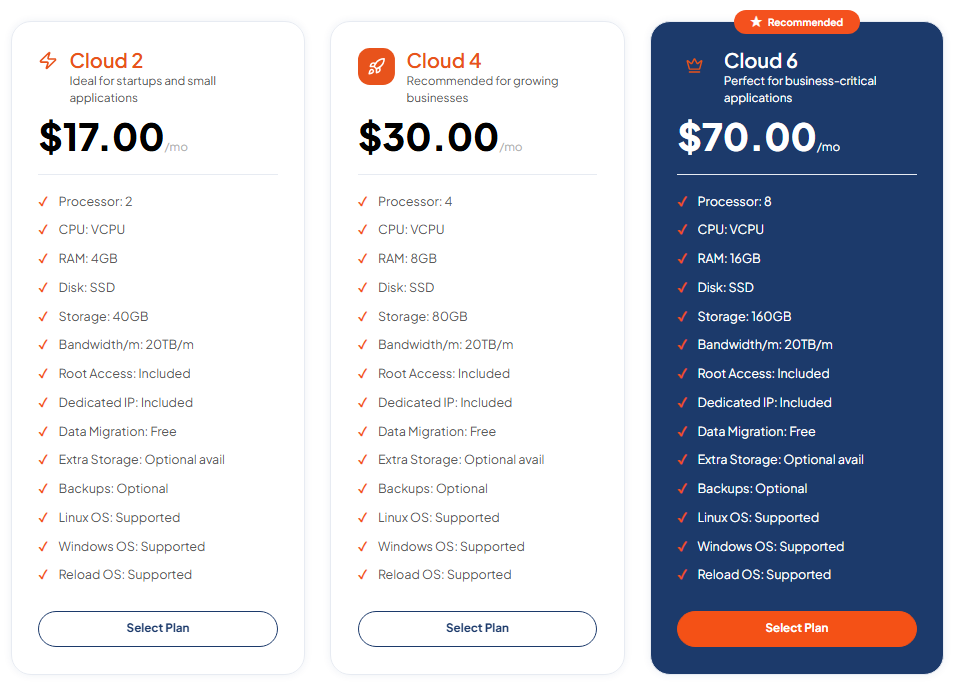
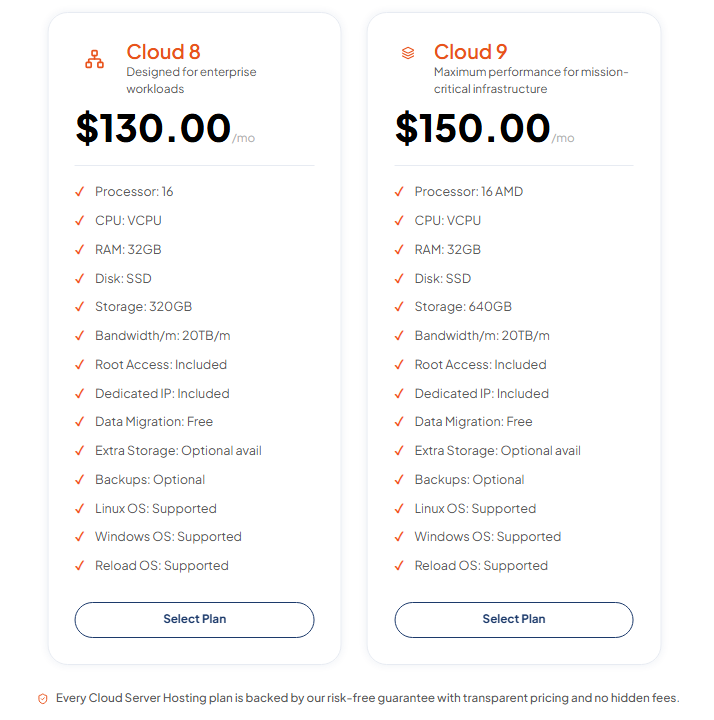
TezHost offers several cloud server configurations for different workloads.
Here is a look at selected available plans:
| Plan | vCPU | RAM | Storage | Monthly price |
|---|---|---|---|---|
| Cloud 2 | 2 | 4GB | 40GB | $17 |
| Cloud 4 | 4 | 8GB | 80GB | $30 |
| Cloud 6 | 8 | 16GB | 160GB | $70 |
| Cloud 8 | 16 | 32GB | 320GB | $130 |
| Cloud 9 | 16 | 32GB | 640GB | $150 |
All these configurations list 20TB monthly bandwidth, root access, a dedicated IP, free data migration, and Linux and Windows operating system support. Backups are optional.
For example, a growing business website requiring 8GB RAM and 80GB storage could consider Cloud 4. A media-heavy application requiring additional disk capacity could evaluate Cloud 9.
The important point is to compare the complete specifications rather than choosing a plan based on storage alone.
Explore TezHost Cloud Server plans and compare the available resources.
You can also read our guide on choosing the best cloud server for your business for additional guidance.
7. How TezHost Is Revolutionizing Cloud Hosting Through Smarter Capacity Planning
At TezHost, we believe businesses shouldn’t have to choose between affordable infrastructure and the resources they need to operate efficiently.
Our approach focuses on offering flexible cloud server configurations that allow businesses, developers, and growing organizations to select infrastructure according to their actual requirements.
Instead of assuming that every customer needs an enterprise-level server, we provide different configurations for different workloads.
Performance-Focused Infrastructure
TezHost Cloud Servers are powered by AMD EPYC processors, DDR5 memory, and Gen4 NVMe SSD storage, providing a modern infrastructure foundation for demanding applications.
Flexible Resource Upgrades
Business requirements change. A website that starts with a small database may eventually become a high-traffic platform.
TezHost provides cloud configurations with different CPU, RAM, and storage allocations, allowing customers to move towards larger resources as their needs grow.
Developer-Friendly Environment
Every listed cloud server configuration includes full root access, a dedicated IP, and Linux and Windows operating system support.
This gives developers greater flexibility to configure their environments, deploy applications, and manage server-level requirements.
Support Beyond the Purchase
Choosing the right infrastructure can be challenging, especially when you’re moving from shared hosting to cloud servers.
Our team can help customers explore available configurations and understand which resources are relevant to their projects.
If you’re evaluating how much cloud server space you need, connect with TezHost and discuss your workload before ordering.
You can also visit TezHost to explore our wider hosting and infrastructure services.
Frequently Asked Questions About Cloud Server Capacity
1. How much cloud server space does a small business need?
A small business website may start with 10–20GB of storage, while a growing WordPress website or application may need 20–80GB or more. The actual requirement depends on website files, databases, media, backups, and expected growth.
2. Is 40GB enough for a cloud server?
Yes, 40GB can be sufficient for smaller websites, development environments, and lightweight applications. However, you should account for operating system files, software, databases, logs, and free storage requirements.
3. Is 80GB enough for WordPress hosting?
For many WordPress websites, 80GB is a comfortable starting allocation. However, websites with large media libraries, multiple installations, ecommerce functionality, or extensive backups may require more.
4. How much RAM should a cloud server have?
Smaller applications may work with 4GB RAM, while growing websites and applications may benefit from 8GB or 16GB. Larger databases and resource-intensive applications may require 32GB or more. Monitor actual memory consumption before upgrading.
5. Does more storage make a cloud server faster?
Not necessarily. More storage increases the amount of data you can store, but it does not automatically improve processing performance. CPU, RAM, storage technology, database optimization, and network performance all influence server speed.
6. How much storage should I reserve for backups?
Your backup allocation depends on the size of your data, backup frequency, retention period, and compression. For example, keeping seven full 50GB backups requires up to 350GB before accounting for compression or incremental backup methods.
Storing backups separately from your production server is generally a better approach.
7. Can I upgrade my cloud server later?
Yes, depending on the hosting provider and available configurations. TezHost offers different cloud server sizes, allowing businesses to evaluate larger CPU, RAM, and storage allocations as their requirements increase.
Conclusion: Choose the Right Capacity Before Your Business Outgrows It
Understanding how much cloud server space you need is about more than choosing a storage number.
You need to consider your website files, databases, operating system, applications, backups, CPU, RAM, and bandwidth. You also need to leave sufficient room for growth without paying for resources that your business doesn’t currently require.
The best approach is to measure your existing usage, estimate future demand, and choose a configuration that provides a practical balance between performance and cost.
Whether you’re launching a new website, migrating an ecommerce platform, or deploying a business-critical application, TezHost offers cloud server configurations designed for different workloads.
Ready to find the right cloud server for your project?
Explore TezHost Cloud Servers or register with TezHost to get started.
Not sure which configuration to choose? Talk to our sales team and let us help you evaluate your requirements before you invest.