Cloud data transfer costs can turn an affordable cloud server into an unexpectedly expensive monthly bill. And the frustrating part? Many businesses don’t realize they’re paying extra to move data until they receive their invoice.
Imagine this.
You sign up for a cloud server that costs $25 per month.
The storage looks sufficient. The RAM meets your requirements. The processor is powerful enough to run your applications.
Everything seems perfect.
Then your website starts attracting more visitors.
Your application begins transferring more data.
And suddenly, your monthly bill is higher than expected.
But wait. Didn’t you already pay for the cloud server?
Yes. However, depending on your provider and plan, transferring data can involve additional charges.
This is one reason why cloud pricing is confusing for businesses that are new to cloud infrastructure.
At TezHost, we believe businesses should understand their infrastructure requirements before committing to a hosting solution.
Whether you’re launching an application or reviewing your current cloud expenses, you can register with TezHost to explore available services.
Have questions about bandwidth or cloud server pricing? Talk to a TezHost sales agent before choosing your plan.
Let’s explore why data transfer can make cloud hosting more expensive and seven practical ways to control those costs.
1. What Are Cloud Data Transfer Costs?
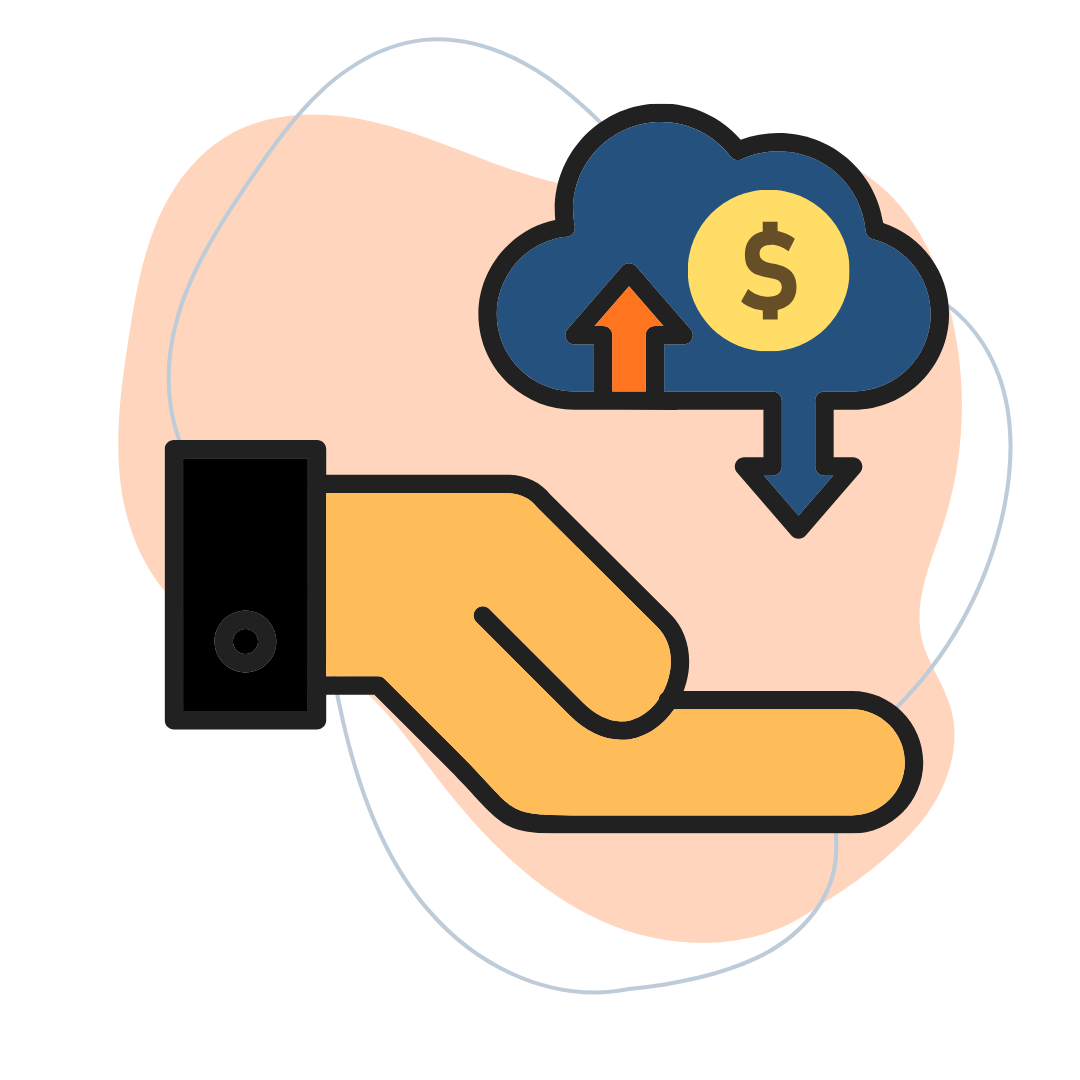
Cloud data transfer costs are charges associated with moving data between cloud resources, networks, geographic regions, or the public internet.
Cloud providers use different pricing models.
Some hosting plans include a fixed amount of monthly data transfer.
Others charge separately for certain types of traffic.
For example, your business might pay for:
- Data transferred from a cloud server to internet users.
- Communication between cloud regions.
- Traffic between certain cloud services or availability zones.
- Data transferred through gateways or load balancers.
- Data exceeding the bandwidth allowance included in your plan.
Not every provider charges for all these activities.
That’s why understanding your cloud server’s pricing structure matters.
What Is the Difference Between Bandwidth and Data Transfer?
Bandwidth describes a network’s data transmission capacity, while data transfer measures how much information actually moves across the network.
Think of bandwidth as the width of a highway.
Data transfer is the amount of traffic traveling along it.
A server with a high-speed network connection doesn’t necessarily include unlimited monthly data transfer.
The key takeaway: Always check both network speed and included transfer allowances before purchasing cloud hosting.
2. What Are Cloud Egress Fees, and Why Do They Matter?
Cloud egress fees are charges some cloud providers apply when data leaves their cloud infrastructure, such as when a server sends information to users over the internet.
Here’s a simple example.
A customer visits your ecommerce website.
They browse products, view images, and download information.
Your cloud server sends data to their device.
That outgoing traffic may count toward your data transfer allowance or generate usage-based charges.
Now imagine thousands of customers doing the same thing every day.
Your data transfer requirements can grow quickly.

Is Incoming Cloud Traffic Free?
Incoming internet data transfer is free with many major cloud services, but pricing varies by provider, service, and traffic route.
Outgoing traffic is more likely to involve charges.
However, internal transfers can also carry fees in certain configurations.
That’s why cloud data transfer costs should be evaluated based on your actual network architecture.
Why Can Cloud Egress Fees Become Expensive?
Three common reasons are:
Growing Website Traffic: More visitors can mean more outgoing data.
Large Files: Images, videos, downloads, and backups can significantly increase transfer volumes.
Complex Cloud Architecture: Applications communicating across regions or services may create additional billable traffic.
The surprising part? Your cloud server doesn’t have to use more CPU or RAM for your network charges to increase.
3. How Much Can Cloud Data Transfer Costs Increase Your Bill?
Cloud data transfer costs can significantly increase monthly expenses when a business exceeds its included transfer allowance or uses services billed separately for network traffic.
Consider this hypothetical example.
A business purchases a cloud server for $25 per month.
Its workload also generates the following additional charges:
| Expense | Illustrative Monthly Cost |
|---|---|
| Cloud Server | $25 |
| Additional Internet Data Transfer | $18 |
| Cross-Region Data Transfer | $12 |
| Network Gateway Processing | $8 |
| Total Monthly Bill | $63 |
Instead of paying $25, the business pays $63.

That’s $38 in additional monthly expenses.
Over a year, the extra charges total $456.
These figures are illustrative, not actual TezHost pricing or a quote from a particular cloud provider. Real charges depend on the provider, plan, location, and workload.
Why Is Cloud Pricing So Confusing?
Cloud pricing can be confusing because compute resources, storage, network traffic, and additional services may be measured and billed differently.
For example:
Your server might be billed monthly.
Storage might be billed according to capacity.
Network traffic might be billed per gigabyte.
And additional infrastructure services might have their own pricing rules.
Individually, those charges may seem small.
Together, they can make the final bill difficult to predict.
For a broader breakdown, read our guide on Understanding Cloud Server Total Cost.
4. What Are the 7 Best Ways to Reduce Cloud Data Transfer Costs?
The best way to reduce cloud data transfer costs is to understand your traffic patterns, minimize unnecessary transfers, and choose a pricing model that matches your workload.
Here are seven practical strategies.
1. Understand Your Cloud Provider’s Pricing
Before purchasing a cloud server, check:
- How much monthly data transfer is included.
- Whether incoming traffic is charged.
- How outgoing traffic is billed.
- Whether transfers between regions cost extra.
- What happens when you exceed your allowance.
Tip: Ask for a breakdown of expected monthly expenses based on your anticipated traffic.
2. Use a Content Delivery Network
A Content Delivery Network (CDN) can cache website content closer to visitors.
This may reduce repeated requests to your origin server and improve loading performance.
However, CDNs can have their own traffic and service charges.
Tip: Compare the CDN’s cost with the origin traffic expenses it may help reduce.
3. Optimize Images and Large Files
Large images, videos, and downloadable files can consume substantial bandwidth.
Compressing images and serving appropriately sized files can reduce the amount of data transferred.

Tip: Use modern image formats such as WebP or AVIF where appropriate.
4. Avoid Unnecessary Cross-Region Transfers
Moving data between cloud regions can create additional expenses.
For example, an application hosted in one region might frequently communicate with a database in another.
Depending on the provider, that communication may be billable.

Tip: Where performance, resilience, and compliance requirements allow, keep frequently communicating resources in suitable locations.
5. Monitor Your Data Usage
You can’t control expenses you aren’t measuring.
Review your network traffic regularly.

Look for unusual spikes, unexpected transfers, and applications consuming excessive bandwidth.
Tip: Enable usage alerts and budget notifications if your provider supports them.
6. Review Your Backup and Migration Strategy
Backups and cloud migrations can involve large amounts of data.
Moving information between providers or regions may result in network charges.
Tip: Estimate data transfer requirements before starting a migration.

Our Cloud Migration Checklist can help you plan important steps before moving infrastructure.
If you’re moving an existing website, explore our Guide to Transferring a Website to a New Host.
7. Choose Hosting with Suitable Data Transfer Allowances
Sometimes, the simplest way to control network expenses is to select a hosting plan with a predictable monthly transfer allowance.
For businesses with relatively stable traffic, this can make budgeting easier.
However, fixed allowances still need to be checked against expected usage and any applicable overage rules.

Tip: Compare total monthly costs rather than choosing a server based only on CPU, RAM, and storage.
The goal isn’t to eliminate data transfer. It’s to avoid paying unnecessarily for the data your business needs to move.
5. Is Cloud Hosting Still Worth It Despite Data Transfer Fees?
Yes. Cloud hosting can still offer excellent value, provided its performance, scalability, flexibility, and total operating costs match your business requirements.
Cloud infrastructure can be useful for:
- Ecommerce websites.
- SaaS applications.
- Business websites.
- Development environments.
- Customer portals.
- Growing online platforms.
But not every business needs the same pricing model.
Usage-Based Cloud vs. Fixed-Allowance Hosting
| Factor | Usage-Based Cloud | Fixed-Allowance Cloud Hosting |
|---|---|---|
| Data Transfer | May be billed according to usage | A specified amount may be included |
| Monthly Predictability | Depends on traffic and pricing rules | Often easier within the allowance |
| Traffic Growth | May increase network charges | May trigger overages or require an upgrade |
| Flexibility | Often highly configurable | Depends on the available plans |
| Best Fit | Workloads needing granular resource control | Businesses seeking simpler budgeting |
Neither model is universally better.
The right choice depends on how your applications use cloud resources.
A business serving large video files may have very different requirements from a company hosting a small WordPress website.
6. How Is TezHost Revolutionizing Cloud Hosting with a Smarter Approach?
TezHost is helping businesses explore cloud hosting through resource-based plans, performance-focused infrastructure, and practical guidance on choosing suitable configurations.
At TezHost, we understand that cloud hosting decisions shouldn’t begin and end with the advertised server price.
Businesses need to consider the complete picture.
How much traffic will their website generate?
What resources will their applications require?
Will their hosting needs change over time?
And how can they plan their expenses more effectively?
Our approach focuses on helping customers evaluate these questions before making a decision.
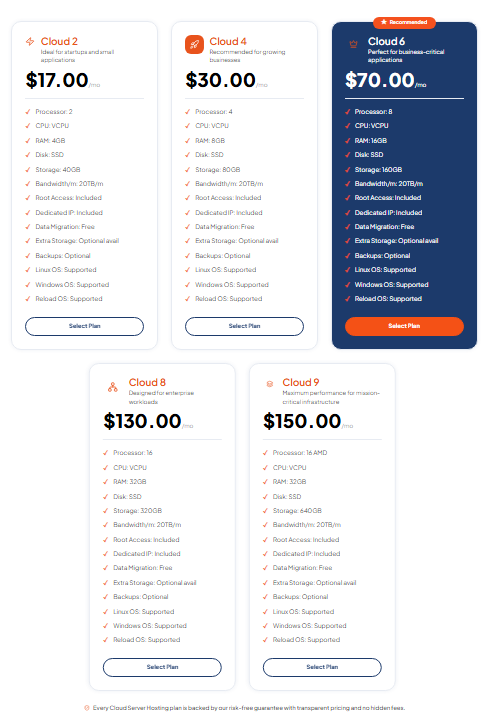
Performance-Focused Cloud Infrastructure
TezHost offers cloud server solutions featuring technologies such as:
- AMD EPYC processors.
- DDR5 RAM.
- Gen4 NVMe SSD storage.
- Full root access.
- Different CPU, RAM, and storage configurations.
These features give businesses options for hosting websites and applications with varying resource requirements.
Cloud Server Plans with Defined Resources
TezHost provides cloud server plans with specified infrastructure resources.
Selected cloud server offerings advertise substantial monthly data transfer allowances, including plans with 20 TB of traffic.
However, customers should confirm the current allowance, network policies, overage terms, and any applicable restrictions for their selected plan before purchasing.
Helping Businesses Plan More Effectively
Choosing the right cloud server isn’t always about selecting the largest configuration.
It’s about understanding your workload.
A small website may not need the same infrastructure as a resource-intensive business application.
Our team can help customers explore available configurations and discuss their requirements.
Supporting Businesses Through Cloud Migration
Moving from one hosting environment to another requires planning.
Businesses should consider application compatibility, DNS changes, backups, downtime risks, and data transfer requirements.
TezHost offers different hosting solutions for businesses evaluating their infrastructure options.
Domains and Cloud Hosting Together
Alongside cloud servers, TezHost provides domain registration services.
Businesses can explore available domains while planning their websites and applications.
Our approach is simple: Help businesses choose cloud infrastructure based on actual requirements, not just attractive advertised prices.
Ready to Explore Your Cloud Hosting Options?
Visit TezHost Cloud Servers to compare available plans.
Not sure how much data transfer your website needs?
Talk to a TezHost sales agent to discuss your traffic expectations and available hosting options.
7. How Can You Estimate Cloud Data Transfer Costs Before Buying?
To estimate cloud data transfer costs, calculate your expected monthly traffic, identify where data will travel, and compare those requirements against your provider’s pricing and included allowances.
Start with a simple calculation.
Example: Estimating Website Traffic
Suppose your website receives:
50,000 monthly visits
And each visit transfers approximately:
3 MB of data
Your estimated monthly outgoing traffic would be:
50,000 × 3 MB = 150,000 MB
That’s approximately 150 GB per month using decimal units.
This estimate doesn’t include every possible transfer, such as backups, API calls, administrative traffic, or other services.
Actual usage may also differ because of caching, repeat visitors, and website behavior.
What Should You Ask Before Purchasing?
Use this checklist:
| Question | Why It Matters |
|---|---|
| How much data transfer is included? | Helps estimate monthly expenses |
| Are outgoing transfers charged separately? | Identifies possible egress fees |
| Are transfers between regions billable? | Helps evaluate application architecture |
| What happens when I exceed my allowance? | Prevents unexpected charges or restrictions |
| Are backups and migrations included? | Helps estimate additional expenses |
| Can I monitor network usage? | Supports cost control |
| Can I upgrade my plan? | Helps accommodate future growth |
A few questions before purchasing can prevent unpleasant surprises after deployment.
Frequently Asked Questions About Cloud Data Transfer Costs
What Are Cloud Data Transfer Costs?
Cloud data transfer costs are charges associated with moving data between cloud services, geographic regions, networks, or internet users.
The applicable fees depend on the provider and service configuration.
What Are Cloud Egress Fees?
Cloud egress fees are charges some providers apply when data leaves their cloud infrastructure.
These fees may apply to outgoing internet traffic or certain other data transfer routes.
Why Is Cloud Pricing So Confusing?
Cloud pricing can be confusing because compute, storage, networking, and additional services may follow different billing models.
Understanding the total cost requires reviewing each component.
Is Incoming Data Transfer Free in Cloud Computing?
Incoming internet traffic is free with many cloud services, but this isn’t universal.
Always review your provider’s pricing documentation.
How Can I Reduce Cloud Egress Fees?
You can reduce certain egress expenses by optimizing files, using caching or a CDN where cost-effective, minimizing unnecessary cross-region transfers, and monitoring network usage.
Does Cloud Migration Involve Data Transfer Costs?
It can.
Moving data between providers, regions, or infrastructure environments may generate network charges depending on the services involved.
Is Unlimited Bandwidth the Same as Unlimited Data Transfer?
No.
Bandwidth describes network capacity, while data transfer describes the amount of information transmitted.
Plans advertised as unlimited may still be subject to acceptable-use policies or other restrictions.
Can TezHost Help Me Choose a Cloud Server?
Yes. TezHost provides cloud server options, and its sales team can discuss available configurations and traffic allowances.
Contact TezHost Sales for assistance.
Conclusion: Don’t Let Data Transfer Costs Surprise You
Cloud data transfer costs don’t have to become an unpredictable expense for your business.
Cloud computing offers flexibility, performance, and opportunities for growth.
But those benefits are easier to manage when you understand the complete pricing structure.
Before choosing a cloud server, take time to review:
- Included data transfer.
- Potential cloud egress fees.
- Network traffic requirements.
- Backup and migration costs.
- Resource usage.
- Upgrade and overage policies.
The most affordable cloud server isn’t necessarily the one with the lowest advertised price.
It’s the one that provides the right resources and predictable value for your workload.
At TezHost, we believe businesses should be able to explore cloud hosting options with a clearer understanding of their infrastructure needs.
Is Your Cloud Bill Higher Than Expected?
Stop guessing where your cloud budget is going. Start asking the questions that matter.
Whether you’re launching a new website, planning a cloud migration, or evaluating your existing hosting expenses, TezHost can help you explore suitable cloud server options.
Explore available cloud server plans:
Discover TezHost Cloud Servers
Ready to get started?
Register with TezHost
Not sure which plan fits your traffic requirements?
Talk to a TezHost Sales Agent
Your cloud infrastructure should help your business grow—not leave you guessing about your next invoice.