Cloud customer service expectations have changed as businesses increasingly depend on cloud infrastructure to operate websites, applications, databases, and business-critical systems. Today, choosing a cloud server is about more than CPU cores, RAM, NVMe storage, and bandwidth. It is also about knowing who will help when something goes wrong.
Imagine your ecommerce website suddenly becomes unavailable during peak traffic. Your application stops responding, or your database experiences unexpected errors. Every minute of downtime can affect revenue, customer trust, and business operations.
This is where cloud server support and SLA commitments become important. A reliable hosting provider should offer knowledgeable technical assistance, clear communication, defined support procedures, and practical solutions when infrastructure problems occur.
Before selecting a hosting provider, understand what level of assistance you actually need. You can register with TezHost to explore its cloud hosting services or talk to a sales agent about your technical requirements.
Let’s examine seven important areas that determine whether a cloud hosting provider can deliver the support your business deserves.
1. What Technical Support Should a Cloud Server Provider Offer?
Cloud customer service expectations should begin with access to professionals who understand server infrastructure, operating systems, networking, and virtualization.

What should technical support actually cover?
Cloud server support should help customers investigate infrastructure-related problems, understand server configurations, and troubleshoot issues affecting server availability and performance.
Depending on the hosting package, technical assistance may include:
- Server availability and connectivity troubleshooting.
- Operating system installation and reinstallation.
- Network configuration assistance.
- CPU, RAM, and storage troubleshooting.
- Server provisioning and deployment assistance.
- Investigation of virtualization-related issues.
- Guidance on root access and server configuration.
- Migration assistance, where included.
However, there is an important distinction between infrastructure support and application support.
For example, a hosting provider may investigate why your server is unreachable, but this does not automatically mean its engineers will debug your custom PHP application, optimize MySQL queries, or repair third-party software.
Developers should understand this distinction when comparing cloud support options.
Before purchasing, ask the provider which responsibilities belong to its technical team and which remain with your own development or IT team.
Explore TezHost Cloud Servers to review available infrastructure options, or contact its sales team to discuss your workload.
2. Does 24/7 Cloud Support Guarantee Immediate Resolution?
Cloud customer service expectations frequently include round-the-clock assistance. However, 24/7 availability does not necessarily mean every technical problem will be resolved immediately.
What does 24/7 technical support actually mean?
It means customers can access the provider’s designated support channels throughout the day and night, subject to its published policies.
Different incidents require different investigation times.
For example:
- Billing enquiries may require minimal investigation.
- Server connectivity problems may need network diagnostics.
- Hardware-related incidents may require infrastructure escalation.
- Database corruption may require specialized recovery procedures.
This is why cloud server support and SLA agreements deserve careful attention.
A Service Level Agreement (SLA) defines the provider’s contractual service commitments. Depending on the agreement, it may cover uptime targets, response times, maintenance conditions, exclusions, and service credits.
Before purchasing, ask:
- Is technical support available 24/7?
- Are critical incidents prioritized?
- What is the initial response time?
- Are resolution targets documented?
- How are scheduled maintenance activities communicated?
- What happens when contractual uptime commitments are not met?
Remember that uptime and support response time are two different measurements.
For example, 99.9% uptime allows approximately 43.8 minutes of downtime in a 30-day month. It does not mean every support ticket will be resolved within that period.
You can review the TezHost Support Policy to understand its support procedures and available communication channels.
3. Which Cloud Support Options Should You Look For?
Cloud customer service expectations also involve having convenient ways to communicate with your hosting provider.
Not every issue requires the same communication method. A sales enquiry, billing question, server outage, and complex configuration problem may require different channels.

Here are four common cloud support options.
Ticket Support
Ticketing systems are particularly useful for technical problems requiring investigation, documentation, and multiple troubleshooting steps.
Customers can maintain a written record of conversations, technical findings, and previous solutions.
Live Chat Support
Live chat is useful for quick enquiries, product information, and initial troubleshooting guidance.
It is especially valuable when customers need clarification before purchasing or upgrading a server.
Phone Support
Phone communication can be helpful when discussing urgent concerns, complex requirements, or situations requiring direct interaction.
However, customers should check whether phone support includes technical troubleshooting or is primarily intended for general enquiries.
Email Support
Email is useful for detailed explanations, configuration information, and maintaining written records.
Businesses should also consider professional email options when communicating with hosting providers. The difference between free email vs domain email can be important when establishing a professional business identity.
A domain-based email address provides better brand consistency than a generic personal email account.
TezHost provides chat, ticket, and phone support, with its published policy outlining how technical and billing enquiries are handled.
Explore the TezHost Support Policy or speak directly with a sales representative to understand the available assistance.
4. Why Are Server Monitoring and Incident Management Important?
Cloud customer service expectations should extend beyond waiting for customers to report problems. Monitoring and incident management are essential for identifying infrastructure issues and maintaining operational stability.

Why is server monitoring important?
Server monitoring helps identify unusual resource consumption, performance degradation, connectivity problems, and other operational issues.
Technical teams commonly monitor:
- CPU utilization and load averages.
- RAM consumption and swap usage.
- Disk capacity and I/O performance.
- Network throughput and packet loss.
- Server uptime and availability.
- Application response times.
- Database performance.
For example, if an application suddenly consumes excessive memory, monitoring can help administrators identify the problem before the server becomes unresponsive.
Incident management is equally important. A structured process should include incident reporting, prioritization, investigation, escalation, communication, and recovery.
Customers should also understand the difference between infrastructure monitoring and application monitoring. A provider may monitor the underlying server without continuously monitoring every application installed by the customer.
These responsibilities should be clarified when comparing cloud support options.
For additional information, read our guide on web hosting customer support quality.
5. Does Cloud Hosting Include Backup and Disaster Recovery?
Cloud customer service expectations should include clear information about backups, recovery procedures, and disaster preparedness.
Does purchasing a cloud server automatically guarantee data backups?
No. Cloud infrastructure does not automatically guarantee that your files, databases, and applications have recoverable backups.
Businesses should confirm whether their package includes automated backups, snapshots, replication, or additional recovery services.
Consider these important technologies:
Automated Backups: Regular copies of important data help restore information after accidental deletion, software errors, or unexpected incidents.
Snapshots: These capture a particular state of a server or storage environment, allowing customers to restore an earlier state when supported.
Replication: Data replication maintains additional copies in another environment, depending on the infrastructure design.
Disaster Recovery: A disaster recovery plan defines how critical applications, databases, and services will be restored after a major disruption.
Two important technical measurements are:
- RPO (Recovery Point Objective): The maximum acceptable amount of data loss, measured in time.
- RTO (Recovery Time Objective): The target time required to restore systems following an incident.
For example, an ecommerce platform processing hundreds of orders daily may require a shorter recovery window than a personal website.
TezHost lists backups as an optional feature for its cloud server offering, so customers should confirm their backup requirements before purchasing.
Read our detailed guide on Cloud Disaster Recovery to understand how businesses can prepare for infrastructure failures.
If you are planning to host business-critical applications, discuss your requirements with TezHost before selecting a configuration.
6. How Much Technical Expertise Should Your Hosting Provider Have?
Cloud customer service expectations should include access to professionals who understand modern server technologies, rather than relying entirely on generic responses.
This is particularly important for developers, system administrators, SaaS companies, and businesses operating resource-intensive applications.

A technically capable support team should understand:
- Linux and Windows server environments.
- SSH and remote server administration.
- DNS configuration and networking.
- Firewall rules and security configurations.
- Virtualization and resource allocation.
- Storage performance and disk management.
- Server migration and operating system deployment.
- Apache, Nginx, and common web technologies.
For example, if your application experiences intermittent connectivity problems, an experienced engineer should be able to help investigate whether the issue relates to networking, firewall rules, resource limitations, or application configuration.
Another important consideration is managed versus unmanaged cloud hosting.
What is the difference between managed and unmanaged cloud hosting?
Managed hosting generally includes a broader range of server administration and maintenance responsibilities handled by the provider.
With unmanaged hosting, customers retain more responsibility for operating system updates, security configurations, software installation, and troubleshooting.
The actual scope varies between providers and packages.
Businesses without an in-house IT department should carefully evaluate these differences before purchasing.
Our article on whether premium hosting support is worth it explains when additional technical assistance can justify its cost.
7. How TezHost Is Revolutionizing Cloud Server Support
Cloud customer service expectations are evolving, and hosting providers must offer more than basic server resources to remain competitive.
TezHost combines performance-focused infrastructure, flexible configurations, accessible support channels, and practical hosting features designed for developers and growing businesses.
Here is what makes its approach worth considering.
Performance-Focused Infrastructure
TezHost cloud servers use AMD EPYC processors, DDR5 memory, and Gen4 NVMe SSD storage to provide infrastructure for demanding workloads.
These technologies support applications, business websites, databases, and ecommerce platforms requiring reliable computing resources.
Flexible Server Configurations
Businesses do not always need the same resources throughout their growth journey.
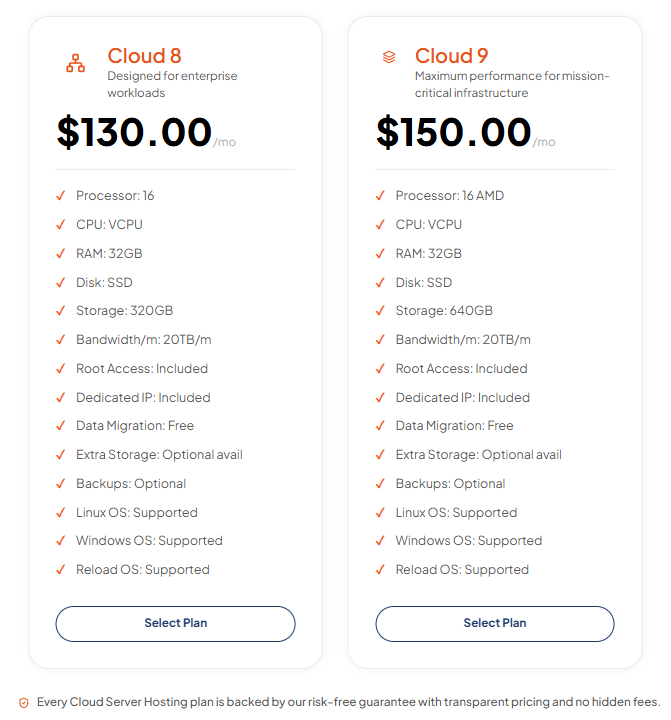
TezHost offers different cloud server configurations, allowing customers to select resources according to their requirements and upgrade as their workloads increase.
Root Access and Operating System Flexibility
Developers and system administrators need control over their server environments.
TezHost provides root access and Linux and Windows operating system options, allowing customers to configure environments for different deployment requirements.
Free Data Migration
Moving infrastructure can be challenging, especially when businesses have existing applications, databases, and configurations.
TezHost includes free data migration with its cloud server plans, helping customers transition their workloads.
Multiple Customer Support Channels
TezHost provides access to chat, ticket, and phone support. Its published support policy explains how customers can approach technical and billing enquiries.
Affordable Entry-Level Cloud Infrastructure
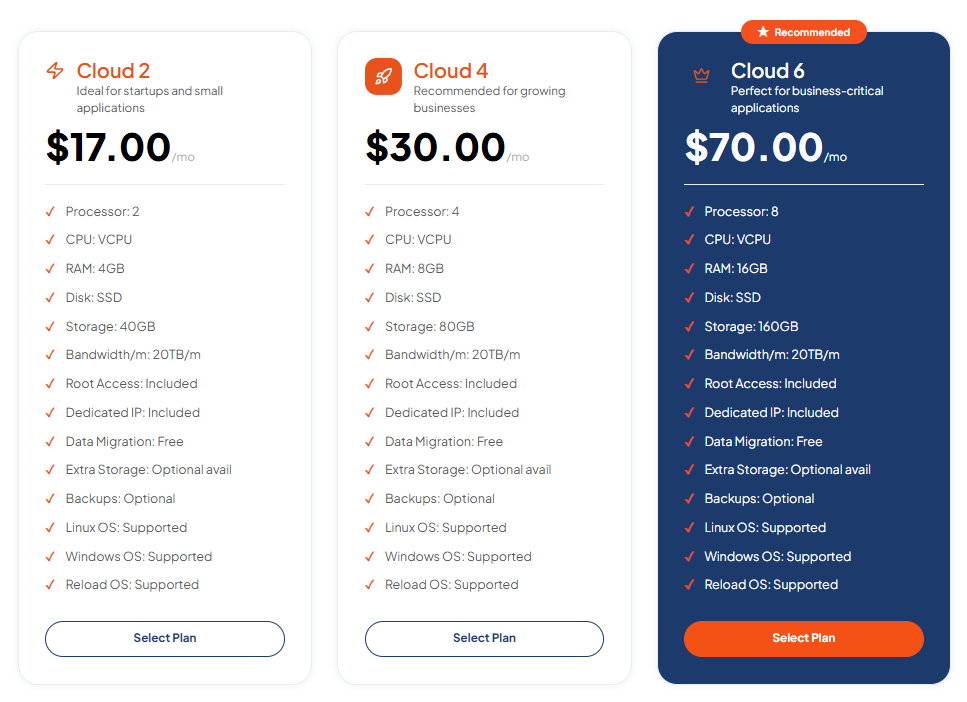
TezHost cloud server configurations start from $17 per month. The listed Cloud 2 configuration includes:
| Feature | Cloud 2 |
|---|---|
| CPU | 2 vCPU |
| RAM | 4GB |
| Storage | 40GB SSD |
| Bandwidth | 20TB |
| IP Address | Dedicated IP |
| Access | Root access |
| Backups | Optional |
These features provide a starting point for developers and businesses evaluating cloud infrastructure without immediately committing to a larger server.
Explore TezHost Cloud Server Hosting to compare configurations and features.
Not sure which server is suitable for your application? Talk to a TezHost sales agent and discuss your technical requirements before purchasing.
You can also visit the official TezHost website to explore its hosting and infrastructure services.
8. What Should You Check Before Choosing a Cloud Server Provider?
Cloud customer service expectations should be evaluated before committing to a hosting provider.
Impressive hardware specifications and competitive pricing are important, but customers should also understand what happens when technical problems occur.

Use this checklist before purchasing:
| Evaluation Area | What to Check |
|---|---|
| Technical Support | Access to knowledgeable engineers |
| Support Channels | Tickets, chat, phone, and email |
| SLA | Uptime commitments and response expectations |
| Escalation | Procedures for critical incidents |
| Backups | Frequency, retention, and restoration options |
| Security | Firewall and access control options |
| Migration | Availability and migration costs |
| Scalability | CPU, RAM, and storage upgrades |
| Management | Managed or unmanaged responsibilities |
| Documentation | Clear policies and technical guidance |
Also consider whether your business needs a conventional cloud environment or a hybrid infrastructure.
Some organizations prefer keeping certain applications on local infrastructure while using cloud resources for scalability, backups, and additional computing capacity.
Our guide on Hybrid Infrastructure Setup explains how businesses can combine different infrastructure environments.
You can also read Are Cloud Servers Reliable? to understand the infrastructure factors that influence cloud server reliability.
Frequently Asked Questions (FAQs)
1. What support should I expect from a cloud server provider?
You should expect assistance with server connectivity, infrastructure troubleshooting, operating system issues, network configuration, and server provisioning. The exact services depend on the provider’s support policy and hosting package.
2. Does cloud hosting include 24/7 technical support?
Not all cloud hosting providers offer 24/7 technical support. Check the provider’s support policy to confirm availability, communication channels, response times, and escalation procedures.
3. What is an SLA in cloud server hosting?
A Service Level Agreement (SLA) defines the service commitments between a hosting provider and its customers. It may cover uptime guarantees, response expectations, maintenance conditions, exclusions, and compensation for qualifying service interruptions.
4. What are the different cloud support options?
Common cloud support options include ticket support, live chat, phone assistance, and email support. Some providers also offer managed server administration, monitoring, migration, and additional technical services.
5. Does cloud server hosting include automatic backups?
Not necessarily. Some providers include automated backups, while others offer them as optional services. Always confirm backup frequency, retention periods, restoration procedures, and associated costs.
6. What is the difference between managed and unmanaged cloud servers?
Managed cloud servers include additional administration and maintenance handled by the hosting provider. Unmanaged servers give customers more control but require them to handle operating system updates, security configurations, and server maintenance.
7. How quickly should cloud server support respond to technical issues?
Response times depend on the provider’s SLA, support policy, and incident priority. Critical infrastructure problems should have clearly defined escalation procedures and response expectations.
8. Does TezHost provide technical support for cloud servers?
Yes. TezHost provides customer support through chat, ticket, and phone channels. Customers can review the TezHost Support Policy for details about available assistance and procedures.
9. Can I upgrade my cloud server resources as my business grows?
Yes. Cloud server configurations can generally be upgraded to accommodate increasing CPU, RAM, and storage requirements. Check your provider’s available upgrade options and any associated downtime.
10. How do I choose the right cloud server support plan?
Evaluate your technical expertise, application requirements, support availability, SLA commitments, backup requirements, and management responsibilities. Businesses without dedicated IT teams may benefit from managed support.
Conclusion: Choose Cloud Support That Helps Your Business Grow
Cloud customer service expectations should go beyond basic technical assistance. Businesses need knowledgeable support professionals, transparent SLAs, effective communication, monitoring, backup options, and clearly defined responsibilities.
A cloud server is an important part of your business infrastructure, but the support behind that infrastructure can influence how confidently you operate, scale, and respond to unexpected technical problems.
Before selecting a provider, evaluate its support channels, escalation procedures, management responsibilities, recovery options, and service commitments.
TezHost combines performance-focused cloud infrastructure, flexible server configurations, free migration, root access, and multiple support channels to help developers and businesses build their online operations.
Ready to upgrade your infrastructure?
Register with TezHost to explore cloud server packages, or talk to our sales team to discuss your technical requirements.
Your cloud infrastructure deserves more than powerful hardware. It deserves dependable technical support.