Does hosting affect Google ranking? Absolutely—but perhaps not in the way you think.
You can publish excellent content, build quality backlinks, and optimise every page on your website, yet still struggle with SEO if your hosting environment is unreliable. Slow server responses, frequent downtime, poor resource allocation, and technical errors can undermine the experience you’re working so hard to create.
Here’s the important distinction: Google does not automatically reward a website simply because it uses an expensive hosting plan. However, your hosting provider can influence several technical factors that affect website performance, crawling, user experience, and ultimately your SEO potential.
If you’re planning to improve your website’s performance, start with the foundation. Register with TezHost and explore hosting solutions designed to support your website as it grows.
Let’s look at seven ways your web host and SEO rankings are connected—and what you can do about them.
1. Slow Server Response Times Can Undermine SEO Performance
Does hosting affect Google ranking through website speed? Yes, indirectly. Your server’s response time contributes to how quickly a browser can begin loading your website.
When someone visits your website, the browser sends a request to your server. The server processes that request and returns the necessary files. If the server is overloaded, poorly configured, or running with insufficient resources, this process can take longer.

A slow website can frustrate visitors, increase abandonment, and make important pages less enjoyable to use.
Pay attention to these performance metrics:
- TTFB (Time to First Byte): Measures how long the browser waits for the first byte of a response from the server.
- LCP (Largest Contentful Paint): Measures when the largest visible content element finishes rendering.
- INP (Interaction to Next Paint): Measures how quickly a page responds to user interactions.
- CLS (Cumulative Layout Shift): Measures unexpected layout movement while a page loads.
Google’s Core Web Vitals include LCP, INP, and CLS. They are used by Google’s ranking systems, although good scores alone do not guarantee higher rankings.
What should you do?
Choose hosting with suitable server resources, efficient storage, reliable infrastructure, and properly configured caching. Also optimise your images, scripts, themes, and plugins.
Explore how WordPress hosting impacts your SEO strategy.
2. Frequent Downtime Can Affect Google’s Ability to Crawl Your Website
Does hosting affect Google ranking when your website frequently goes offline? It can create serious crawling and indexing problems.
Imagine Googlebot trying to access an important product page or recently published article while your server is unavailable. If the server repeatedly returns errors or times out, Google may reduce its crawling activity.

Common problems include:
- HTTP 500 internal server errors.
- HTTP 502 and 503 server errors.
- Connection timeouts.
- DNS resolution failures.
- Unresponsive hosting infrastructure.
Occasional short interruptions do not automatically destroy your rankings. Persistent availability problems, however, can prevent Google from accessing important content and may eventually affect indexing.
What should you do?
Look for a hosting provider with dependable infrastructure, monitoring, and responsive technical support. Review your Google Search Console Crawl Stats report to identify availability issues and server errors.
Don’t rely solely on an uptime percentage advertised on a hosting page. Monitor your actual website availability and investigate recurring incidents.
If you’re experiencing persistent technical issues, talk to a TezHost sales agent to discuss your hosting requirements.
3. Poor Hosting Resources Can Hurt Website Performance During Traffic Spikes
Does hosting affect Google ranking when your website receives sudden traffic? It certainly can if your hosting environment cannot handle the workload.
A website might perform perfectly with 100 daily visitors but struggle when a marketing campaign, product launch, or viral post brings thousands of visitors.

Insufficient CPU, RAM, storage I/O capacity, or concurrent connection limits can cause:
- Slow page loading.
- Database query delays.
- Failed requests.
- Temporary website unavailability.
- Poor performance during checkout or form submissions.
This is particularly important for ecommerce stores, content-heavy websites, membership platforms, and WordPress installations with multiple plugins.
For example, a WooCommerce store processing orders while running several resource-intensive plugins may need more CPU and memory than a basic business website.
What should you do?
Understand your website’s resource requirements before selecting a plan. Monitor CPU usage, RAM consumption, disk I/O, PHP workers, and database performance.
If your website regularly approaches its resource limits, consider upgrading to a more suitable hosting environment.
4. Hosting Security Is Important for SEO and Website Trust
Does hosting affect Google ranking through security? Yes, security problems can affect website accessibility, user trust, and how your pages appear in search results.
A compromised website can be used to distribute malware, inject spam pages, redirect visitors, or display deceptive content.
Google may warn users about dangerous websites through Safe Browsing warnings. Such warnings can discourage visitors from accessing your website and damage your reputation.

Your hosting provider is only one part of website security, but its infrastructure and available security features matter.
Look for:
- Free SSL certificates and HTTPS support.
- Server-level security measures.
- Malware scanning and protection.
- Regular backups.
- Secure account access.
- Timely software and server updates.
Remember that an SSL certificate does not make a website completely secure. You still need secure passwords, updated applications, properly configured permissions, and regular security checks.
For more information, explore the other factors that impact SEO.
5. Shared Hosting Is Not Automatically Bad for SEO
Does hosting affect Google ranking if you’re using shared hosting? Not necessarily.
This is one of the most common misconceptions in web hosting.
Shared hosting means multiple websites use resources on the same physical server. However, that does not automatically mean your website will receive poor performance or lower Google rankings.

The real concern is whether your hosting environment provides sufficient resources and isolates accounts appropriately.
A well-managed shared hosting environment can work perfectly well for a portfolio, blog, startup website, or small business.
Problems arise when a server becomes overloaded, resource limits are too restrictive, or neighbouring workloads affect overall performance.
When should you upgrade?
Consider a higher-capacity plan or a VPS when:
- Your traffic is growing consistently.
- Your website frequently reaches CPU or RAM limits.
- You experience recurring resource-related errors.
- Your application needs greater server control.
- Your website handles demanding database operations.
The right hosting choice depends on your actual workload, not simply whether a plan is labelled shared, cloud, or VPS.
Explore TezHost’s cPanel web hosting and DirectAdmin hosting options to compare suitable environments.
6. Poor Hosting Configuration Can Create Technical SEO Problems
Does hosting affect Google ranking beyond speed and uptime? Yes. Incorrect server configuration can interfere with crawling, indexing, redirects, and how search engines access your content.

Some technical issues worth checking include:
Incorrect redirects: Long redirect chains, redirect loops, or incorrect HTTP-to-HTTPS redirects can create crawling and user experience problems.
DNS errors: Unresponsive DNS servers can prevent browsers and search engine crawlers from reaching your website.
Server response codes: Incorrectly configured error pages may return a 200 status code when a page should return a 404 or another appropriate response.
HTTPS configuration: Mixed content, certificate errors, and inconsistent canonical URLs can create technical problems.
Caching configuration: Poorly configured caching can cause unnecessary server processing or display outdated content.
PHP and database performance: Outdated software, inefficient database queries, and poorly configured PHP workers can slow down dynamic websites.
For WordPress websites, the hosting environment should also support the PHP version and database requirements of the installed WordPress release and plugins.
Your hosting configuration should make it easier—not harder—for search engines to access the correct pages.
You can also explore how WordPress website design impacts SEO.
7. The Right Hosting Environment Supports Long-Term SEO Growth
Does hosting affect Google ranking over the long term? A reliable hosting environment helps you maintain the technical foundations required for sustainable SEO.
Your website will probably change as your business grows. You may publish more content, add ecommerce functionality, introduce new applications, or attract visitors from different regions.

Your hosting environment should be able to accommodate those changes without repeatedly compromising performance.
Consider these factors when choosing a hosting provider:
| Hosting feature | Why it matters |
|---|---|
| NVMe or SSD storage | Supports responsive storage operations |
| Adequate CPU and RAM | Helps handle application workloads |
| Reliable uptime | Keeps your website accessible |
| Free SSL | Supports secure HTTPS connections |
| Backups | Helps recover from data loss |
| CDN support | Can improve content delivery to visitors |
| Technical support | Helps resolve hosting-related issues |
| Scalability | Allows resources to grow with demand |
The hosting impact on SEO becomes particularly noticeable when a website grows beyond the resources of its original plan.
Choose a provider that offers a clear upgrade path rather than forcing you to rebuild your infrastructure every time traffic increases.
How TezHost Is Approaching Performance-Focused Hosting
Hosting should do more than keep a website online. It should provide the technical foundation businesses need to deliver reliable digital experiences.
TezHost focuses on combining accessible hosting plans with practical performance and management features.
Here are some of the options available:
cPanel Web Hosting: A familiar control panel for managing websites, databases, email accounts, and other hosting functions.
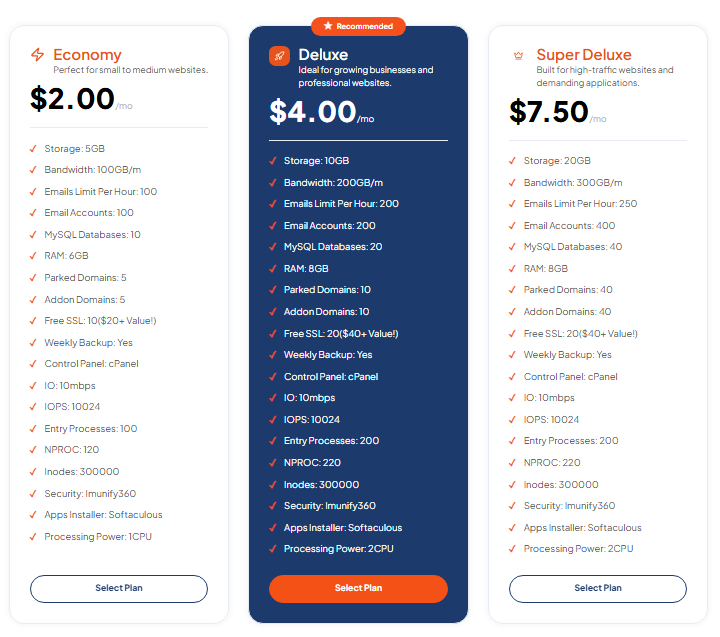
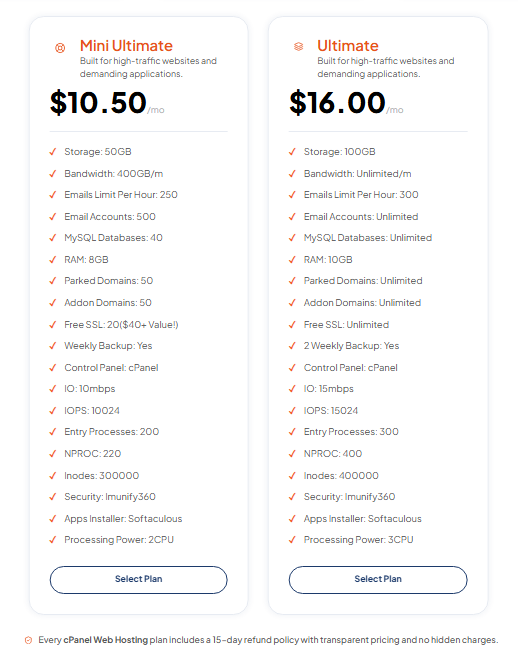
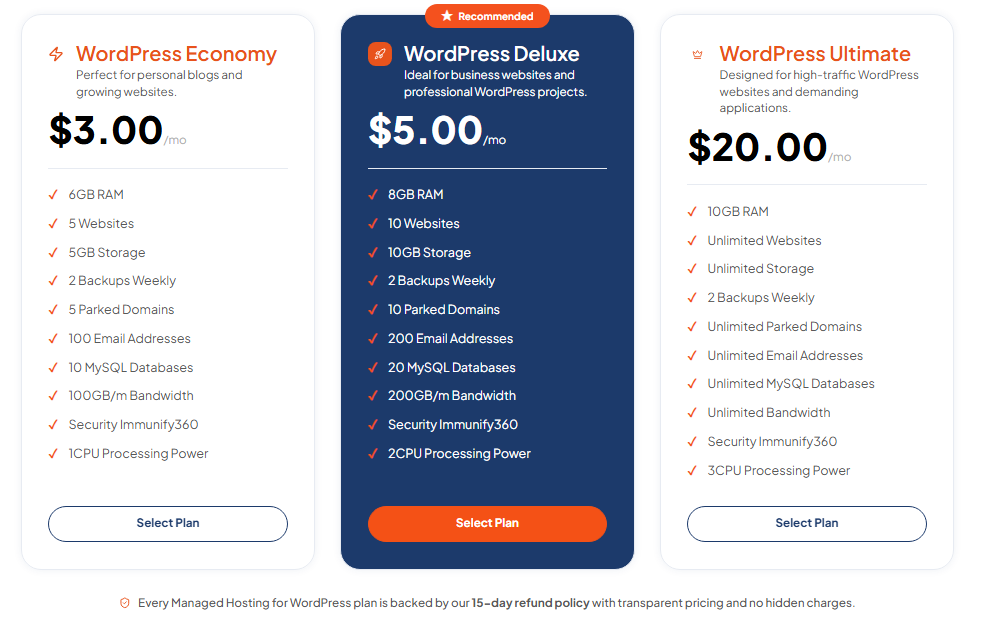
Managed WordPress Hosting: An option for WordPress users who want a hosting environment tailored to their website platform.
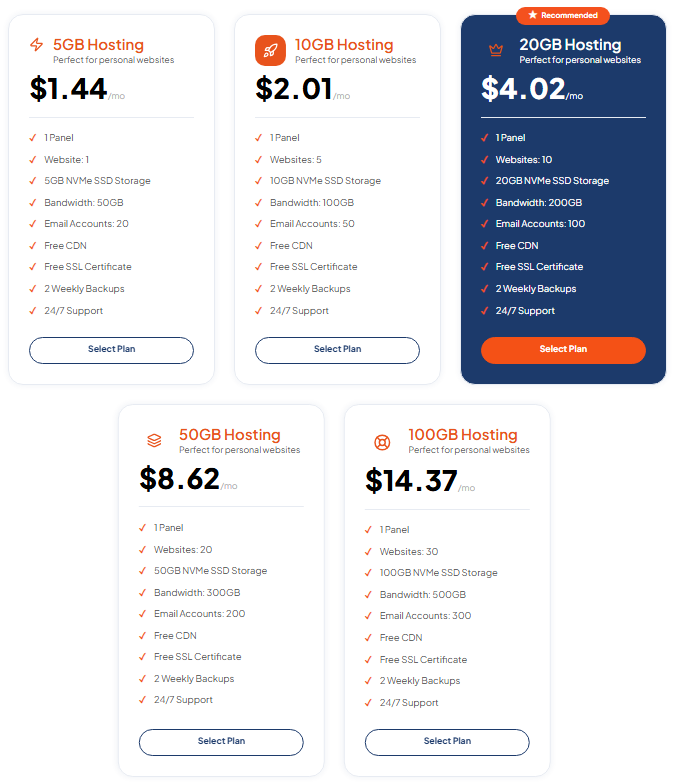
DirectAdmin Hosting: A lightweight control panel with NVMe SSD storage, free SSL, CDN, regular backups, and 24/7 support.
TezHost’s published DirectAdmin plans currently start from $1.44/month and include features such as NVMe storage, free SSL, CDN, and two weekly backups. Plan resources and prices vary by package and billing period.
You can explore the available solutions:
The goal is to give website owners access to hosting options that match their technical requirements, budget, and growth plans.
If you’re unsure which environment is appropriate for your website, speak with a TezHost sales agent before choosing a plan.
Frequently Asked Questions
1. Does hosting affect Google ranking directly?
Hosting is not a standalone ranking guarantee or a simple ranking factor that automatically rewards one provider over another. However, hosting can influence server response times, availability, and crawling conditions. Core Web Vitals are used by Google’s ranking systems.
2. Can changing web hosting improve SEO rankings?
It can help if your previous hosting environment caused slow responses, recurring downtime, or server errors. However, switching hosts alone does not guarantee better rankings. You should also maintain redirects, DNS settings, HTTPS, and website functionality during migration.
3. Is cheap hosting bad for SEO?
No. Affordable hosting is not automatically bad for SEO. The important factors are resource availability, server reliability, security, configuration, and how well the plan handles your website’s workload.
4. Does server location affect Google rankings?
Server location can influence latency and loading performance for visitors who are far from the server. A CDN can help distribute content closer to users. However, server location alone should not be treated as a guaranteed ranking advantage.
5. Is VPS hosting better for SEO than shared hosting?
Not automatically. VPS hosting provides more dedicated resources and greater control, which can benefit demanding websites. But a properly managed shared hosting plan can perform well for smaller websites. Choose based on actual resource requirements.
6. Do Core Web Vitals affect Google rankings?
Yes. Google confirms that Core Web Vitals are used by its ranking systems. The three current metrics are LCP, INP, and CLS. Good scores are useful, but they do not guarantee top rankings.
7. Does domain age affect SEO rankings?
Domain age alone does not guarantee higher rankings. Google evaluates many signals, including the relevance and usefulness of content. Read more in our guide: Does Domain Age Affect SEO?.
Conclusion: Your SEO Strategy Needs a Reliable Foundation
So, does hosting affect Google ranking? It can influence several technical conditions that help your website perform well in search.
A slow server, frequent downtime, insufficient resources, or recurring technical errors can make it harder for visitors and search engines to access your content. On the other hand, reliable hosting gives your website a stronger foundation for performance, crawling, and long-term growth.
But remember: hosting alone won’t get you to Google’s first page. Quality content, relevant keywords, useful backlinks, technical optimisation, and a good user experience all matter.
Don’t let an unsuitable hosting environment become the weak link in your SEO strategy.
Ready to give your website a stronger technical foundation?
Register with TezHost and explore hosting options that fit your website’s needs.
Have questions about performance, resources, or migration? Talk to our sales team.
Visit TezHost.com and take the next step towards a faster, more reliable website.