Switch cloud providers when your current platform no longer fits your technical, financial, or operational requirements. The process can be straightforward for a simple virtual machine, but much more involved when applications depend on proprietary databases, managed services, APIs, identity systems, or complex network configurations.
The biggest concern is often cloud vendor lock-in: the difficulty of moving workloads because important parts of an application are tied to one provider’s technology, architecture, or pricing model. A planned cloud migration between providers helps you understand those dependencies before they become expensive obstacles.\
If you are evaluating a new infrastructure option, register with TezHost to explore available services. Have questions about compatibility or migration requirements? Talk to a TezHost sales agent before choosing a plan.
1. Why Do Businesses Switch Cloud Providers?
Businesses switch cloud providers when pricing, performance, support, compliance, service availability, or technical requirements change. The right decision should be based on measurable business needs, not simply a lower advertised monthly price.
Common reasons include:
- Rising infrastructure costs: Compute, storage, managed services, support, and data transfer charges may increase the total bill.
- Performance limitations: The current environment may not provide the CPU, memory, storage, or network performance an application needs.
- Changing workloads: A business may need a different operating system, server configuration, or level of administrative control.
- Support requirements: A team may need clearer technical assistance or a different service model.
- Architecture changes: Modernizing an application can make another infrastructure model more suitable.
Before you switch cloud providers, identify the specific issue you want to solve. A move will not automatically fix inefficient code, poor database queries, or an incorrectly configured application.
For a broader look at cloud adoption across sectors, read Industries Moving to Cloud. It helps explain why different organizations adopt cloud infrastructure for different operational needs.
2. What Is Cloud Vendor Lock-In?
Cloud vendor lock-in happens when moving an application or its data away from a provider becomes difficult, costly, or time-consuming because the workload relies on provider-specific services or technologies.
Lock-in is not always deliberate. It can develop gradually as teams adopt managed databases, proprietary serverless functions, unique storage APIs, monitoring tools, identity services, and automation workflows.
For example, an application may use a provider-specific database feature that has no direct equivalent elsewhere. Moving the application files alone will not recreate that database behavior.
Common sources of cloud vendor lock-in include:
- Proprietary databases and database extensions.
- Provider-specific serverless functions and APIs.
- Object storage features and access policies.
- Identity and access management configurations.
- Monitoring, logging, and deployment tools.
- Network services, load balancers, and firewall rules.
- Data formats or integrations that are difficult to reproduce.
The practical response is not to avoid every managed service. Those services can save engineering time. Instead, document where they are used, understand the cost of replacing them, and avoid unnecessary dependencies.
When you plan to switch cloud providers, an application dependency map makes the work more predictable.
3. How Difficult Is Cloud Migration Between Providers?
Cloud migration between providers can range from relatively simple to highly complex. A standalone virtual machine with a portable application may be easier to move than a distributed platform built around proprietary databases, event systems, and managed services.
The difficulty depends on several technical factors:
| Factor | Why It Matters |
|---|---|
| Data volume | Large databases and object stores take longer to transfer |
| Application architecture | Monolithic and distributed applications have different migration needs |
| Database compatibility | Engine versions, extensions, and data types may differ |
| Operating system | Packages, drivers, and system dependencies must be supported |
| Network design | Private networks, IP allowlists, VPNs, and routing may need rebuilding |
| Security | IAM roles, secrets, certificates, and firewall policies must be recreated |
| Downtime tolerance | Some workloads require replication and a controlled cutover |
A cloud migration between providers should start with an inventory of applications, databases, storage, network connections, scheduled jobs, and external integrations.
Do not assume that a virtual machine image will run unchanged on another platform. Differences in hypervisors, drivers, firmware, boot configuration, and licensing can affect portability.
If the destination is a different hosting environment, TezHost’s web hosting transfer service and switching hosting provider guide offer useful background on planning website and hosting transfers. Cloud infrastructure migrations may require additional engineering beyond a standard website move.
4. What Should You Check Before You Switch Cloud Providers?
Before you switch cloud providers, confirm that the destination supports your application, data, security, network, and operational requirements. A compatibility checklist can prevent costly surprises after the migration starts.

Review these seven areas:
- Compute: Compare CPU architecture, vCPU allocation, memory, virtualization, and instance limits.
- Storage: Check capacity, performance, snapshots, object storage compatibility, and file system requirements.
- Operating system: Confirm supported Linux distributions or Windows Server versions.
- Database: Verify database engine versions, extensions, collation, character sets, and replication options.
- Networking: Plan IP addresses, DNS, firewall rules, load balancing, VPNs, and private connectivity.
- Security: Rebuild access policies, secrets management, encryption, certificates, and audit logging.
- Operations: Confirm monitoring, alerting, backups, deployment pipelines, and support responsibilities.
This review also helps you understand cloud vendor lock-in. If the application depends on services that are not available at the destination, you may need to replace or redesign those components before moving production traffic.
Need help comparing server resources? Talk to a TezHost sales agent and discuss your workload before selecting an infrastructure plan.
5. How Can You Reduce Data Transfer Costs During Migration?
Data transfer costs can increase the cost of a cloud migration between providers, particularly when large datasets must leave the source platform or move between regions.
Some providers charge for outbound data transfer, while others apply different rates based on region, service, or monthly usage. Always check the source provider’s current pricing rather than assuming that all transfers are free.
A useful migration cost estimate should include:
- Outbound data transfer or egress charges.
- Temporary destination infrastructure.
- Storage during the migration period.
- Database replication or synchronization costs.
- Network appliances and transfer tools.
- Engineering time and testing.
- Any parallel-running period before the old environment is retired.
For a practical explanation of network billing, read Cloud Data Transfer Costs. It explains why data movement, cross-region traffic, and usage allowances can affect the final cloud bill.
To control costs, remove unnecessary data before transfer, compress suitable files, schedule large transfers carefully, and avoid repeatedly copying unchanged datasets. Where supported, use incremental synchronization after the initial transfer.
When comparing providers, look at total operating cost—not just the advertised server price. This is especially important when you switch cloud providers for budget reasons.
6. What Is the Safest Way to Switch Cloud Providers?
The safest way to switch cloud providers is to assess dependencies, create verified backups, prepare the destination, test the workload, synchronize recent changes, and move production traffic through a controlled cutover with a rollback plan.
A practical migration sequence looks like this:
Step 1: Inventory the current environment. Document servers, databases, storage, IP addresses, DNS records, security rules, integrations, and scheduled tasks.
Step 2: Create and test backups. Back up application files, databases, configurations, and essential data. A backup is not a recovery plan until you have tested restoration.
Step 3: Prepare the destination. Configure the operating system, runtime, storage, network, access controls, firewall, monitoring, and backup policy.
Step 4: Transfer data. Move the initial dataset using an appropriate secure method. For large or active databases, consider replication or incremental synchronization where supported.
Step 5: Test before cutover. Validate application behavior, database integrity, authentication, file uploads, background jobs, email delivery, integrations, performance, and security.
Step 6: Synchronize final changes. Pause or control writes where necessary, transfer the latest changes, and confirm that source and destination data are consistent.
Step 7: Redirect traffic and monitor. Update DNS or routing, monitor logs and application health, and keep the old environment available for an agreed rollback period.
A cloud migration between providers should not end when the files finish copying. The destination must be tested under realistic conditions before the source environment is decommissioned.
7. How Can You Avoid Vendor Lock-In in the Future?
You can reduce cloud vendor lock-in by designing applications around portable components where practical, documenting provider-specific dependencies, keeping reliable data exports, and maintaining a tested exit plan.

Useful practices include:
- Use containers where appropriate: Containers can make application packaging more consistent, although they do not remove dependencies on databases, networking, storage, or managed services.
- Automate infrastructure: Tools such as Terraform or other infrastructure-as-code systems can make environments easier to reproduce. Provider-specific resources may still require changes.
- Prefer portable data formats: Use documented export formats and test whether data can be restored outside the current platform.
- Separate application logic from provider APIs: Use abstraction layers only where they provide real value; unnecessary abstraction can add complexity.
- Document identity and networking: Record IAM policies, secrets, certificates, firewall rules, DNS, and routing dependencies.
- Test backups and exports: Periodically restore data in a separate environment to confirm that it is usable.
- Review exit costs: Include data transfer, replacement services, engineering effort, and temporary parallel infrastructure in your planning.
The objective is not to make every cloud workload identical across providers. It is to make sure you understand the effort and cost required to move when business needs change.
A clear exit strategy makes it easier to switch cloud providers without turning a future decision into an emergency.
How TezHost Is Making Cloud Infrastructure More Accessible
TezHost focuses on giving businesses practical server options with defined resources, operating system flexibility, root access, and migration assistance listed with its cloud server plans.
Its published Cloud 2 configuration starts at $17 per month and includes 2 vCPU, 4GB RAM, 40GB storage, 20TB monthly bandwidth, root access, a dedicated IP, and Linux or Windows support. The published plans also list free data migration; backups are optional and should be included in your recovery planning.
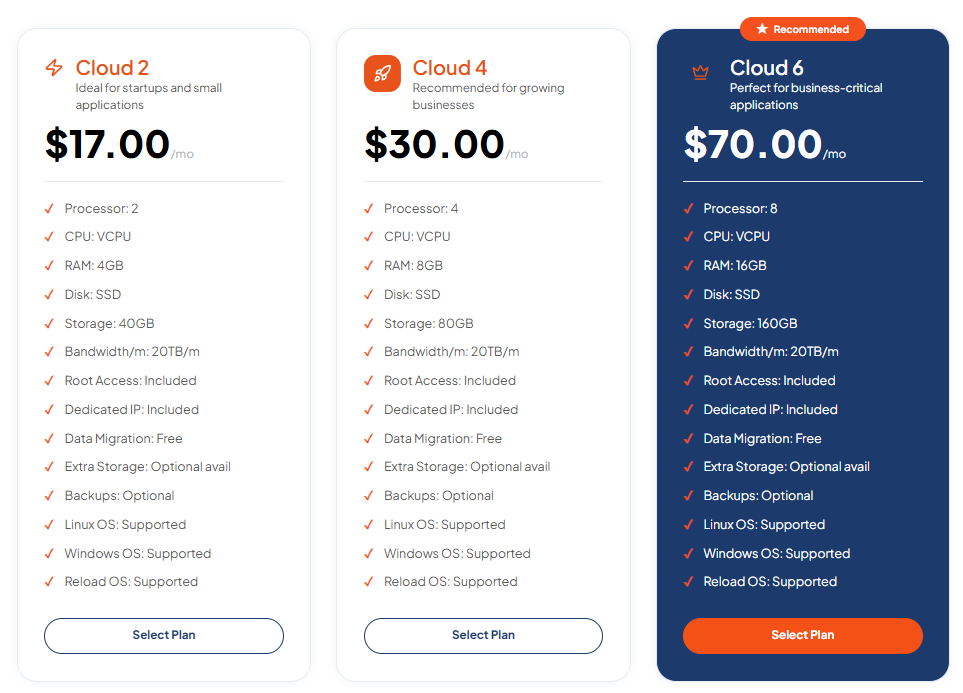
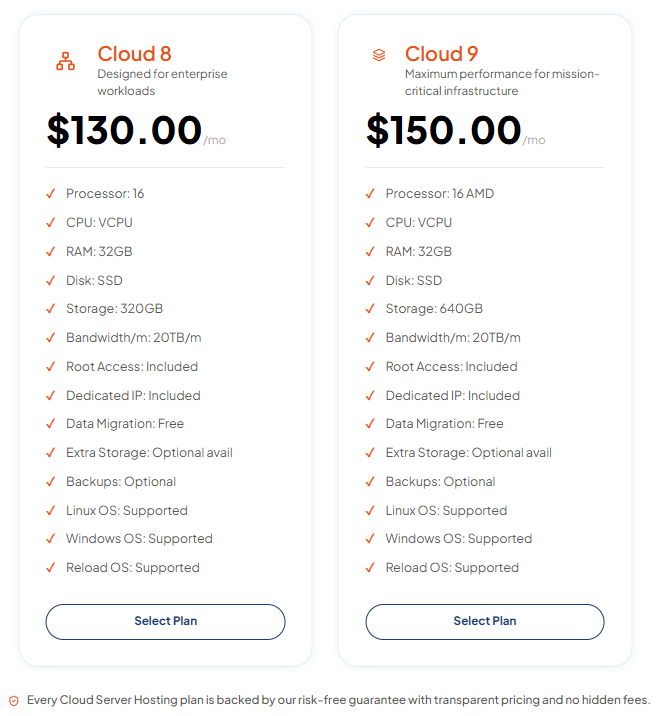
These specifications provide a starting point for businesses that need a cloud server for websites, applications, development environments, or other workloads. They are not a like-for-like replacement for every hyperscale cloud service. The right configuration depends on your software, architecture, performance needs, and operational responsibilities.
TezHost’s approach is to make the available resources clear so customers can compare configurations against their actual requirements. Before moving, discuss your current environment and confirm whether the required migration assistance covers your specific workload.
Explore TezHost Cloud Servers or visit TezHost to review available services. If you are planning a cloud migration between providers, speak with our sales team to discuss compatibility, resources, and migration scope.
Frequently Asked Questions
Can I switch cloud providers without downtime?
Sometimes, but zero downtime cannot be guaranteed. Applications with strict availability requirements may need replication, load balancing, a controlled cutover, and a tested rollback plan.
How long does cloud migration between providers take?
It depends on data volume, application complexity, network speed, dependencies, testing, and downtime requirements. A simple server may move relatively quickly, while a distributed application can take weeks or longer to prepare and validate.
Will I lose data when I switch cloud providers?
Data loss can be reduced by using verified backups, secure transfer methods, integrity checks, and final synchronization. Always test restoration and confirm data consistency before decommissioning the original environment.
What is the biggest cause of cloud vendor lock-in?
There is no single cause. Provider-specific managed services, proprietary APIs, databases, identity systems, and data transfer costs can all make moving more difficult.
Is it cheaper to switch cloud providers?
Not automatically. Compare compute, storage, network transfer, support, licensing, migration effort, and ongoing operations. A lower server price may not mean a lower total cost.
Can I move a cloud server from one provider to another?
Often, yes, but the process depends on the operating system, image format, drivers, licensing, storage, networking, and application dependencies. You may need to rebuild the server rather than copy its image directly.
Does TezHost provide cloud migration assistance?
TezHost lists free data migration with its cloud server plans. Confirm the scope, eligibility, supported source environments, and any limitations with the team before ordering.
Conclusion: Make Your Next Cloud Move a Planned Decision
Switching cloud platforms does not have to be a complicated gamble. With a clear inventory, compatibility checks, cost estimate, tested backups, and controlled cutover, businesses can reduce migration risks and make better infrastructure decisions.
The real challenge is often not moving the server. It is identifying the services, data, integrations, and operational processes connected to it.
Understand your cloud vendor lock-in before it becomes a barrier. Plan your cloud migration between providers around measurable requirements, not assumptions. And before you switch cloud providers, make sure the destination is genuinely suited to your workload.
Ready to explore another cloud hosting option? Register with TezHost, review Cloud Server plans, or talk to a sales agent about your requirements.