Dedicated vs shared cloud servers: which one does your business actually need? The answer depends on your website’s traffic, resource requirements, budget, and how much control you need over your hosting environment.
Here’s a situation many business owners know too well.
Your website is growing. Traffic is increasing. Customers are placing more orders.
Great news, right?
Until your website starts slowing down.
Your hosting provider recommends an upgrade, but now you’re faced with a confusing decision.
Should you pay more for dedicated resources, or will shared cloud hosting do the job?
Choose too little, and your website might struggle. Choose too much, and you could spend money on infrastructure you barely use.
The good news? You don’t need to be a server engineer to make an informed decision.
At TezHost, we believe businesses should choose hosting based on their actual needs rather than confusing technical jargon.
You can register with TezHost to explore available hosting solutions or talk to our sales team for help comparing options.
Let’s break down the differences and find out what makes sense for your business.
1. What Is the Difference Between Dedicated vs Shared Cloud Servers?
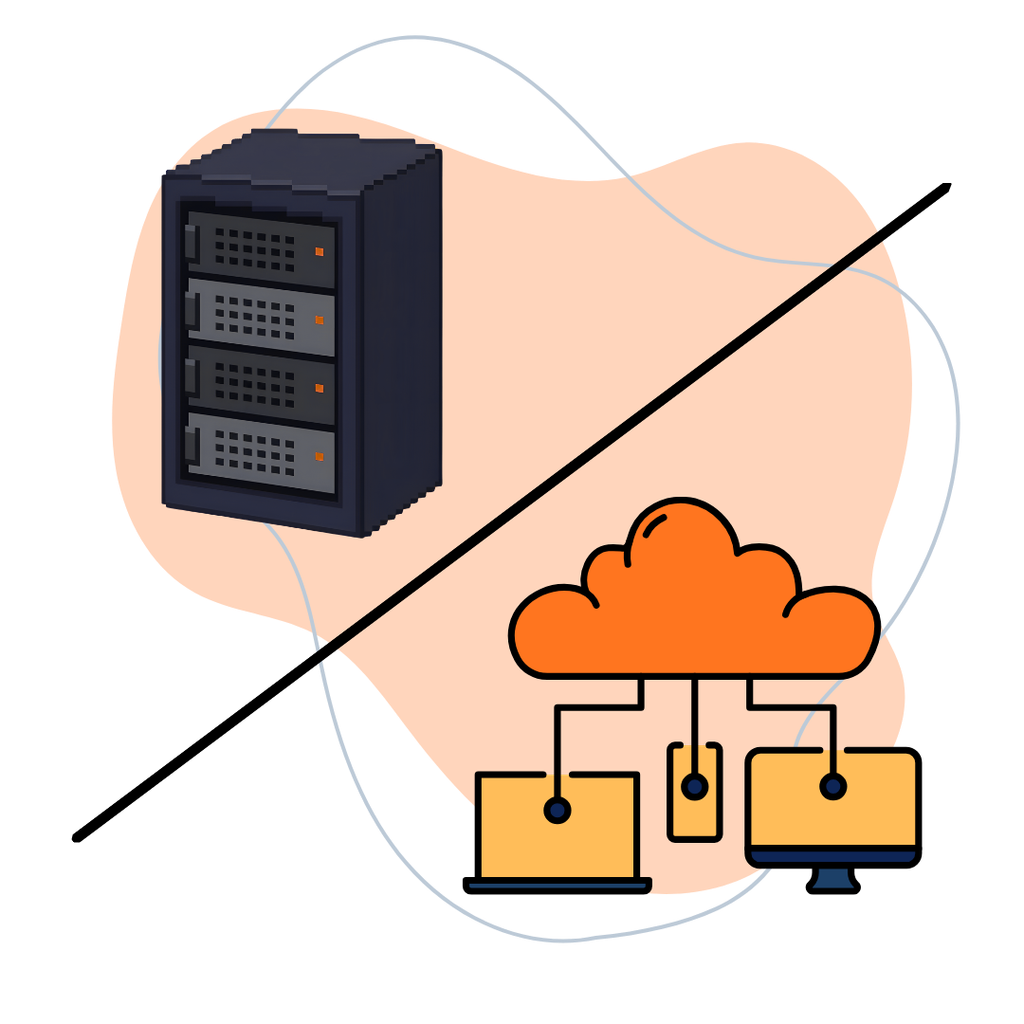
The main difference between dedicated vs shared cloud servers is how computing resources are allocated and whether the underlying hardware is shared with other customers.
With shared cloud infrastructure, multiple customers may use virtual servers running on the same physical hardware.
With dedicated infrastructure, a customer receives exclusive access to specified physical hardware or dedicated resources, depending on the service.
There’s an important distinction, though.
A cloud VPS can have allocated CPU and RAM while still running on shared physical hardware.
Likewise, a dedicated physical server isn’t automatically a cloud server. Cloud hosting generally involves additional virtualization, orchestration, or infrastructure capabilities.
Shared Cloud Infrastructure
Think of shared infrastructure as renting an apartment.
You have your own space, but the building’s underlying infrastructure is shared.
Virtualization helps separate workloads, although performance can still depend on resource allocation and provider management.
Shared infrastructure is often suitable for:
- Small business websites.
- Blogs and portfolios.
- Development environments.
- Startups with modest workloads.
- Applications with manageable traffic.
Dedicated Infrastructure
Dedicated infrastructure is more like having an entire building for your own use.
You have exclusive access to the specified hardware, giving you greater control over resource usage and configuration.
It’s often considered for:
- Resource-intensive applications.
- Large databases.
- High-traffic platforms.
- Specialized software.
- Workloads requiring hardware isolation.
Neither option is automatically better. The right choice depends on your workload.
2. How Does Cloud Resource Allocation Affect Performance?
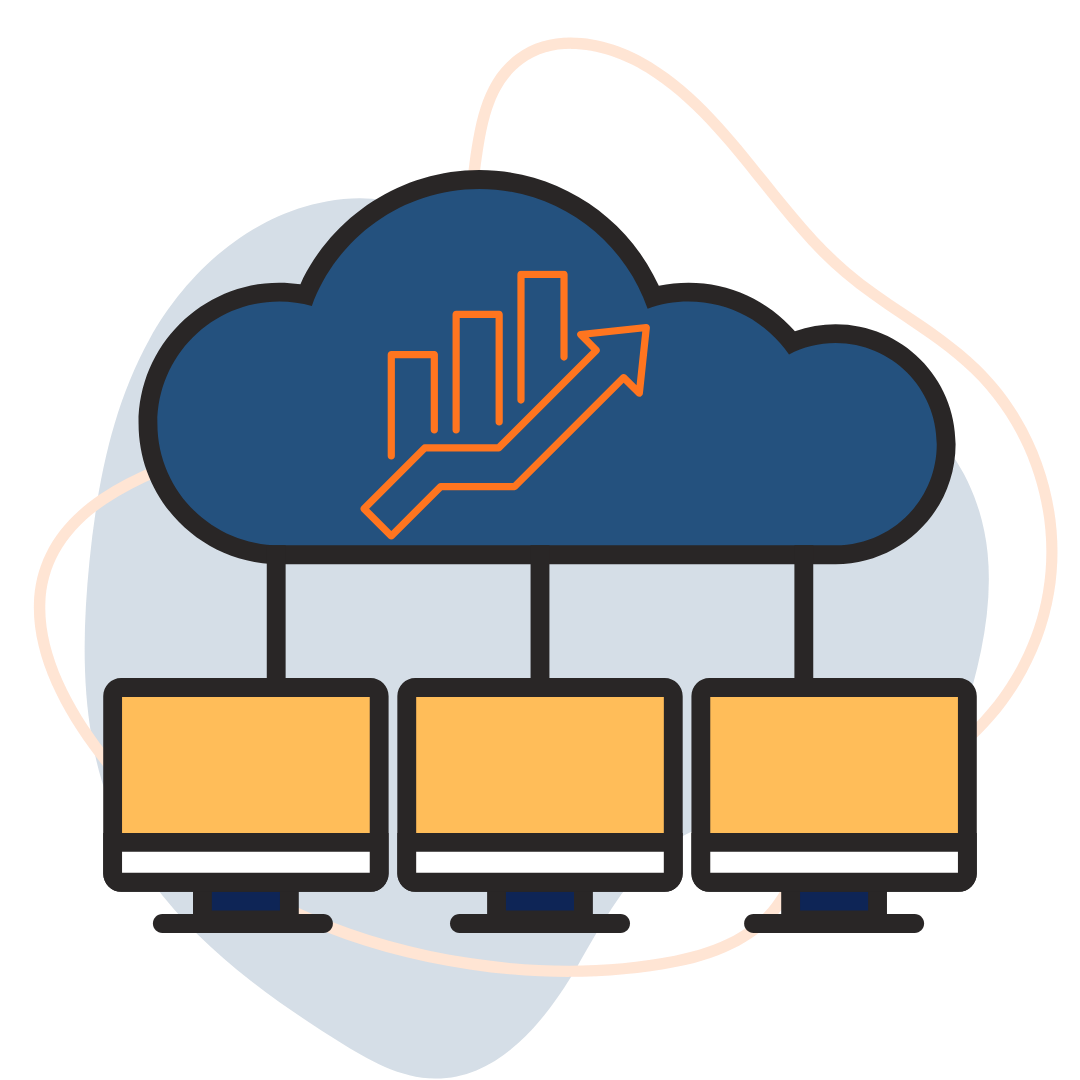
Cloud resource allocation determines how much CPU, RAM, storage, and network capacity your application can access.
And here’s why that matters.
Imagine running an ecommerce website during a major sale.
Hundreds of customers are browsing products.
Orders are coming in.
Your database is handling more requests than usual.
If your hosting environment lacks sufficient resources, your website may become slow or unresponsive.
What Resources Should You Evaluate?
CPU: Handles application processing and server tasks.
RAM: Supports active processes and application memory requirements.
Storage: Determines available capacity and influences data access performance.
Network Capacity: Affects how quickly your server can transmit and receive data.
Resource Isolation: Influences how workloads are separated and whether neighboring activity can affect performance.
Does Shared Infrastructure Always Mean Slow Hosting?
No. Well-managed shared cloud infrastructure can deliver excellent performance for workloads that fit its allocated resources.
However, performance may become less predictable if physical resources are heavily contended.
Dedicated hardware provides greater isolation, but it still needs suitable configuration and management.
For a broader comparison, read our guide to Shared vs VPS vs Dedicated Server Hosting.
The lesson? Don’t buy a server based only on its name. Check the resources you’re actually receiving.
3. Which Cloud Server Type Is More Affordable?
Shared cloud infrastructure is often more affordable initially, while dedicated infrastructure generally costs more because the customer receives exclusive hardware resources.
But cheaper doesn’t always mean better value.

Let’s compare.
| Feature | Shared Cloud Infrastructure | Dedicated Infrastructure |
|---|---|---|
| Starting Cost | Usually lower | Usually higher |
| Physical Hardware | Shared | Exclusive |
| Resource Allocation | Depends on plan and virtualization | Dedicated hardware resources |
| Performance Isolation | Varies by configuration | Greater physical isolation |
| Customization | Depends on service | Often more extensive |
| Scalability | Often flexible | May require hardware changes or additional servers |
| Maintenance | Depends on management model | Depends on management model |
| Best For | Small to medium workloads | Demanding or specialized workloads |
When Does Dedicated Hosting Become Worth the Cost?
When the performance, isolation, or configuration benefits justify the additional expense.
For example, a small company website may not need a dedicated server.
But a resource-intensive business application might benefit from one.
Explore our guide to Affordable and Reliable Dedicated Server Hosting to understand what to compare.
Smart hosting isn’t about choosing the cheapest plan. It’s about avoiding unnecessary expenses while meeting your requirements.
4. Are Dedicated Servers More Secure Than Shared Cloud Servers?
Dedicated servers offer greater physical resource isolation, but overall security depends on configuration, software updates, access controls, monitoring, and provider practices.
This is one of the biggest misconceptions in hosting.
Some businesses assume that purchasing a dedicated server automatically makes their applications secure.
Unfortunately, it doesn’t work that way.
A poorly configured dedicated server can still be vulnerable.
Similarly, a properly managed virtual server on shared infrastructure can provide strong security protections.

What Should You Look For?
Regardless of the server type, evaluate:
- Firewall configuration.
- Operating system updates.
- Access controls.
- Backup and recovery options.
- Malware protection.
- Monitoring and logging.
- Network security.
- Administrative responsibilities.
What About Sensitive Business Data?
Organizations handling confidential or regulated information may need additional controls, including encryption, access restrictions, audit logging, and appropriate data residency arrangements.
Dedicated hardware can help address certain isolation requirements, but it doesn’t guarantee regulatory compliance.
For more information, explore our article on Sensitive Data in the Cloud.
You can also read about Dedicated Server Security and Performance.
Security should be part of your hosting decision—not an assumption based on the word “dedicated.”
5. Which Is Better for a Growing Business: Dedicated or Shared Cloud Servers?
For many growing businesses, shared cloud infrastructure or a VPS is a practical starting point, while dedicated infrastructure becomes attractive when resource demands or isolation requirements increase.
Let’s look at three examples.
Example 1: A Small Business Website
You have a company website with service pages, a contact form, and a blog.
Traffic is moderate.
Your resource requirements are relatively predictable.
A shared hosting or appropriately sized cloud VPS plan may be sufficient.
Example 2: A Growing Ecommerce Store
Your online store receives increasing traffic.
You have a large product catalog and frequent database activity.
Your website experiences occasional performance problems.
A higher-resource VPS or cloud server may be the next logical step.
Dedicated hardware could also be appropriate if performance demands justify it.
Example 3: A Resource-Intensive Business Application
Your organization runs specialized software, large databases, or computationally demanding applications.
You need greater control over the operating environment and consistent access to hardware resources.
Dedicated infrastructure may be worth evaluating.
Can You Upgrade Later?
Often, yes.
However, the process depends on your provider and hosting architecture.
Some virtual servers can be resized relatively easily. Moving to dedicated hardware may involve migration planning.
If your business is expanding, our article on Cloud Computing Demand explores why organizations are increasingly considering cloud infrastructure.
Start with what your business needs today, but plan for what it may need tomorrow.
6. How Is TezHost Revolutionizing Cloud and Dedicated Hosting?
TezHost is helping businesses access different infrastructure options by offering cloud servers, dedicated servers, and hosting solutions suited to varying technical requirements.
At TezHost, we understand that no two businesses operate exactly the same way.
A startup launching its first website has different needs from a company running resource-intensive applications.
That’s why we don’t believe every customer should be pushed toward the same server configuration.
Cloud Servers for Flexible Workloads
TezHost offers cloud server configurations with specified CPU, RAM, storage, and network resources.
Selected offerings include technologies such as AMD EPYC processors, DDR5 memory, and NVMe storage.
Customers can explore available configurations based on their application requirements.
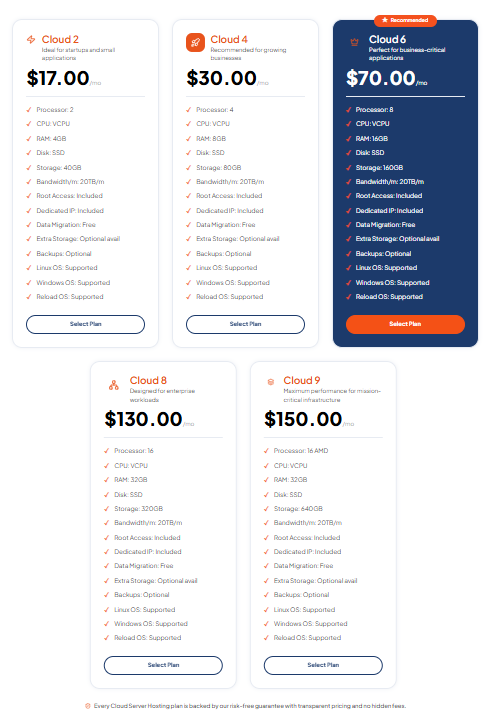
Explore TezHost Cloud Servers.
Dedicated Servers for Greater Hardware Control
For businesses requiring exclusive physical hardware, TezHost also provides dedicated server options.
These solutions may be suitable for applications requiring greater control, customization, or hardware isolation.
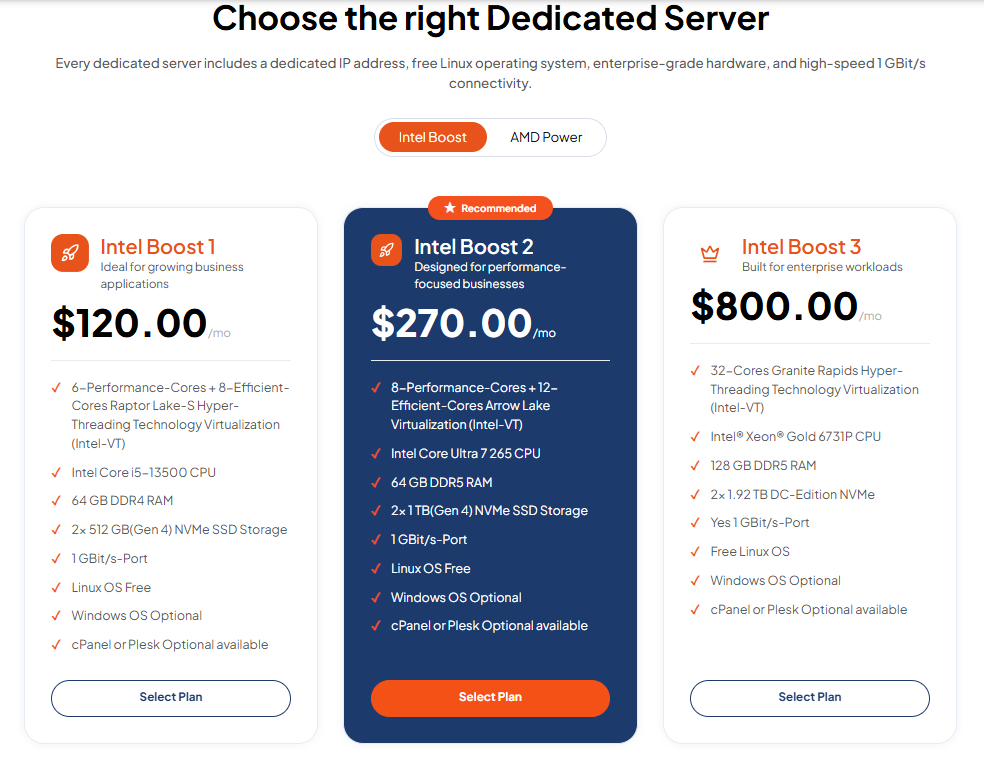
Explore TezHost Dedicated Servers.
Helping Customers Choose Suitable Infrastructure
We believe the right hosting decision begins with understanding the workload.
Before choosing a server, consider:
- Expected website traffic.
- CPU and RAM requirements.
- Storage capacity.
- Security requirements.
- Technical expertise.
- Monthly budget.
- Future growth.
Our sales team can help customers discuss these requirements and explore available plans.
Supporting Different Stages of Business Growth
From affordable hosting to cloud and dedicated infrastructure, TezHost provides options for businesses at different stages.
Customers can also explore domain registration services alongside their hosting requirements.
Greater Control Where It Matters
Businesses with specialized infrastructure requirements may benefit from dedicated hardware.
Our guide on Why Businesses Prefer Dedicated Server Control explains some of those considerations.
Our approach is simple: Help businesses choose infrastructure based on performance needs, control, scalability, and budget—not unnecessary upgrades.
Not Sure Which Server Is Right for You?
You don’t have to make the decision alone.
Talk to a TezHost Sales Agent to discuss your workload and compare available options.
7. How Do You Choose Between Dedicated vs Shared Cloud Servers?
To choose between dedicated vs shared cloud servers, evaluate your actual resource usage, performance requirements, security needs, technical expertise, and total operating costs.
Here are seven questions worth asking.
1. How Much Traffic Does Your Website Receive?
A low-traffic website usually requires fewer resources than a busy ecommerce platform.
2. How Much CPU and RAM Does Your Application Need?
Check current resource usage rather than relying on estimates alone.
3. Does Your Workload Require Hardware Isolation?
Certain applications may benefit from exclusive physical resources.
4. How Important Is Customization?
Dedicated infrastructure may offer greater control over hardware and operating environments.
5. Do You Have the Technical Expertise to Manage It?
Some services are managed, while others require customers to handle server administration.
6. What Is Your Realistic Monthly Budget?
Compare hosting charges, software licensing, backups, support, and administration costs.
7. How Quickly Might Your Requirements Change?
Consider how easily your chosen infrastructure can accommodate growth.
Quick Decision Guide
| Your Requirement | Consider |
|---|---|
| Small website with modest traffic | Shared hosting or entry-level VPS |
| Growing website needing more resources | Higher-resource VPS or cloud server |
| Specialized software requiring hardware control | Dedicated server |
| Workload requiring physical isolation | Dedicated infrastructure |
| Flexible virtual server configurations | Cloud VPS |
| Resource-intensive, sustained workloads | Compare high-resource cloud and dedicated options |
The best server isn’t the most powerful one you can afford. It’s the one that reliably supports your workload without unnecessary expense.
For more background, explore our guide to the Different Types of Cloud Services.
Frequently Asked Questions About Dedicated vs Shared Cloud Servers
What Is the Main Difference Between Dedicated and Shared Cloud Servers?
The main difference is resource allocation and hardware isolation. Shared cloud infrastructure uses underlying hardware across multiple customers, while dedicated infrastructure provides exclusive access to specified hardware.
Are Dedicated Cloud Servers Faster?
Not always. Dedicated infrastructure can provide greater hardware isolation, but actual performance depends on specifications, workload, storage, networking, and configuration.
Is Shared Cloud Hosting Secure?
It can be. Properly configured virtualized infrastructure can provide strong security, although customers and providers must still manage their respective security responsibilities.
Which Server Type Is Best for a Small Business?
Shared hosting or a suitably configured VPS is often sufficient for small business websites with modest resource requirements.
When Should I Upgrade to a Dedicated Server?
Consider dedicated infrastructure when you need greater hardware isolation, specialized configuration, or sustained computing resources that justify the additional cost.
Is a VPS the Same as a Dedicated Server?
No. A VPS is a virtual server that generally runs on shared physical hardware, while a dedicated server provides exclusive physical hardware.
Can TezHost Help Me Compare Server Options?
Yes. TezHost offers cloud and dedicated server services, and its sales team can discuss available configurations.
Conclusion: Choose the Server Your Business Needs, Not the One That Sounds Most Impressive
Dedicated vs shared cloud servers isn’t simply a question of which option is better. It’s about which one is better for your business.
Shared infrastructure can be affordable, efficient, and perfectly suitable for many websites.
Dedicated infrastructure offers greater hardware control and isolation for workloads that need those capabilities.
But paying for dedicated hardware when your website doesn’t need it can be an unnecessary expense.
And choosing an underpowered hosting plan can create performance problems as your business grows.
The smart approach?
Understand your workload.
Compare resources.
Evaluate security.
Consider scalability.
And choose hosting that makes financial and technical sense.
At TezHost, we’re committed to helping businesses explore hosting solutions that fit their needs.
Is Your Current Server Helping Your Business Grow—or Holding It Back?
Don’t upgrade just because someone tells you to. Upgrade because your business needs it.
Whether you’re launching a website, expanding an ecommerce store, or deploying a resource-intensive application, explore the infrastructure options available at TezHost.
Need flexible cloud hosting?
Explore TezHost Cloud Servers
Need greater hardware control?
Discover TezHost Dedicated Servers
Ready to get started?
Register with TezHost
Still unsure which option is right for your business?
Talk to a TezHost Sales Agent
The right hosting decision isn’t about spending more. It’s about getting more value from the resources you actually need.