Should my company move to cloud? If your business is experiencing slow applications, rising infrastructure costs, limited storage, unexpected downtime, or difficulty supporting remote teams, it may be time to reconsider how your IT infrastructure works.
Cloud adoption is no longer just a technology trend. It is a business decision that can influence operational efficiency, scalability, security, and long-term growth.
But moving to the cloud isn’t automatically the right decision for every company. The real question is whether your current infrastructure is helping your business move forward or holding it back.
If you’re exploring cloud solutions, register with TezHost and explore hosting options designed to support growing businesses. You can also talk to a TezHost sales agent to discuss your infrastructure requirements.
Let’s look at seven signs that can help you make an informed decision.
1. Your Current Infrastructure Cannot Keep Up With Business Growth
One of the clearest signs that you should consider moving to cloud is when your existing infrastructure struggles to handle increasing workloads.
Traditional infrastructure often requires businesses to purchase additional physical servers, upgrade hardware, arrange installation, and manage maintenance before expanding capacity.

This can slow down projects and make growth more expensive.
Cloud infrastructure offers a more flexible approach. Businesses can increase computing resources such as CPU, RAM, and storage as their requirements change.
For example, an ecommerce business preparing for a seasonal sales campaign may need additional resources to handle increased traffic. A cloud environment makes it easier to scale infrastructure without purchasing an entirely new physical server.
Ask yourself:
- Is website traffic increasing?
- Are applications becoming more resource-intensive?
- Do you frequently experience performance issues during peak hours?
- Does expanding your infrastructure require significant hardware investment?
If the answer to several of these questions is yes, your cloud adoption business case may already be taking shape.
2. Your IT Infrastructure Costs Are Becoming Difficult to Manage
Should my company move to cloud to reduce IT expenses? Potentially, but the decision requires a complete cost comparison.
Maintaining on-premises infrastructure involves more than purchasing servers. Businesses must also account for electricity, cooling, hardware maintenance, physical security, software licensing, IT personnel, replacements, and unexpected repairs.
Cloud hosting can reduce some of these infrastructure responsibilities by providing computing resources through a hosting provider.
However, cloud services are not automatically cheaper. Costs can increase through excessive resource allocation, storage consumption, bandwidth usage, backups, licensing, and poorly managed workloads.

A proper cloud adoption business case should compare the total cost of ownership (TCO), not just monthly hosting charges.
Consider these expenses:
| Traditional infrastructure | Cloud infrastructure |
|---|---|
| Initial hardware investment | Recurring service costs |
| Physical maintenance | Provider-managed infrastructure |
| Electricity and cooling | Included or separately billed services |
| Hardware replacement | Resource upgrades |
| Physical server expansion | Scalable server configurations |
| On-site infrastructure management | Remote server management and administration |
Before making a decision, calculate your current infrastructure expenses and compare them with the expected cloud operating costs.
The objective is not simply to spend less. It is to get better value, flexibility, and predictable infrastructure performance.
3. Your Business Experiences Downtime and Performance Issues
A slow application or unavailable website can affect customer trust, employee productivity, and revenue.
If your infrastructure frequently struggles with traffic spikes, resource limitations, or hardware failures, a cloud migration decision deserves serious consideration.
Cloud servers provide dedicated virtual resources and can offer greater flexibility than basic shared hosting environments.

However, remember that cloud hosting alone does not guarantee zero downtime. Availability depends on infrastructure architecture, redundancy, monitoring, backups, network connectivity, and disaster recovery planning.
Before migrating, evaluate:
- CPU and RAM utilization.
- Storage performance and capacity.
- Network latency and bandwidth.
- Application response times.
- Server uptime and failure history.
- Backup and recovery procedures.
For businesses running resource-intensive applications, choosing infrastructure with sufficient computing power is essential.
TezHost cloud servers use AMD EPYC processors, DDR5 memory, and Gen4 NVMe SSD storage. These specifications are designed to support demanding workloads, including business applications, ecommerce platforms, databases, and development environments.
If performance problems are affecting your operations, explore TezHost Cloud Servers and speak with a sales specialist about your requirements.
4. Your Employees Need Better Remote Access and Collaboration
Modern businesses are not always operating from a single office.
Employees may work remotely, travel frequently, or operate from different cities and countries. If your systems depend heavily on physical office infrastructure, providing secure and consistent access can become complicated.
Cloud-based applications and infrastructure can make business resources accessible through authorized internet connections.
Depending on the solution, employees can access applications, databases, files, and development environments without being physically connected to the office network.
However, accessibility must be balanced with security.
A reliable remote-access strategy should include:
- Multi-factor authentication (MFA).
- Role-based access control (RBAC).
- Encrypted connections.
- Centralized identity management.
- Access logging and monitoring.
- Regular security reviews.
Should my company move to cloud to support remote teams? If your existing infrastructure makes secure remote access difficult, cloud adoption may help improve flexibility and collaboration.
The right solution depends on your applications, compliance requirements, and access policies.
5. Your Business Needs Better Data Protection and Disaster Recovery
Data loss can be extremely expensive.
Hardware failures, accidental deletion, ransomware, cyberattacks, and natural disasters can disrupt business operations and compromise important information.
Cloud infrastructure can support stronger backup and disaster recovery strategies, but moving data to the cloud does not automatically make it safe.
Businesses must understand their provider’s backup policies and establish their own recovery requirements.
Important considerations include:
Backup frequency: How frequently should your data be backed up?
Recovery Point Objective (RPO): How much data can your business afford to lose, measured in time?
Recovery Time Objective (RTO): How quickly must your systems become operational again?
Data encryption: Is sensitive information protected during transmission and storage?
Access management: Who can access, modify, or delete business data?
For critical workloads, consider maintaining independent backups and regularly testing restoration procedures.
A practical cloud migration decision should include a documented disaster recovery plan, not just a decision about where to host your applications.
6. Your Applications Need More Flexibility and Technical Control
Some businesses outgrow traditional hosting because their applications require specific software, operating systems, configurations, or computing resources.
For example, a development company may need root access to install packages, configure services, deploy Docker containers, or run custom applications.
An ecommerce platform may require additional CPU and RAM during high-traffic periods. A SaaS business may need a dedicated environment for APIs, databases, and application services.
This is where cloud servers can provide greater control.
Depending on the provider and configuration, businesses can benefit from:
- Dedicated virtual CPU and RAM resources.
- Custom operating system environments.
- Root or administrator access.
- Flexible storage configurations.
- Application-specific server setups.
- Support for Linux and Windows workloads.
TezHost cloud servers support Linux and Windows operating systems and provide full root access, allowing technical teams to configure their environments according to application requirements.
If you’re unsure which configuration your applications need, talk to a TezHost sales agent before selecting a plan.
7. Your Competitors Are Becoming More Technologically Agile
Technology affects how quickly businesses can develop products, launch services, respond to customers, and enter new markets.
If competitors can deploy applications faster, scale their platforms more easily, or support customers more efficiently, your infrastructure may need an upgrade.
Cloud infrastructure can help organizations create development and testing environments, deploy applications, expand computing capacity, and support new digital services.

However, adopting cloud technology simply because competitors are doing it is not a strategy.
Your cloud adoption business case should identify measurable business outcomes, such as:
- Faster application deployment.
- Reduced infrastructure management overhead.
- Improved application performance.
- More flexible resource allocation.
- Better support for business expansion.
- Improved recovery capabilities.
The goal is to make technology an enabler of business growth rather than another operational burden.
How to Make the Right Cloud Migration Decision
Recognizing the signs is only the beginning. Before moving your infrastructure, you need a practical assessment of your existing systems, business objectives, and technical requirements.
Here are five steps to make a more informed cloud migration decision.
Step 1: Audit Your Existing Infrastructure
Document your current servers, applications, databases, storage, operating systems, network dependencies, and software licenses.
Identify which workloads consume the most resources and where performance bottlenecks occur.
Step 2: Identify Your Business Objectives
Define what you expect cloud adoption to achieve.
Are you trying to improve performance, support remote employees, reduce hardware maintenance, increase scalability, or strengthen disaster recovery?
Set measurable targets so you can evaluate whether migration delivers the expected results.
Step 3: Calculate the Total Cost of Ownership
Compare your existing infrastructure expenses with the projected cloud costs.
Include migration, hosting, licensing, storage, bandwidth, backups, security, monitoring, and ongoing management.
Don’t forget to account for possible downtime and the internal resources required during migration.
Step 4: Plan a Phased Migration
You don’t necessarily need to move everything at once.
Start with less critical workloads, test application compatibility, verify data integrity, and monitor performance.
Once the environment is stable, migrate more important systems according to your planned schedule.
For a more structured approach, read our Cloud Migration Guide.
Step 5: Monitor and Optimize After Migration
Migration is not the final step.
Monitor CPU, RAM, storage, bandwidth, application response times, security events, and infrastructure costs.
Review resource allocation regularly to avoid overprovisioning or performance bottlenecks.
A successful cloud migration should deliver measurable improvements, not simply move existing problems to a different environment.
How TezHost Is Revolutionizing Cloud Hosting for Growing Businesses
Cloud adoption should not be unnecessarily complicated. Businesses need infrastructure that offers performance, flexibility, technical control, and room to grow.
TezHost focuses on providing cloud server solutions that support startups, developers, ecommerce businesses, agencies, and organizations with demanding workloads.
Its cloud infrastructure combines:
- AMD EPYC processors: Designed to support demanding computing workloads.
- DDR5 memory: High-performance memory for resource-intensive applications.
- Gen4 NVMe SSD storage: Fast storage technology for demanding workloads.
- Dedicated resources: Configurations with defined CPU, RAM, and storage allocations.
- Full root access: Greater control over operating systems and server configurations.
- Linux and Windows support: Flexibility for different application environments.
- Free data migration: Migration assistance included with the listed cloud server plans.
- 20TB monthly bandwidth: Included across the published cloud server plans.
Which TezHost Cloud Server Plan Should You Consider?
Here is a quick look at selected configurations published on the TezHost website:
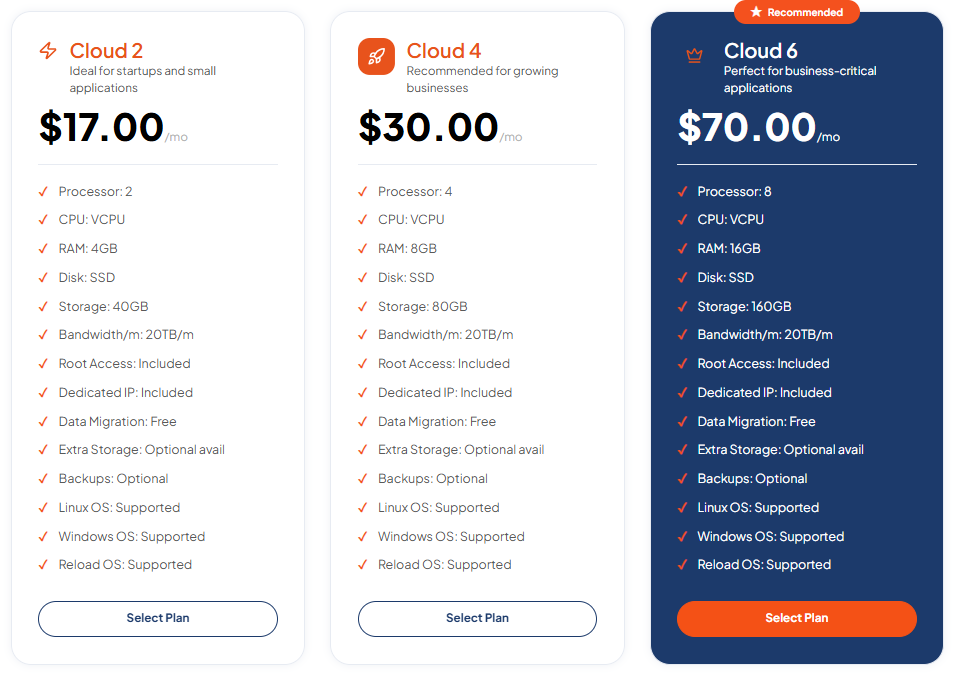
| Plan | vCPU | RAM | Storage | Monthly price |
|---|---|---|---|---|
| Cloud 2 | 2 | 4GB | 40GB | $17 |
| Cloud 4 | 4 | 8GB | 80GB | $30 |
| Cloud 6 | 8 | 16GB | 160GB | $70 |
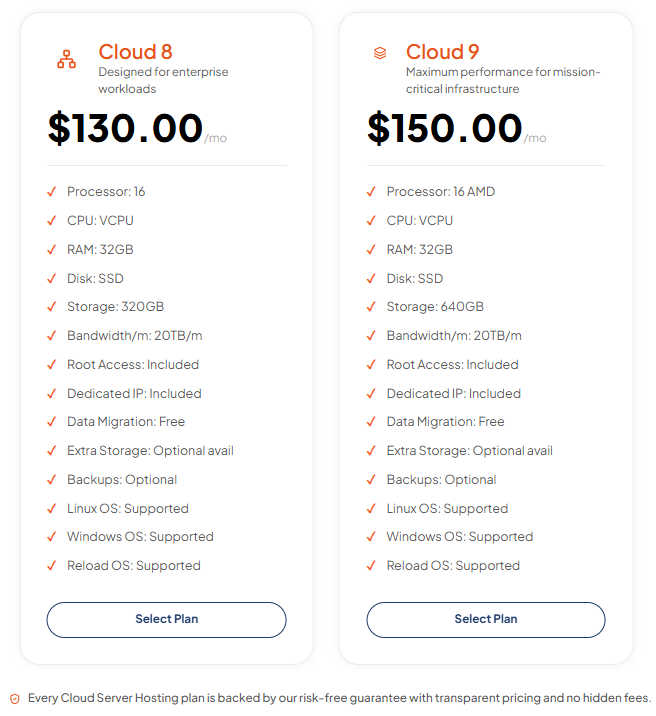
| Cloud 8 | 16 | 32GB | 320GB | $130 |
| Cloud 9 | 16 | 32GB | 640GB | $150 |
All listed plans include 20TB monthly bandwidth, a dedicated IP, root access, and free data migration. Backups are listed as optional, so businesses should confirm their backup requirements before ordering.
These configurations give businesses options for different workloads, from smaller applications to more demanding business-critical environments.
Explore the available configurations on the TezHost Cloud Servers page.
Not sure whether your business needs a cloud server, VPS, or another hosting solution? Talk to our sales team. We’ll help you assess your requirements before you commit.
You can also visit TezHost to explore hosting, domains, and other infrastructure services, or browse domain registration options if you’re building a new online presence.
Frequently Asked Questions
1. Should my company move to cloud?
Your company should consider moving to cloud if its existing infrastructure struggles with performance, scalability, remote access, maintenance costs, or disaster recovery. The decision should be based on business requirements, security needs, and a realistic cost assessment.
2. What are the main benefits of cloud adoption for businesses?
The main benefits include flexible resource allocation, easier infrastructure scaling, remote accessibility, reduced dependence on physical hardware, and support for modern applications. Actual benefits depend on the cloud architecture and how well it is managed.
3. Is cloud hosting cheaper than maintaining physical servers?
It can be, particularly when businesses want to avoid large hardware investments and ongoing physical infrastructure expenses. However, cloud costs can increase through storage, bandwidth, backups, licensing, and unused resources. Compare total cost of ownership before deciding.
4. Is cloud migration safe for business data?
Cloud migration can be secure when supported by encryption, access controls, verified backups, secure configurations, and proper monitoring. Businesses should also test recovery procedures and confirm their provider’s security responsibilities.
5. Can a small business benefit from cloud adoption?
Yes. Small businesses can use cloud infrastructure to access computing resources without purchasing and maintaining their own physical servers. They can start with a suitable configuration and expand as their requirements grow.
6. Should a company migrate everything to the cloud at once?
Not necessarily. A phased migration is often more practical because it allows businesses to test applications, identify compatibility issues, verify data, and reduce operational disruption before moving critical workloads.
7. How do I choose the right cloud hosting provider?
Compare infrastructure performance, CPU and RAM resources, storage technology, bandwidth, pricing, operating system support, migration assistance, security, backup options, and technical support. Choose a provider that aligns with your workloads and business objectives.
Conclusion: Is It Time for Your Company to Move to Cloud?
So, should my company move to cloud? The answer depends on how well your current infrastructure supports your business today and where you want to take it tomorrow.
If your systems are struggling with growth, performance, flexibility, or infrastructure management, cloud adoption may be a worthwhile investment.
But don’t migrate just because cloud technology is popular. Assess your workloads, calculate the costs, plan your migration, and select infrastructure that meets your actual requirements.
With scalable configurations, dedicated resources, modern server technology, and migration assistance, TezHost offers cloud server solutions for businesses ready to take the next step.
Ready to explore your cloud options?
Explore TezHost Cloud Servers or register here to get started.
Have questions about your infrastructure? Talk to a TezHost sales agent and find a cloud solution that fits your business.
Build for today. Scale for tomorrow. Make your infrastructure work for your growth.