Transfer domain to new registrar without losing control of your website, business email, or DNS settings. Whether you’re moving because of renewal costs, poor customer support, limited domain management features, or a better service offering, the process is relatively straightforward when you prepare correctly.
Your domain is more than a web address. It represents your brand, customer relationships, email identity, and online presence. A poorly managed transfer can cause unnecessary delays or even disrupt services if DNS settings are changed without planning.
If you’re considering a move, register here with TezHost and explore domain services designed to make domain management easier. You can also talk to a TezHost sales agent for assistance before getting started.
This domain transfer guide explains how to prepare, unlock your domain, obtain the authorization code, complete the transfer, and verify everything afterwards.
1. Why Transfer Your Domain to a New Registrar?
Why would a website owner want to move domain registrar services?
The main reasons include lower renewal costs, better customer support, improved account management, and access to domain features that better suit business requirements.
Your current registrar may have served you well initially, but your needs can change as your website or business grows.

Here are some common reasons to consider a transfer:
- High renewal prices: Introductory registration prices may increase significantly at renewal.
- Poor customer support: Delayed responses can become a serious problem when domain access or DNS configuration needs attention.
- Limited management tools: You may need better DNS controls, domain forwarding, account security, or bulk management.
- Account consolidation: Managing several domains through one provider can simplify renewals, billing, and administration.
- Better service: A provider with clearer processes and accessible technical assistance can make domain ownership easier to manage.
Before deciding to transfer domain to new registrar services, compare the complete renewal price, transfer charges, available extensions, privacy options, and support arrangements.
Explore TezHost domain services to review available domain options. If you need help evaluating your requirements, speak with a sales agent.
2. Check Domain Transfer Eligibility Before Starting
Can you transfer a domain at any time?
No. Your domain must meet the eligibility requirements of its registry and current registrar before the transfer can proceed.
For many generic top-level domains, such as .com and .net, ICANN rules generally restrict transfers during the first 60 days after initial registration. A 60-day transfer lock may also apply after certain changes to registrant information.

Before you transfer domain to new registrar services, check these conditions:
- Registration age: Confirm that the domain has passed the applicable initial registration lock period.
- Previous transfer: Check whether it has been at least 60 days since the last registrar transfer, where the relevant policy applies.
- Registrant information: Review recent changes to the registrant name, organisation, or email address that could trigger a transfer lock.
- Domain status: Check for statuses such as
clientTransferProhibited, which may prevent a transfer until the domain is unlocked. - Expiration date: Avoid starting the process too close to the expiry date. Renew first if necessary.
- Disputes or holds: Check whether the domain is subject to a legal dispute, payment hold, or other transfer restriction.
Remember that country-code extensions and certain specialised domain extensions can follow different rules. Always confirm the requirements for your specific TLD.
You can use ICANN Lookup to identify the current registrar of a domain covered by ICANN’s lookup service.
3. Prepare Your Domain Before You Move It
A successful domain transfer starts before you submit the transfer request. A few technical checks can prevent unnecessary downtime and administrative problems.

Before you move domain registrar services, save your DNS configuration, verify your account access, and make sure your contact email is working.
Use this preparation checklist:
1. Save your DNS records
Export or document your existing DNS zone, including:
- A and AAAA records
- CNAME records
- MX records
- TXT records
- SPF, DKIM, and DMARC records
- Subdomain records
- Any custom verification records
These records may control your website, email delivery, subdomains, and third-party services. Keep a copy so you can restore them if needed.
For additional technical guidance, read our article on the precise domain transfer method.
2. Check your domain contact email
Your registrar may send transfer notifications and approval requests to the registered email address. Make sure you can access it.
3. Review your nameservers
Record your current nameservers before making changes. A registrar transfer does not automatically require a nameserver change.
4. Check your hosting and email arrangements
If your website and email are hosted separately from your domain registrar, identify those providers and confirm that their services will remain active during the transfer.
These checks are particularly important when you transfer domain to new registrar services for a business website with active customers and email communication.
Need help reviewing your setup? Talk to a TezHost agent before initiating the transfer.
4. Unlock Your Domain and Obtain the EPP Code
What is an EPP code, and why do you need it?
An EPP code, also called an Auth-Code or authorization code, is a security code used to authorise a domain transfer between registrars for many generic top-level domains.
Your current registrar normally provides this code through its control panel or customer support team.

Follow these steps:
- Log in to your current domain registrar account.
- Open the domain management section.
- Select the domain you want to transfer.
- Find the domain lock or transfer protection setting.
- Disable the registrar lock if required.
- Request or generate your EPP/Auth-Code.
- Store the code securely until you submit the transfer.
Some registrars allow you to generate the code directly. Others require a support request. Under ICANN’s applicable transfer policy, registrars must provide the Auth-Code within five calendar days if the registrant cannot generate it through the available system.
Technical note: Unlocking a domain does not mean ownership or control has been transferred. It simply removes a transfer restriction so the new registrar can submit an authorised request.
Keep your EPP code private. Do not share it with anyone other than the provider handling your transfer.
If you encounter difficulties, our domain transfer guide explains the process in more detail.
5. Initiate the Transfer With Your New Registrar
Once your domain is unlocked and you have the authorization code, you can begin the transfer.
To transfer domain to new registrar services, enter your domain name, provide the required authorization code, and complete the new registrar’s verification and payment process.

The exact interface varies by provider, but the general process is:
- Visit the new registrar’s domain transfer page.
- Enter your complete domain name, including its extension.
- Review the transfer eligibility and any applicable charges.
- Enter the EPP/Auth-Code when requested.
- Provide or confirm your registrant contact information.
- Complete payment if a transfer fee applies.
- Submit the transfer request.
For example, if you want to move your domain to TezHost, visit the TezHost domain transfer page.
Before proceeding, check the transfer price and renewal terms for your particular extension. Some transfers include a registration renewal, while rules and charges vary by TLD.
If you are unsure which option to select, contact the TezHost sales team for guidance.
6. Approve the Transfer and Monitor Its Progress
Submitting a transfer request does not always mean the process is complete.
You must complete any required confirmation or approval requests before the transfer can finish.
After the new registrar submits the request, you may receive an email from the current registrar or the new provider. Follow the instructions carefully.
For many ICANN-governed gTLD transfers, the losing registrar has a five-calendar-day period to respond to the registry’s transfer notification. Depending on the registrar’s process, the transfer may complete sooner if the required approval is given.

During this stage:
- Monitor your registered email address.
- Check the transfer status in your new registrar account.
- Respond to any verification requests.
- Avoid making unnecessary registrant or DNS changes.
- Keep the transfer confirmation for your records.
If the transfer fails, check the reason before submitting another request. Common causes include an incorrect EPP code, an active domain lock, an ineligible domain, or incomplete verification.
If you need assistance to transfer domain to new registrar services, contact TezHost for guidance on the transfer process.
7. Verify Your Domain After the Transfer
How do you know the transfer was successful?
Check that the new registrar appears as the domain’s registrar and confirm that your DNS, website, and email services continue to work as expected.
Once the transfer is complete, do not assume every related service has automatically moved.

Run these checks:
- Registrar details: Verify that the new registrar is listed in the domain registration information.
- Domain control panel: Confirm that you can access and manage the domain from your new account.
- Nameservers: Make sure the correct nameservers are still configured.
- DNS records: Compare your current DNS records with the backup you created.
- Website availability: Test your main website and important subdomains.
- Email delivery: Send and receive test emails to check MX and authentication records.
- Security: Enable registrar account two-factor authentication and review domain lock settings.
- Renewal information: Confirm the new expiration date and renewal settings.
One important point: a registrar transfer does not automatically migrate your website files, databases, hosting account, or mailbox data. If you are also changing hosting providers, plan that as a separate migration.
You can learn more about domain management and available services through the TezHost website.
How TezHost Is Revolutionizing the Domain Transfer Experience
Transferring a domain should not require technical guesswork or endless support requests. Domain owners need clear instructions, reliable assistance, and a provider that understands how domain registration connects with the rest of their online infrastructure.
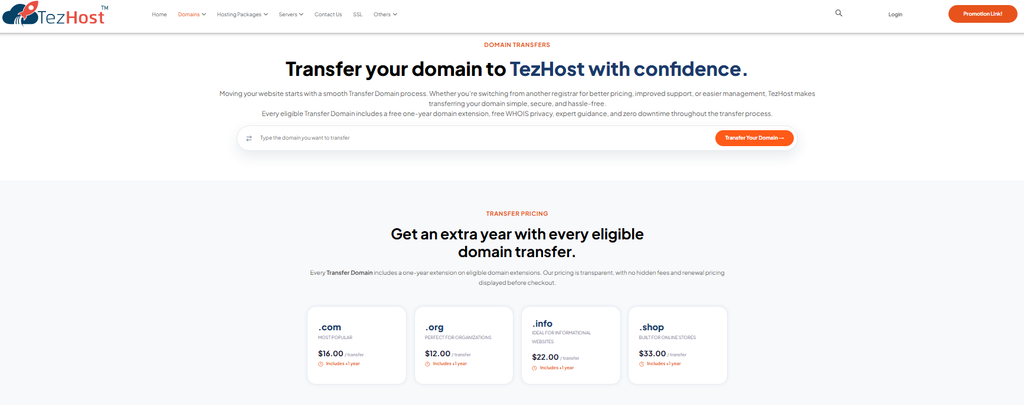
TezHost approaches domain services with a focus on accessibility and practical support.
Here’s what customers can explore:
- Domain transfer assistance: Guidance through the process of unlocking a domain, obtaining its authorization code, and submitting a transfer request.
- Domain management options: Access to domain services and management features through the TezHost domain platform.
- Technical guidance: Support for customers who need help understanding domain settings and transfer requirements.
- Additional hosting services: Options for customers who want to manage their domains alongside web hosting and other infrastructure services.
- Customer assistance: Support is available through the website and live chat to help customers navigate their requirements.
TezHost provides domain services through registrar partners rather than operating as the underlying accredited registrar itself. This distinction matters: the underlying registrar and applicable registry policies still govern the transfer process.
The aim is to make the experience easier to understand and manage, while helping customers choose services that suit their online requirements.
Ready to explore your options? Register with TezHost, visit the domain transfer page, or talk to a sales agent.
Frequently Asked Questions
1. How long does it take to transfer a domain to a new registrar?
A domain transfer can take several days, depending on the extension, registrar procedures, and how quickly approvals are completed. Some transfers finish sooner when the required confirmation is provided promptly.
2. Will my website go offline when I transfer my domain?
Not necessarily. A registrar transfer does not automatically change your website hosting or nameservers. If your existing DNS configuration remains intact and your hosting service is active, your website should generally continue working. Always save and verify your DNS settings before transferring.
3. Can I transfer an expired domain to another registrar?
It depends on the domain’s status and extension. Some expired domains may still be eligible for transfer during a permitted renewal or grace period, while others may be locked, suspended, or in redemption. Check with both registrars before proceeding.
4. What happens if my EPP code is incorrect?
The new registrar may reject the transfer request. You will need to obtain the correct authorization code from your current registrar and submit the request again.
5. Does transferring a domain also transfer website hosting?
No. A domain registrar transfer changes the company managing the domain registration. Website files, databases, email accounts, and hosting services must be migrated separately if you are changing hosting providers.
6. Can I transfer a domain registered less than 60 days ago?
For many ICANN-governed generic top-level domains, transfers are restricted during the first 60 days after initial registration. Some extensions have different policies, so check the rules for your specific domain.
7. Will I need to pay to transfer my domain?
Many registrars charge a transfer fee. Depending on the extension and provider, the fee may include an additional registration period. Always review the price and renewal terms before submitting your request.
Conclusion: Make Your Domain Transfer a Confident Move
Choosing to transfer domain to new registrar services can be a practical decision when you need better pricing, improved support, or more convenient domain management.
The key is preparation. Check eligibility, back up your DNS records, unlock the domain, obtain the correct EPP code, submit the transfer request, and verify your services once the process is complete.
Most importantly, remember that your domain, hosting, DNS, and email are connected but separate services. Understanding that distinction can help you avoid unnecessary downtime and protect your online presence.
If you’re ready to make a change, explore TezHost domain services, start your registration, or speak with a TezHost sales agent for assistance.
Make your next domain move with a clear plan and the right support.