A cheap website and domain can be the starting point of something extraordinary. Whether you’re launching a small business, building a personal brand, starting a blog, or taking your freelance services online, you don’t need a massive budget to establish a professional digital presence.
Your website is often the first place potential customers go to learn about your business. A slow, outdated, or unprofessional website can cost you valuable opportunities, while a well-designed website can build trust, attract customers, and help your business grow.
The good news? Building a professional online presence doesn’t have to be expensive. By choosing an affordable domain, reliable web hosting, a suitable website platform, and the right tools, you can create a website that looks professional without draining your savings.
With TezHost, getting started is easier. Explore affordable hosting options, discover services that suit your requirements, and register through TezHost’s affiliate link to begin your journey toward building an online presence.
Need help deciding which option suits your budget? Talk to a TezHost sales agent for assistance in choosing a suitable hosting package.
Let’s explore seven practical ways to build a professional online presence without spending more than necessary.
1. Choose a Cheap Website and Domain That Fit Your Budget
The first step toward building an affordable online presence is choosing a domain name and hosting plan that meet your needs without unnecessary expenses.
A domain name is your website’s address, such as yourbusiness.com. Web hosting is the service that stores your website’s files and makes them accessible online.
Both are essential, but you don’t need to purchase the most expensive options to get started.
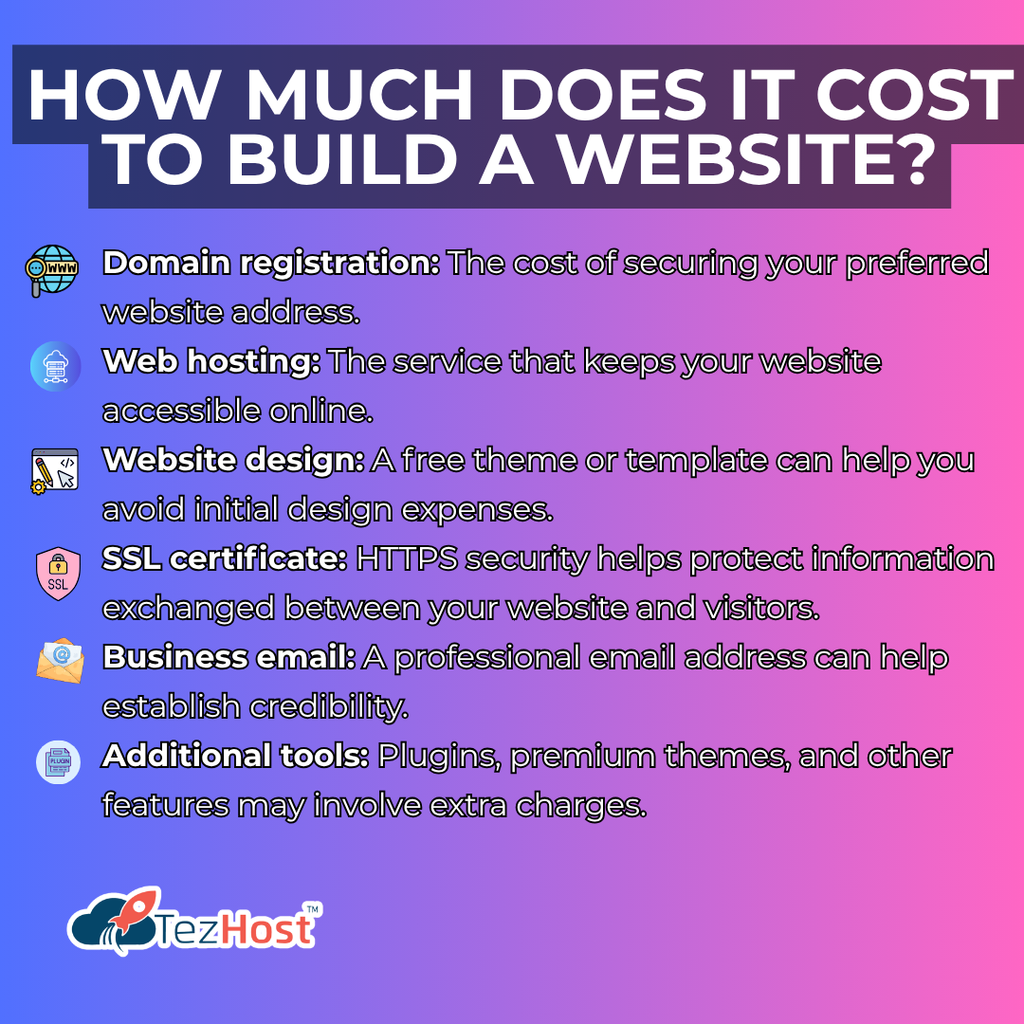
How much does it cost to build a website?
A basic website can be launched with a relatively small initial investment by choosing an affordable domain, an entry-level hosting plan, and a free website platform or template. The total cost depends on your domain extension, hosting package, website requirements, and any additional services you choose.
Here are the main expenses to consider:
- Domain registration: The cost of securing your preferred website address.
- Web hosting: The service that keeps your website accessible online.
- Website design: A free theme or template can help you avoid initial design expenses.
- SSL certificate: HTTPS security helps protect information exchanged between your website and visitors.
- Business email: A professional email address can help establish credibility.
- Additional tools: Plugins, premium themes, and other features may involve extra charges.
Start with the essentials and add paid features when your business needs them.
For guidance on choosing an appropriate domain, read TezHost’s guide on how to buy a domain. You can also explore the available domain registration options to find an address that suits your brand.
Budget tip: Check renewal prices before registering a domain or purchasing hosting. An introductory price may be lower than the standard renewal rate, so consider the long-term cost rather than just the initial payment.
If you need help understanding your options, contact a TezHost sales agent to discuss your requirements and budget.
2. Pick the Right Domain Name for Your Brand
A memorable domain name helps customers recognize your business, find your website, and remember your brand.
When building a cheap website and domain, choosing the right domain matters just as much as finding an affordable price. A poorly chosen name can make your business difficult to remember, even if your website looks excellent.
What makes a good domain name?
A good domain name is short, memorable, easy to spell, and relevant to your brand or business.
Follow these tips when selecting your domain:
- Keep it simple: Avoid complicated words and unnecessarily long names.
- Make it memorable: Choose a name people can easily recall after hearing it once.
- Reflect your brand: Your domain should relate to your business, services, or identity.
- Choose an appropriate extension: Consider
.comfor broad commercial recognition or a relevant country-code extension when targeting a particular market. - Avoid unnecessary numbers and hyphens: These can make your domain harder to communicate verbally.
- Check availability: Make sure the domain is available and investigate potential trademark conflicts before registering it.
For example, a freelance graphic designer might choose a domain built around their name or creative brand, while a local bakery could use a short name associated with its business.
Before making a decision, explore TezHost’s article on five powerful ways to pick a domain name.
You should also review what you need to register a domain so you can prepare the necessary information before completing your purchase.
Budget tip: Don’t pay a premium for an expensive domain simply because it sounds attractive. A clear, relevant, affordable domain can be an excellent starting point for a growing brand.
3. Select Affordable Hosting Without Sacrificing Quality
Choosing the right hosting package is one of the most important decisions when building a cheap website and domain.
Your hosting provider affects your website’s performance, reliability, security, and ability to handle visitors. The cheapest package isn’t always the best choice if it lacks essential features or dependable support.
Instead, look for a hosting plan that balances affordability with the resources your website needs.
Which web hosting is best for a small business on a budget?
Shared hosting is often a practical starting point for small businesses, personal websites, portfolios, and blogs because multiple websites share the resources of a server.
As your website grows, you may need a hosting environment with more dedicated resources.
Here’s a quick comparison:
| Hosting Type | Best For | Relative Cost | Main Consideration |
|---|---|---|---|
| Shared Hosting | Personal websites, blogs, and small business websites | Low | Resources are shared with other websites |
| VPS Hosting | Growing businesses and resource-intensive websites | Medium | More control and allocated resources |
| Dedicated Hosting | High-traffic websites and demanding applications | High | An entire physical server is allocated to one customer |
| Cloud Hosting | Websites that need flexible resources and scalability | Varies | Costs depend on the service and resources used |
For most beginners, shared hosting provides a sensible starting point. VPS or cloud hosting may become more appropriate as traffic and technical requirements increase.
Read TezHost’s detailed guide to shared vs. VPS vs. dedicated hosting to understand the differences before choosing a package.
You can also explore affordable web hosting from TezHost to compare available options.
What should you check before buying hosting?
Before purchasing, consider:
- Storage and processing resources.
- SSL certificate availability.
- Backup options and restoration procedures.
- Security features and malware protection.
- Email hosting requirements.
- Website migration assistance.
- Technical support availability.
- Renewal pricing and billing terms.
The right package should cover your current requirements without forcing you to pay for resources you don’t need.
Not sure where to start? Talk to a TezHost sales agent to discuss suitable hosting options for your website.
4. Build Your Website With Free or Affordable Tools
You don’t need to hire a developer or build a website from scratch to establish a professional online presence.
Many website platforms offer free themes, templates, and extensions that allow beginners to create attractive, functional websites with minimal technical knowledge.
For businesses building a cheap website and domain, using the right tools can significantly reduce upfront development costs.
Can you build a professional website without hiring a developer?
Yes. You can create a professional website using a content management system such as WordPress, a suitable theme, and essential plugins. However, more complex functionality, custom designs, and specialized integrations may require professional assistance.
Start by identifying the main purpose of your website.
For a small business: Create a homepage, an About page, a Services page, a Contact page, and any necessary legal or policy pages.
For a freelancer: Showcase your portfolio, explain your services, publish testimonials, and provide a straightforward way for potential clients to contact you.
For a blogger: Focus on readable layouts, organized categories, useful content, and easy navigation.
For an online store: Choose a suitable e-commerce platform and account for payment processing, security, product management, and shipping requirements.
Ways to keep website development costs low
- Use a free, reputable theme that suits your industry.
- Start with essential plugins instead of installing too many.
- Use properly licensed free images or your own photography.
- Write your initial website copy yourself.
- Use a simple design that works well on mobile devices.
- Avoid paying for features you aren’t ready to use.
Remember that free tools can still have limitations. Check their licensing, update frequency, support arrangements, and compatibility before relying on them for a business website.
A professional website doesn’t need dozens of animations or expensive design features. It needs to communicate your value clearly, work reliably, and make it easy for visitors to take action.
5. Choose the Right Hosting Control Panel and Technology
When building a cheap website and domain, the hosting control panel and technology behind your website can affect how easily you manage it and how much you spend maintaining it.
A hosting control panel allows you to manage services such as website files, databases, email accounts, and other hosting settings through a graphical interface.
Choosing the right environment can simplify website management and help you avoid unnecessary technical expenses.
Which hosting control panel is best for beginners?
The best control panel depends on your technical experience, application requirements, and budget. Look for an interface that supports your needs without introducing unnecessary complexity or licensing costs.
Here are some options worth exploring:
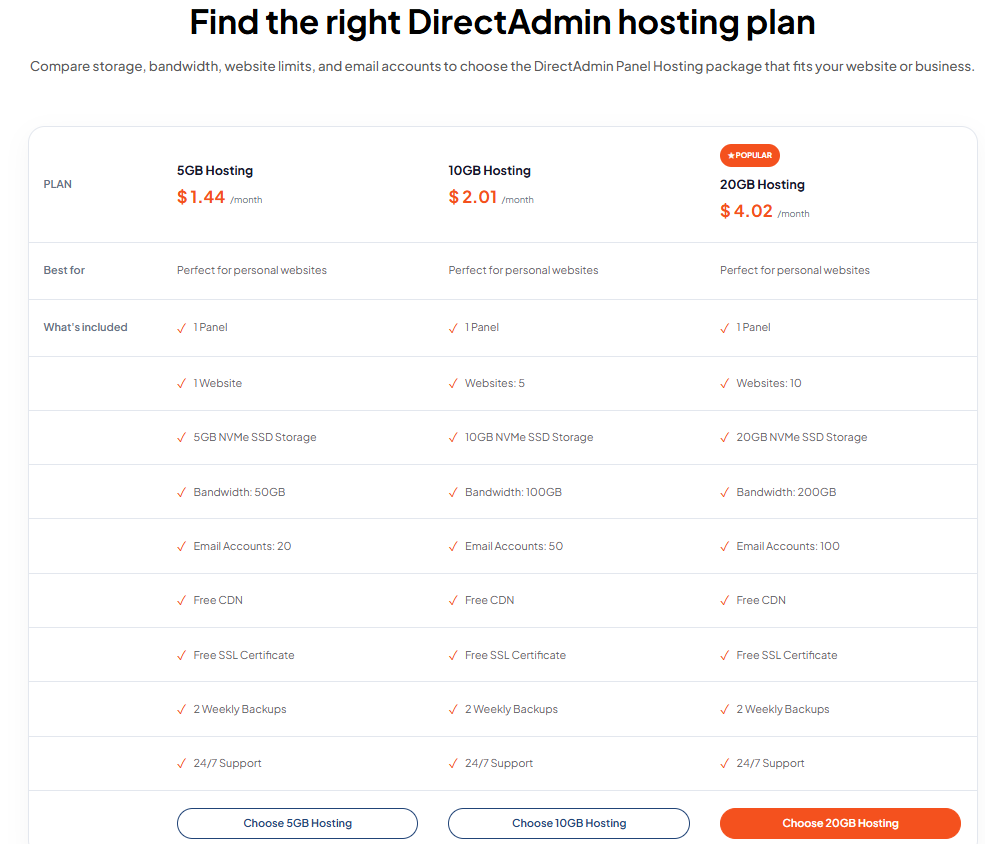
DirectAdmin Hosting
DirectAdmin offers a hosting control panel for managing websites, email, databases, and other hosting functions. It may suit website owners who want a straightforward management interface.
Explore DirectAdmin Hosting from TezHost to learn more.
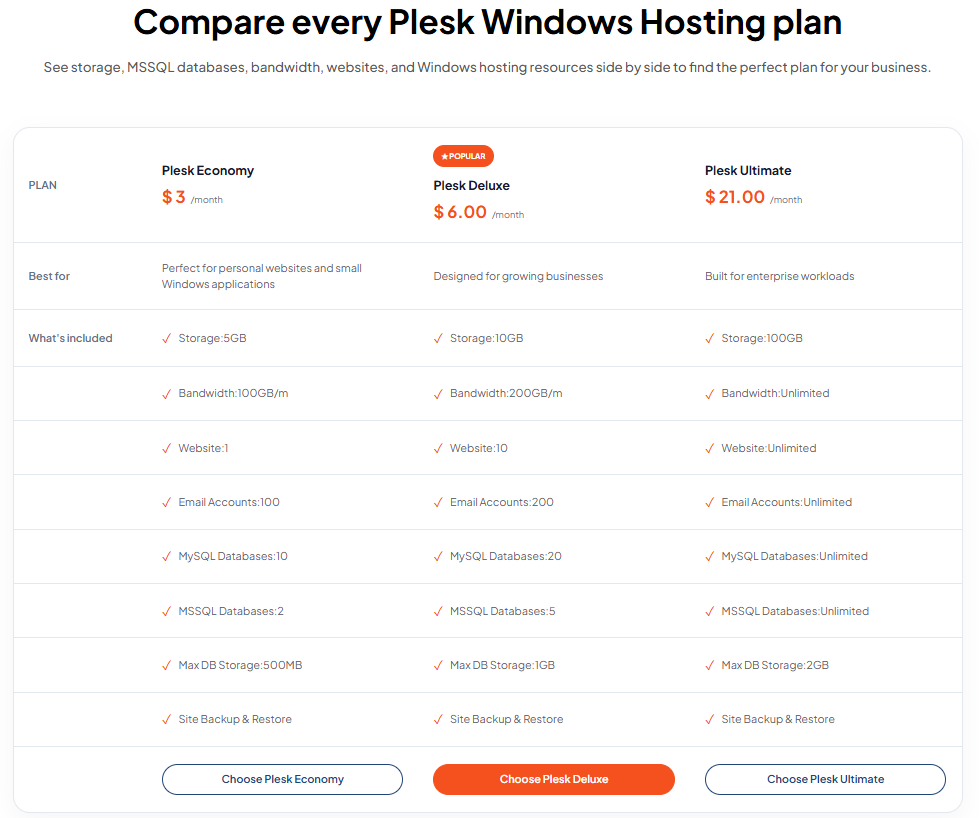
Plesk Windows Web Hosting
If your project depends on Windows-compatible hosting technologies, Plesk may be an appropriate option. The right package depends on the application, framework, and operating system requirements.
Learn about Plesk Windows Web Hosting.
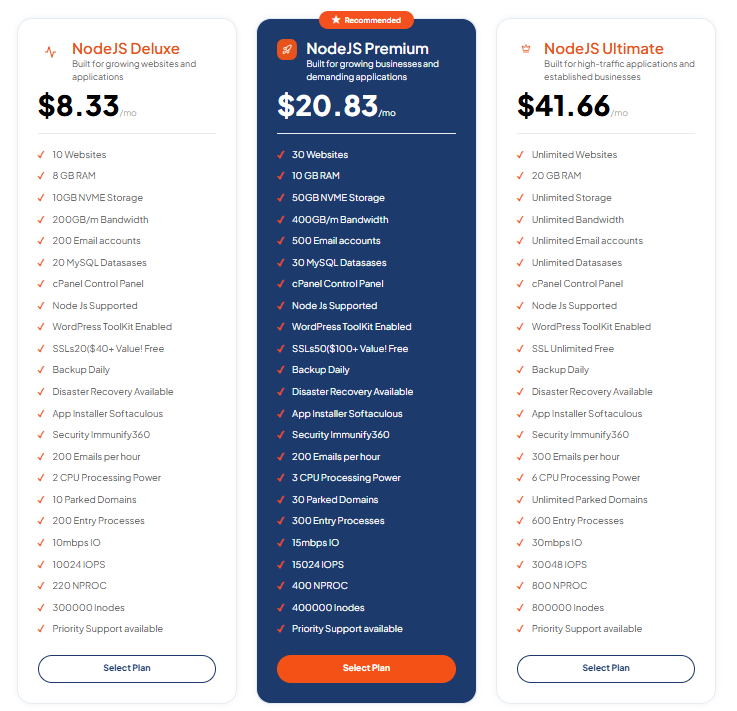
Node.js Hosting
Node.js is useful for JavaScript-based applications, APIs, and certain dynamic web projects. Developers can use it to build applications that require server-side JavaScript execution.
Explore Node.js Hosting for projects built around this technology.
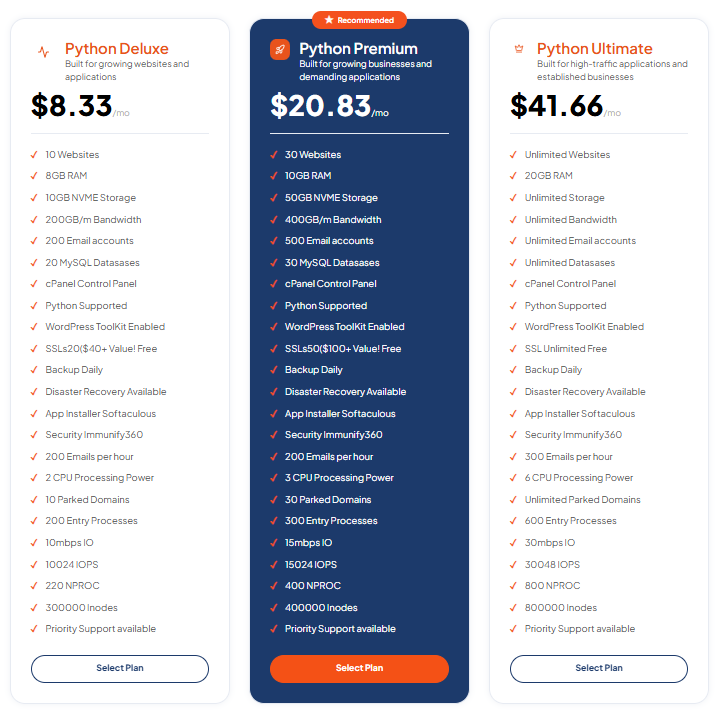
Python Hosting
Python hosting can support applications and websites built using Python-based frameworks, depending on the hosting environment and available resources.
Find out more about Python Hosting.
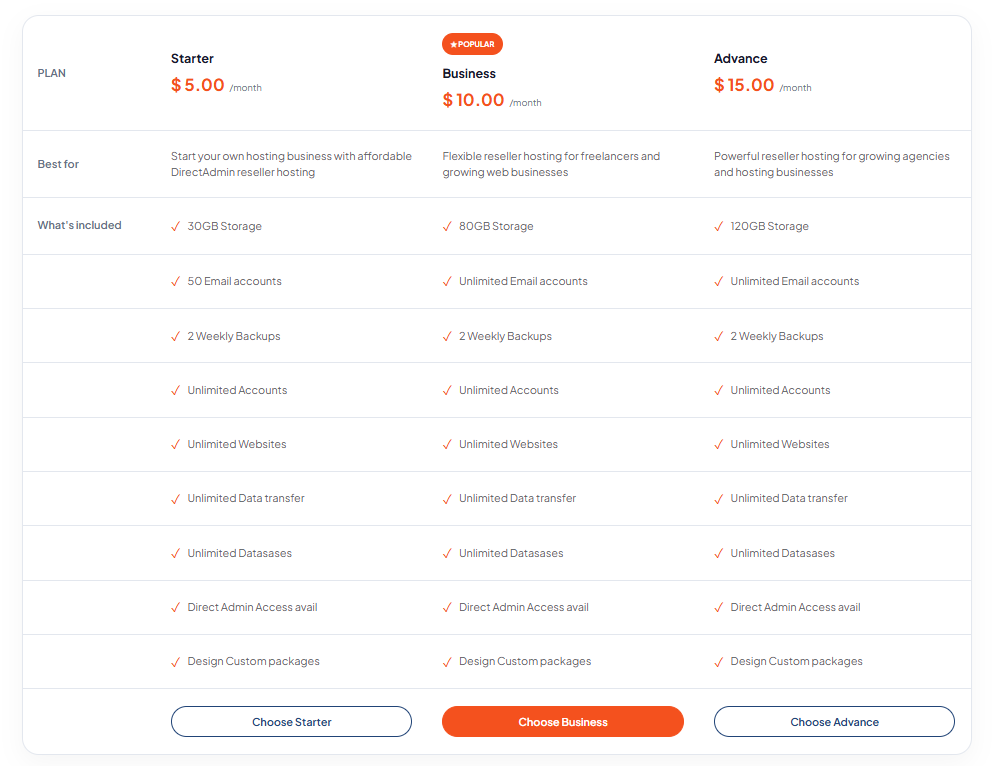
DirectAdmin Reseller Hosting
If you’re a freelancer, agency, or entrepreneur managing websites for multiple clients, reseller hosting may offer a way to manage separate hosting accounts under a reseller arrangement.
Explore DirectAdmin Reseller Hosting.
How do you avoid paying for unnecessary hosting features?
Start with the technology your website actually requires. A simple WordPress website usually doesn’t need the same hosting environment as a custom application built with Node.js or Python.
Choose a plan that meets your requirements, and upgrade when your website needs additional resources or capabilities.
This approach helps you keep your initial investment low while leaving room for future growth.
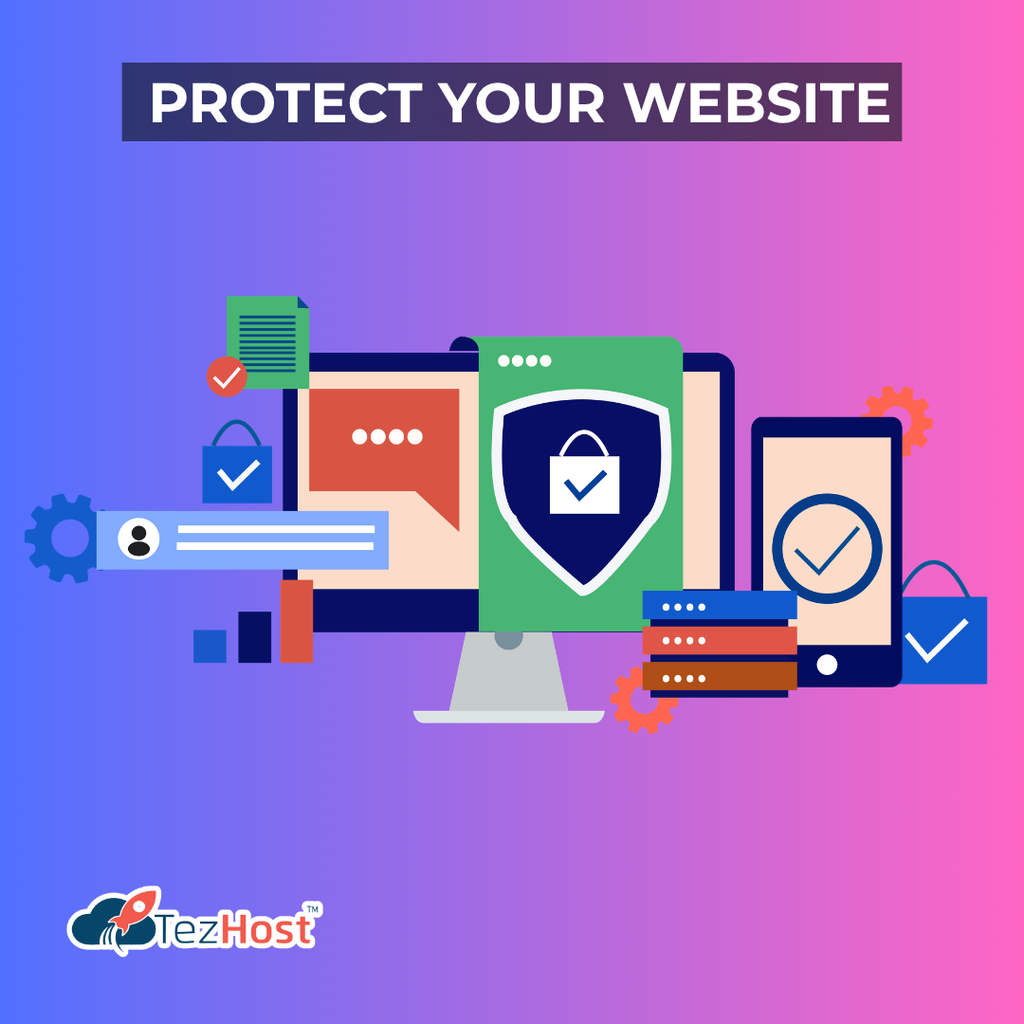
6. Protect Your Website and Build Customer Trust
Affordability should never come at the expense of basic website security.
A cheap website and domain can still provide a trustworthy customer experience when you implement sensible security practices from the beginning.
Visitors are more likely to trust a business when its website looks professional, loads correctly, and protects their information.
How can you secure a website on a small budget?
You can improve your website’s security by using HTTPS, keeping software updated, maintaining backups, and protecting administrator accounts.
Start with these essential practices:
- Enable HTTPS: Use a valid SSL/TLS certificate to encrypt connections between your website and visitors.
- Keep software updated: Install security updates for your website platform, themes, and plugins.
- Use strong passwords: Create unique passwords for hosting, email, and website administration.
- Enable two-factor authentication: Add another layer of protection wherever supported.
- Maintain regular backups: Store recoverable copies of your website and verify that restoration works.
- Limit administrator access: Give users only the permissions they need.
- Remove unused software: Unnecessary plugins and themes can create avoidable maintenance and security risks.
You should also consider the information your website collects. If you accept payments, store customer details, or process sensitive information, you may need additional safeguards and must meet applicable legal requirements.
Security features differ between hosting packages, so review what’s included before purchasing.
Why does customer support matter when choosing affordable hosting?
Reliable customer support can help you resolve technical problems before they become bigger issues. For a small business, an inaccessible website can mean lost enquiries, interrupted sales, and damage to customer confidence.
Price matters, but so do response times, technical expertise, available support channels, and the provider’s willingness to help resolve hosting-related issues.
Read TezHost’s guide on how to evaluate web hosting customer support quality to understand what to look for.
When comparing providers, check their support policies and clarify which services are included in your package.
7. Grow Your Online Presence With Smart, Low-Cost Marketing
Launching a cheap website and domain is only the beginning. To attract customers, you need to help people discover your website and give them a reason to return.
Fortunately, many effective online marketing strategies don’t require a large advertising budget.

How can you promote your website without spending much money?
Focus on useful content, search engine optimization, social media, and building relationships with your target audience.
These strategies can help your website gain visibility over time.
1. Optimize your website for search engines
Use descriptive page titles, clear headings, relevant keywords, helpful content, and descriptive image alt text. Make sure important pages can be crawled and indexed by search engines.
For example, a local accounting firm could publish useful articles about tax preparation, bookkeeping, or common financial questions its customers ask.
Focus on answering genuine questions instead of repeating keywords unnaturally.
2. Publish helpful blog content
Blog posts can attract visitors who are searching for information related to your products or services.
Answer frequently asked questions, explain common problems, and provide practical advice. Over time, a useful content library can support organic search visibility and establish your expertise.
3. Use social media strategically
Choose the social platforms your target audience uses most often. Share useful insights, product updates, customer stories, and links to relevant website pages.
You don’t need to post everywhere. Consistency on a few suitable platforms can be more effective than spreading yourself too thin.
4. Create a complete business profile
If you serve customers in a particular geographic area, consider setting up and maintaining a Google Business Profile, where eligible. Keep your business information accurate and encourage genuine customer reviews.
5. Collect email subscribers
An email newsletter can help you maintain relationships with interested visitors. Offer genuinely useful updates and obtain consent where required.
6. Measure your results
Use analytics and search performance tools to understand which pages attract visitors, which search queries bring traffic, and which actions people take on your website.
Then improve the pages and campaigns that offer the greatest value.
Budget tip: Start with one or two marketing channels and measure their performance before investing in paid advertising. A smaller, well-managed marketing effort can be easier to sustain than a large campaign without clear goals.
How TezHost Is Revolutionizing Affordable Website Hosting
Building a professional online presence should be achievable for startups, freelancers, small businesses, and entrepreneurs—not just organizations with substantial budgets.
TezHost aims to make that possible by offering hosting and domain services across different requirements, allowing customers to choose solutions that align with their projects and budgets.
For people looking to build a cheap website and domain, the important consideration is not simply finding the lowest advertised price. It’s finding a suitable combination of affordability, useful features, reliable infrastructure, and accessible support.
Here’s how TezHost can help simplify the process.
1. Hosting Options for Different Budgets
Not every website needs an expensive hosting environment.
TezHost offers different hosting options for website owners, from entry-level projects to businesses that require more resources. This gives customers the opportunity to evaluate their needs and choose a suitable starting point.
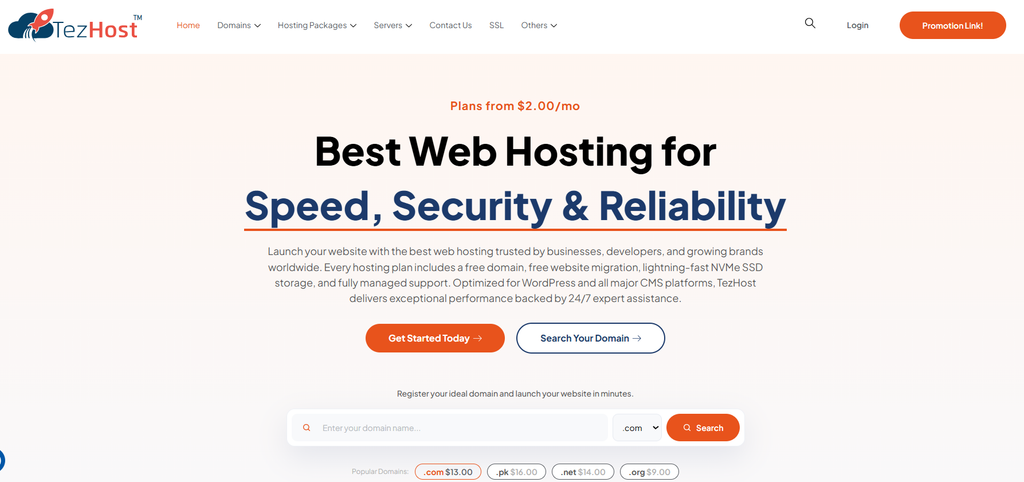
Explore the TezHost website to review available services.
2. Domain Registration and Hosting in One Place
Managing your domain and hosting through a provider that offers both can simplify account administration and make it easier to coordinate your website services.
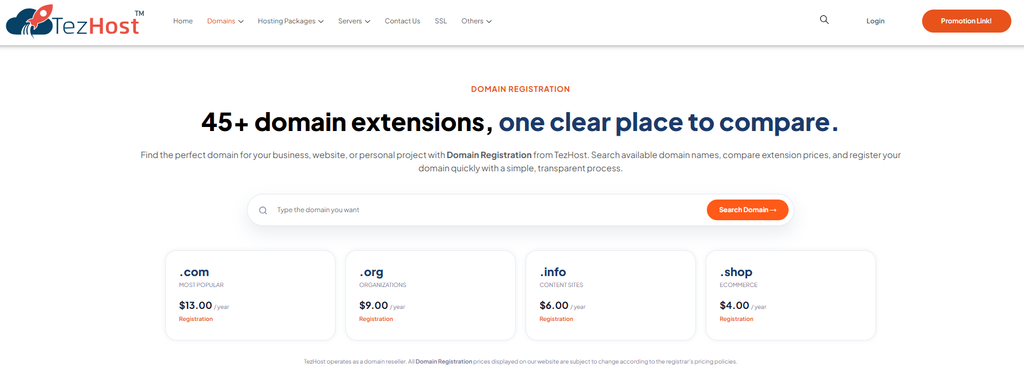
Customers can explore domain registration options, compare available hosting packages, and plan their online presence without having to research every service independently.
Start by exploring TezHost domains and the available hosting solutions.
3. Solutions for Different Technologies
As a business grows, its website requirements may change.
A WordPress website, a JavaScript application, and a Python-based project may need different hosting environments. Access to different technologies can help website owners choose a solution suited to their applications instead of paying for an unsuitable package.
TezHost provides options including Node.js Hosting, Python Hosting, and Plesk Windows Web Hosting.
4. A Focus on Support and Practical Guidance
For beginners, selecting a hosting plan can be confusing. Questions about storage, security, website migration, and control panels can make it difficult to determine which service is appropriate.
Accessible sales guidance can help customers understand their options before purchasing.
If you’re unsure which package fits your needs, speak with a TezHost sales agent to discuss your project and budget.
5. Room to Grow as Your Business Expands
Your first website may be a simple portfolio or business landing page. Later, you might add a blog, an online store, a client portal, or a custom application.
Choosing a provider with multiple hosting options can make it easier to evaluate an upgrade when your needs change.
You can begin with affordable web hosting and reassess your requirements as traffic, functionality, and business activity increase.
The TezHost approach is about making online growth more accessible: start with what you need, understand what you’re paying for, and choose services that can support your next stage of development.
Frequently Asked Questions
These answers address common concerns about creating a professional online presence affordably.
1. Can I build a website with a cheap website and domain?
Yes. You can launch a website on a limited budget by registering an affordable domain, choosing an entry-level hosting plan, and using a free website platform or theme. Your total cost will depend on your hosting requirements, domain extension, and any additional tools or services you purchase.
2. What is the cheapest way to create a professional website?
The most economical approach is usually to combine an affordable domain, an appropriate entry-level hosting plan, and a free website platform such as WordPress. Use a reputable free theme and add paid features only when they provide clear value.
3. Is cheap web hosting reliable enough for a business?
Yes, affordable hosting can be suitable for a small business when the plan provides adequate resources, appropriate security, dependable uptime, backups, and support. Evaluate the provider’s service terms and technical capabilities rather than choosing solely on price.
4. Should I buy my domain and hosting together?
Buying both from one provider can simplify billing and account management. However, purchasing them separately can also work well. Compare prices, renewal terms, management tools, and support arrangements before deciding.
5. Can I start with shared hosting and upgrade later?
Yes. Many website owners begin with shared hosting and move to VPS, cloud, or another suitable environment when their websites require more resources. Before purchasing, confirm the provider’s migration options, upgrade process, and any associated costs.
6. How can I make my website look professional without hiring a designer?
Use a clean theme, consistent typography, a simple color palette, high-quality images, clear navigation, and concise website copy. Make sure your website works well on mobile devices and includes clear contact information and calls to action.
7. Does a cheap website and domain help with SEO?
An affordable domain and hosting package can support an SEO-friendly website, but low cost alone doesn’t improve search rankings. Search performance depends on factors such as useful content, technical accessibility, mobile usability, website performance, and the relevance of your pages to users’ searches.
8. How do I choose the right domain name for my business?
Choose a name that’s easy to remember, spell, and communicate. Ideally, it should reflect your brand or services without being unnecessarily long. Check domain availability, renewal pricing, and potential trademark conflicts before registering it.
9. How much should I spend on my first website?
There is no universal amount. Your budget depends on the type of website, the services you need, and whether you’ll build it yourself or hire a professional. Start by estimating domain registration, hosting, essential security, and any required business tools. Then account for recurring costs and future upgrades.
10. Where can I get help choosing an affordable hosting package?
You can compare hosting options and speak with a sales representative to understand which package suits your requirements. Contact TezHost through its live chat to discuss your website plans and available options.
Conclusion: Build Your Online Future Without Breaking the Bank
Creating a professional online presence doesn’t require an enormous investment. With the right approach, a cheap website and domain can help you establish your brand, connect with customers, and build a foundation for long-term growth.
Start by choosing a memorable domain, selecting hosting that fits your needs, and building a clean, user-friendly website. Protect your website with essential security measures, publish useful content, and promote your business through affordable marketing channels.
As your website grows, review your performance and invest in improvements that support your goals. You don’t need to purchase every feature on day one. You need a reliable starting point and a practical plan for what comes next.
TezHost offers domain and hosting options that you can explore as you build your online presence.
Ready to take your business online?
- Explore TezHost’s affordable web hosting.
- Browse available domain registration options.
- Register through TezHost’s affiliate link to get started.
- Have questions about your hosting requirements? Chat with a TezHost sales agent for guidance.
Your online journey doesn’t have to start with a big budget. It starts with making the right decisions.